
TECHNOLOGY
Unlocking CNC Milling vs Turning Save 20% Costs by Avoiding Common Pitfalls

Introduction
When it comes to the field of Precision Manufacturing, engineers are often faced with a critical decision: determining the right process to use in their CNC machining process. Making the wrong decision between milling and turning can lead to dramatic price and timeline excursions and produce defective components. The widespread problem is mainly caused by a lack of understanding about the basic difference between CNC milling and turning.
Conventional methods are known to lack a macro perspective and fail to examine key aspects like material science, part nature, and worldwide chain behavior. The problem is resolved in this article with a comprehensive and analytically-based description between the two manufacturing processes using authoritative standards to provide a sound framework to make informed manufacturing process decisions based on optimal results.
What Are the Fundamental Differences Between CNC Milling and Turning?
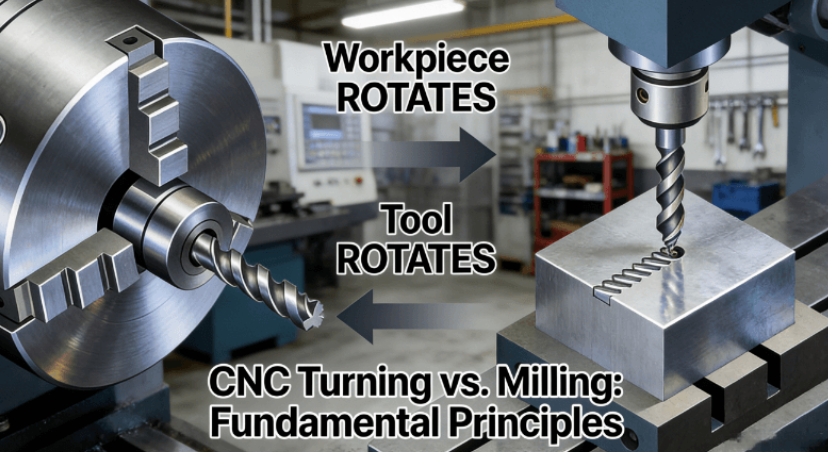
For a proper understanding of CNC Technology and milling and turning processes, it is essential to understand the basic principles involved. The main point of distinction between milling and turning lies in the motion of the cutting tool.
Basic Principles and Motions
- CNC Milling:
It is distinguished by the use of a multi-point cutting tool that is rotated. The material is rigidly attached to the table of this machine, allowing it to move along two or more linear/rotational axes to match the material to be removed by the rotated cutting tool. This is the fundamental difference from turning, in that instead of revolving, the material is mostly stationary. - CNC Turning:
Turning, on the other hand, is a process where the workpiece is rotated as it undergoes the turning operation. The component is clamped on a spindle, which rotates the component at high speed. The component is then subjected to a stationary single-point tool that moves in a linear or radial direction towards the turning component to shear it off. The basic process here is the rotation of the workpiece relative to the fixed tool.
The table below concisely summarizes these key operational differences:
| Characteristic | CNC Milling | CNC Turning |
|---|---|---|
| Workpiece Motion | Stationary or linear/multi-axis movement | Rotates |
| Tool Motion | Rotates and moves multi-axially | Moves linearly/radially |
| Primary Machine | Machining Center | Lathe / Turning Center |
| Ideal Part Shapes | Complex contours, cavities, flat surfaces | Rotationally symmetrical parts (cylindrical, conical) |
Applicable Part Geometries
- Advantages of Milling Process
The machining process in a CNC milling operation excels in the manufacture of complex non-rotational parts. This process is the best when it comes to machining pockets, slots, complex three-dimensional shapes, and planes. Some of the most commonly manufactured parts in the machining process of a CNC milling operation include engine blocks, cavities, brackets, and enclosures.
- Strengths of the Turning Process
CNC turning is unbeatable when it comes to efficiency for the production of rotationally symmetrical parts. CNC turning is also suited for the production of components such as shafts, bolts, nuts, flanges, and connectors. For such components, turning is preferred due to its efficiency compared to other machining operations.
The rate at which the machining process can be completed depends on the performance level of the equipment used. The performance can be checked through standards such as the ASME B5.57, which sets the standards according to which the CNC lathe machines must perform in terms of accuracy standards. The differences between CNC milling and turning can be applied in a more practical process through the CNC Milling and Turning Differences toolkit.
How Do Cost Efficiencies Vary Between CNC Milling and Turning?
Cost-effectiveness is a major concern for each Precision Manufacturing project. The cost profiles of milling operations differ considerably from the turning operations due to several important factors.Material removal rate is a cost-driving factor. In the case of circular components, turning allows continuous cutting. This translates to very high material removal rates and economies of scale for low-cost per piece. Milling, with possibly intermittent cutting patterns, is not very efficient for such simple rotational components. Programming and planning for milling machining, especially multi-axis machining, are more complex and time-consuming than for turning machining. However, it is not less significant to mention the role of economies of scale with the type and volume of machining.
For high-volume machining of standard rotational components, turning machining has a huge economic edge. Milling machining is more flexible for low-volume machining, especially for complex components, with different economies of scale. It has been observed in practice that performing milling machining on components suited for the former can lead to a 20-percent or even higher cost increment due to increased machining time, quicker tool degradation, and so on.
Therefore, initial selection based on part geometric data is critical for economic reasons. Aligning with a partner that has expertise in CNC milling and turning services, as well as abiding by international standards, such as ISO 9001, for a Quality Management System, is integral to providing high-quality Engineering Solutions. The building blocks of Quality Engineering Solutions are explained in detail within ISO 9001.
What Factors Should Guide the Choice Between Milling and Turning for Custom Parts?
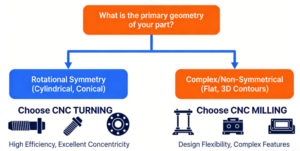
A selection of the best process for Custom Parts or Rapid Prototyping requires a careful assessment of part characteristics and project objectives.Geometrical features of the part play the key role. Turning by default has been the method for axial parts, like shafting or bushings. Turning experts, like milling specialists, cater to parts with complicated profiles, irregular parts, and complex cavities, which call for milling or “mill-turning.” This entails milling for milling, turning for turning, turning for milling, and milling for turning, depending upon the type of component, like turning for making gear teeth for a gear shaft.
Certain materials, like aluminum alloys, favor milling at higher speed, while brass turns out better for turning operations. Precision and surface finish goals also play an important role, with both machining operations offering great precision, although turning provides better concentricity for cylindrical components, while milling offers greater flatness and positional tolerance. One must make a flowchart for making this decision, starting with an initial check for component symmetry. Experienced CNC milling and turning companies utilize a global perspective in this evaluation process to ensure an optimal process flow for each order, considering cost, quality, and lead-time.
How Do Global CNC Services Like Lithuania Compare in Milling and Turning?
There is a strategic element with globalization: geographic choice of CNC milling and turning lithuania. Lithuania, as well as China, has its advantages.
The Specialized Expertise of Lithuania
Lithuanian manufacturers have managed to carve a niche in high-end Precision Manufacturing and related high-end industrial sectors such as aerospace and medical devices. The advantages of Lithuanian manufacturers include a highly skilled workforce well-competent in dealing with complex and high-precision parts. Moreover, a majority of Lithuanian manufacturers adhere to strong certifications such as AS9100D for aerospace and ISO 14001 for their strict management of environmental systems.
A Comparison of Global Capabilities
- The Scale and Efficiency of China
The Chinese value chain is famous for its huge scale and fast turnaround for high volume production. When it comes to cost-sensitive design-stable components produced in high volume, economic superiority is achieved through paramount economies of scale.
- Value of Integrated Service Provision
Apart from location, the ability to provide complete solutions is also important. It is convenient to have all services under one roof. While selecting suppliers for turning projects requiring high-speed turning, it is important to carry out comparisons between all those who provide complete CNC turning services.
Criteria of Strategic
While the choice of regions may depend on project priorities, where extreme precision and complexity are desired, regions like Lithuania are more suitable. For massive productions where cost-effectiveness and mature designs are a priority, the size and scale of the Asian supply chain are very appealing. A wise manufacturer typically partners with others in different regions based on the project objectives.
What Future Trends Will Shape CNC Milling and Turning Technologies?
CNC Technology is always on the move, with many upcoming trends ready to alter the face of Rapid Prototyping even further.
There is integration of artificial intelligence and machine learning to optimize paths, predict the need for maintenance, and adjust cutting parameters in real time for increased efficiency and accuracy during machining. There is also the adoption of multi-axis and mill-turn machines, which is becoming prevalent as it enables production of complex components in one setup. There is also the adoption of sustainable manufacturing principles to cut down on energy and use environment-friendly material. These developments in CNC milling and turning services demonstrate the need to engage advanced technologists in the early stages to take advantage and avoid the design of components for outdated manufacturing process.
Conclusion
The deep and practical understanding of the differences between CNC milling and turning means that the manufacturers are empowered to make strategic decisions by optimizing costs, ensuring quality, and quickening time-to-market. Combining authoritative standards with a judicious selection of specialist or scalable machining services is emphasized in the global manufacturing landscape.
For custom CNC solutions matched to your project’s particular needs, get in touch with JS Precision for a free consultation and an instant quote. With our ISO-certified procedures, you are guaranteed precision and reliability, from concept to delivery.
Author Biography
He is a precision manufacturing expert who has more than a decade of industry experience mainly in the application of advanced CNC technologies. He is also a strong exponent of sustainable manufacturing practices.
FAQs
Q1: On what grounds is CNC turning preferable to milling when creating cylindrical components?
A: CNC turning is more efficient with rotational components when using continuous cutting, achieving a 50% reduction in cycle time when compared to milling processes.
Q2: Can I know if my component needs milling or turning?
A: Assess part symmetry; for turning, use rotated bodies, and for intricate surfaces, use milling. Seeking expert advice prevents pitfalls.
Q3: Are there cost advantages of CNC service provision by countries such as Lithuania?
A: Yes, we do have the skill sets in Lithuania. But the scale benefit that regions like China offer could help lower costs by 20% or so with effective supply chain management.
Q4: What kind of certifications should I search for in the CNC service company?
A: Look for ISO 9001 for quality standards, AS9100D for aerospace industry standards, or ISO 14001 for environmentally responsible companies.
Q5: Are CNC milling and turning capabilities combined in making complex shapes?
A: Yes, the mill-turning centers also provide one-stop processing, which increases accuracy as a result of less clamping errors.


What exactly are predictive insights? Let us understand them correctly. It is known worldwide that major events rarely stick to the original plan. Passenger demand fluctuates, vehicles are delayed, routes become overcrowded, and teams may need to relocate resources on short notice. Predictive insights allow event planners to plan for what is likely to happen next, rather than just what is already happening.
This guide explains how predictive insights play a role in resource planning, how real-time data improves forecasting, and how event transportation management software puts predictions into action.
How Do Predictive Insights Improve Resource Planning for Major Events?
As the term suggests, predictive insights use current and historical event data to identify patterns (predictions) before they actually become issues. With the data, planners are able to make informed decisions by analyzing demand patterns, passenger volumes, traffic conditions, and fleet activity rather than sticking to fixed schedules.
So, if demand is expected to increase following a keynote, transport coordinators and event planners prepare vehicles or staff to handle the surge.
What Event Data Is Used for Predictive Resource Planning?
Predictive planning needs proper operational data; therefore, teams may bring together:
- Data on passenger demand and passenger count
- Real-time vehicle location and movement
- Traffic and travel time patterns
- Route and trip performance
- Pickup and drop-off activities
- Vehicle utilization and idle time
- Event schedules and expected attendance
- Previous event performance
When combined with event transportation management software, this data reveals patterns for future strategizing and planning.
How Does Real-Time Vehicle Tracking Support Event Resource Planning?
Real-time vehicle monitoring offers transportation managers an immediate perspective on fleet activity. When the event starts, resource planning persists. When vehicles experience delays on one route while another has available capacity, teams recognize and rectify the disparity.
Live fleet visibility allows planners to modify assignments and monitor ETAs effectively and efficiently. This turns resource planning into a dynamic operational activity instead of a fixed timetable.
Can Predictive Insights Help to Manage Passenger Demand?
Yes, PAX counting and passenger activity statistics reveal when and where demand is about to increase. Moreover, passenger activity, when combined with predictive data, helps teams get vehicles and staff ready before lines develop.
What Resources Can Event Teams Plan More Effectively?
Predictive insights assist in planning across several operational areas, including:
- Vehicles and Drivers
- Shuttle capacity
- Pick-up and drop-off resources
- Passenger Support Teams
- Dispatch and on-site employees
- Route capacity
- Backup vehicles
- Operational coverage during peak times
Here, the goal is not to add more resources, but to place the appropriate resources whenever and wherever required.
How Does Event Transportation Management Software Turn Insights Into Action?
EventFalcon’s event transportation management software combines prediction and execution. Teams need real-time data, alerts, GPS tracking, passenger information, ETAs, and operational controls in one location. An event transportation command center brings these inputs together, allowing planners to compare expected demand to actual conditions and act more quickly.
So, instead of waiting for a problem to manifest itself, teams can detect and respond to early warning signs.
Why Should Major Events Use Predictive Resource Planning?
Because predictive insights provide a solid foundation for teams to decide and plan where vehicles, personnel, and capacity are needed. EventFalcon combines real-time vehicle tracking, passenger intelligence, fleet visibility, and event transportation management tools to help teams identify movement, understand demand, and respond to changing conditions.
So plan smarter, allocate resources more effectively, and be ready for whatever comes next.

Introduction
A small bakery owner snaps a photo of a beautiful three-tier birthday cake, only to notice later that the background includes a sink full of mixing bowls and a calendar from two years ago. Visual content now shapes nearly every part of modern communication, from online shopping and digital marketing to personal photography and classroom materials. Images often say more in a glance than a paragraph ever could, which makes their quality and presentation essential. Distracting backgrounds, unwanted objects and mismatched settings, though, can quietly weaken even a lovely photograph. Background removal has become a practical way to create cleaner, more focused visuals. Sometimes improving a picture simply means taking things away.
As editing tools become easier to use, individuals and businesses can now adjust images without any advanced design skills. Understanding how background removal works, where it helps most and what makes an edited image genuinely effective allows people to produce far more professional visual content. A little know-how goes a surprisingly long way.
What Is Background Removal?
Background removal is the process of separating the main subject of an image from its surroundings. That subject might be a person, a product, an animal or any other object that needs to stay visible while the background is removed or replaced. A hand-carved walking stick photographed against a cluttered garden shed can end up looking ready for a craft fair catalogue.
For many years, this meant photo editing software and a great deal of patient handiwork. Editors relied on selection tools, masks and brushes to trace the subject’s edges by hand. Those methods still matter for complicated images, but artificial intelligence has brought much faster alternatives. An evening of careful tracing can now take less than a minute.
AI-powered systems analyze edges, colors, textures and shapes to tell the foreground apart from the background. The result can be an image with a transparent background, ready to sit on a new color, photograph or design. The subject stays the same. Everything around it becomes a choice.
Common Uses of Background Removal
E-Commerce and Product Photography
Online shoppers rely heavily on product images when comparing items and deciding what to buy. A cluttered background pulls attention away from the details that matter, such as shape, color and features. A pair of embroidered slippers looks far more inviting on a clean backdrop than on a bedroom rug beside a laundry basket. The product deserves the spotlight.
Removing unnecessary surroundings helps retailers create consistent listings. Clothing, electronics, furniture accessories and household goods can all appear against calm, neutral backgrounds. That consistency also helps an online shop build a recognizable visual identity. Shoppers tend to trust a store that looks organized.
Social Media and Digital Marketing
Social media content competes fiercely for attention in crowded feeds. Clear images get a message across quickly, especially on small phone screens during a busy commute. A post has only a second or two to stop someone scrolling.
Background removal lets designers drop people, objects or product photos into promotional graphics, announcements and educational posts. Rather than arranging a fresh photo shoot for every design, creators can reuse existing images in new settings. A dance teacher can turn one cheerful photo into posters for three different classes. One good picture can work hard all season.
Personal Photography and Creative Projects
Individuals also use background removal to polish portraits, create profile pictures, design invitations and make personalized artwork. A photo taken in an ordinary setting can suit something more formal or creative once its surroundings disappear. A snapshot of a grandfather at a family barbecue can become the centrepiece of an elegant retirement party invitation.
Students and hobbyists use the same technique for presentations, digital collages, posters and other projects. A history project about Roman coins looks far clearer when each coin sits neatly on a plain background. Clean images help ideas land.
How AI Has Simplified Image Editing
Artificial intelligence has cut the time needed for many routine editing jobs. Instead of tracing every edge by hand, people can upload an image and let an automated system find the main subject. A shop owner with twenty new products to list can finish before the kettle has boiled twice.
An online Background Remover tool, for example, can lift a subject away from its original surroundings, making the image far easier to use in presentations, product displays or creative designs. Tools like this are especially handy for people who want simple editing without learning complicated software. Convenience opens the door to people who might never have tried editing otherwise.
Automated results aren’t always perfect, though. Hair, transparent materials, reflective surfaces and objects in colors close to their background can all cause trouble. A string of fairy lights or a pet parrot with bright feathers against a leafy garden can confuse even capable software. A final careful review is still what turns a good edit into a convincing one.
Tips for Achieving Better Results
The quality of the original photo has a big influence on the final result. A few practical habits make the whole process smoother.
Well-lit images with clear subject edges make the best starting point. Strong contrast between the subject and its surroundings usually makes separation far easier, while blurry photos or overlapping objects often need extra work. A product photographed by a bright window will almost always behave better than one snapped under a dim kitchen bulb.
Fine details deserve a close look once the background has gone. Hair strands, glass edges, thin wires and shadows are easy for automated systems to misread. Zooming in reveals missing sections or stray patches of background that slip past at normal size. A few seconds of checking can save an embarrassing mistake.
The image’s final destination matters too. A transparent background suits subjects that will move between different designs, while a solid background often works better for standardized product listings or professional portraits. Knowing where the picture is heading shapes every choice along the way.
Realistic proportions, lighting and shadows keep the finished image believable when the subject is placed on a new background. A person lit by soft evening sunlight never looks quite right on a bright midday beach. The best edits feel as though nothing was ever changed.
Ethical and Practical Considerations
Background editing works best when it keeps the true meaning of an image intact. In advertising, journalism, education and other settings where accuracy matters, removing or replacing visual elements can mislead people if the changes aren’t disclosed when they need to be. A property photo that quietly erases a building site next door can leave buyers feeling deceived on their first visit. Honesty protects trust.
Privacy and copyright deserve real attention as well. Photographs can show identifiable people, private information or work belonging to another creator. A stranger caught in the background of a holiday photo didn’t agree to appear in a public advert. Editing and publishing images with proper permission, and with respect for privacy rules, is always the right approach.
Conclusion
Background removal has become an important part of modern digital photography and visual communication. It supports product presentation, social media design, personal projects and countless other uses by helping subjects stand out from distracting surroundings. Less clutter often means a clearer message.
AI-powered tools have made the process far more accessible, but good results still depend on image quality, careful review and thoughtful design choices. By pairing automated help with an eye for detail and responsible editing habits, people can create clear, versatile visuals that do exactly what they’re meant to do. The software clears the way. A careful eye makes sure the picture still tells the truth.

Introduction
Visual content has become one of the main ways people communicate, share information and present ideas online. Product photos, social media posts, classroom presentations and digital marketing materials all lean on images to grab attention and make information easier to take in. A picture often does its job before a single word has been read. How good an image looks depends on far more than its subject, though. The background can shape its appearance, its clarity and whether it suits the purpose at all. A beautifully made leather wallet doesn’t look quite so premium when it’s photographed next to a half-eaten sandwich on a cluttered desk.
Background removal has become a practical way to improve images without expensive photography equipment or advanced editing skills. By separating the main subject from its surroundings, creators can produce cleaner visuals, swap in new backgrounds and adapt the same image for many different platforms. Understanding how the technology works, and when it’s genuinely worth using, helps individuals and businesses make smarter decisions about their visual content. It’s a small skill that tends to improve a surprising amount of everyday work.
What Is Background Removal?
At its simplest, background removal is an image-editing process that lifts the main subject away from the environment around it. That subject might be a person, a product, an animal or any other object. Once the background has gone, the subject can sit on a transparent canvas, a plain solid color or a completely different scene. A ceramic bowl photographed on a crowded kitchen counter, surrounded by fruit peel and a stray tea towel, can end up looking as though it was shot in a calm, bright studio.
For many years, this meant tracing around the edges of an object by hand using selection tools, masks and brushes. Manual editing can give wonderfully precise results, but it takes patience and a fair amount of technical experience, especially with complicated shapes. Carefully outlining the delicate lace edge of a bride’s veil could easily fill an entire evening.
Modern image-editing systems use artificial intelligence and computer vision to find the main subject automatically. These technologies look at visual patterns, colors, edges and other characteristics to tell the foreground apart from the background. As a result, many images can now be processed in seconds instead of hours. What once belonged to trained editors is now within reach of almost anyone with a phone.
How Artificial Intelligence Improves Image Editing
Artificial intelligence has changed the way people approach everyday image-editing tasks. Machine learning models can recognize common subjects and estimate which pixels belong to the foreground and which belong to the background. Having studied enormous numbers of photos, they’ve become remarkably good at knowing where a person stops and the rest of the room begins.
One key technique is image segmentation. It splits an image into meaningful regions, helping editing software find the outline of a person or object. More advanced systems can even pick out fine details such as hair, transparent materials and irregular edges. A pair of dangling earrings or the soft fuzz of a knitted hat is exactly the kind of detail better tools now handle with real care.
Automatic processing still isn’t perfect, though. Backgrounds in colors close to the subject, poor lighting, motion blur and complicated outlines can all leave unwanted gaps or rough edges. Someone in a pale blue shirt standing against a clear blue sky can give even a clever system a headache. Looking over the result and making a few small adjustments can improve the final image a great deal.
These developments make background removal accessible to complete beginners while still offering real benefits to experienced designers, photographers and content creators. The beginner gets a usable result. The professional gets their evening back.
Common Uses of Background Removal
E-Commerce and Product Photography
Online shoppers depend heavily on product images when they’re comparing one item with another. A distracting background makes it harder to focus on a product’s shape, color and details. Removing the clutter helps create consistent product photographs that sit neatly together in an online catalog. A browser scrolling through rows of handbags on a lunch break wants to see the handbags, not the corner of someone’s spare room.
Businesses can use transparent images to place products against matching backgrounds, so whole collections look organized and polished. It’s still important for sellers to keep product colors accurate and avoid editing details in ways that could mislead customers. A sweater that arrives in a noticeably different shade from the photo leads to disappointed buyers and a pile of returns.
Social Media and Digital Marketing
Social media rewards eye-catching content, yet many creators are working with very little time and a tight budget. Background removal lets them reuse photographs they already have in promotional graphics, announcements, thumbnails and informational posts. One good photo session can feed a whole month of content.
A podcast host, for example, can lift themselves out of a photo taken in front of a messy bookshelf and place their image over a bold, themed background that matches the topic of that week’s episode. This gives far more creative freedom without needing a new photo shoot for every single design. The bookshelf can stay as untidy as it likes.
Presentations and Educational Materials
Teachers, students and professionals regularly use images to explain ideas. Removing a background helps illustrations, portraits and objects sit naturally within slides, reports and instructional materials. A photo of a chemistry flask is far clearer on a slide when it isn’t surrounded by a cluttered lab bench and three other pieces of equipment.
A clean image cuts down on visual distractions and points attention towards the information being shared. This is especially useful when several images need to follow the same visual style across a long presentation. Audiences tend to follow along more easily when every slide feels like part of the same story.
Personal Photography and Creative Projects
Background removal also helps with personal projects such as digital invitations, greeting cards, profile pictures, collages and photo compositions. People can try out all sorts of visual settings while keeping the original subject exactly as it was. A family’s beloved pet hamster can star on a birthday invitation surrounded by balloons, without anyone needing to stage a tiny party for the photo.
Choosing the Right Background Removal Method
The best approach depends on the image, the result someone is hoping for and how much editing experience they have. Manual selection tools give detailed control but can take a lot of time. Automated tools bring speed and convenience, particularly when there’s a stack of everyday images to get through before the end of the day.
People looking for a simpler editing workflow can explore a Background Remover to see how browser-based background removal can take much of the effort out of the process. When weighing up any tool, it helps to think about output quality, supported image formats, ease of use, processing limits and privacy practices. A tool that looks perfect at first can turn out to shrink images to a size that’s useless for print.
For professional projects, the ability to refine edges, keep the full image resolution and export transparent PNG files can matter a great deal. It’s also worth checking whether a tool adds watermarks or holds back certain features. Discovering a logo stamped across the corner of a finished client image is never a pleasant surprise.
Tips for Better Background Removal Results
Automated systems can handle a great many images, but the original photograph still shapes how good the final result will be. A few practical habits make the whole process far more reliable.
It helps to start with images that have a clear subject and plenty of light. Strong contrast between the subject and its surroundings generally makes separation much easier. A yellow raincoat against a grey brick wall is a gift to any editing tool. Once processing is done, the fine details deserve a close look, especially around hair, clothing, glass and other complicated edges.
The new background needs some thought too. A subject photographed in bright midday sunshine can look oddly out of place against a dark, moody scene unless the lighting and shadows are adjusted to match. Matching colors, perspective and brightness helps the final composition feel convincing rather than obviously stitched together. A dancer caught mid-leap on a sunny beach won’t look natural dropped into a dim, candlelit room.
Keeping an untouched copy of the original image is the last and simplest habit. Holding on to the source file leaves room for future edits and makes it easy to fix mistakes without starting again from scratch. It’s a few seconds of effort that can save hours of frustration later.
Privacy and Responsible Image Editing
Convenience is never a good reason to forget about privacy. Before photographs are uploaded to an online editing service, it’s sensible to read its privacy policy and understand how uploaded files are stored, processed and deleted. A couple of minutes spent reading can prevent a great deal of worry.
This matters most with images that include children, private documents, confidential business information or people who can be identified. Getting the right permission before editing and publishing photographs of other people is just as important. A friend who’s happy to be in a group photo may not be thrilled to find themselves cut out and placed somewhere entirely new without being asked.
Responsible editing also means steering clear of changes that misrepresent products, fabricate evidence or create misleading impressions. Background removal is at its best when it improves how something is presented while keeping the subject’s essential character exactly as it is. A cleaner picture is welcome. A dishonest one isn’t.
Conclusion
Background removal has become an important part of modern digital image editing. Artificial intelligence has made the process faster and far more accessible, helping people prepare images for online stores, social media, presentations and personal creative projects. What once took real expertise can now happen in moments.
Good results still depend on image quality, careful checking and sensible editing choices, despite all that convenience. By choosing suitable tools, paying attention to fine details and keeping privacy in mind, people can create clear, professional-looking visuals without unnecessary complexity. As image-processing technology keeps developing, background removal will stay a valuable skill for anyone working with digital content. The tools keep getting smarter. A careful eye is still what makes the difference.
-

 NEWS1 year ago
Historical Churches in Manila
-

 TOPIC4 months ago
Unveiling AvTub: Your Ultimate Guide to the Best AV Content
-

 TOPIC1 year ago
Simbang Gabi and Kakanin
-

 TOPIC1 year ago
Symbols of Hope: The 15th Belenismo sa Tarlac
-

 TOPIC1 year ago
RIZAL at 160: a Filipino Feat in Britain
-

 NEWS5 months ago
What Caused Delta Flight DL275 to Diverted LAX? A Detailed Breakdown
-

 TOPIC3 months ago
Understanding Fascisterne: Origins and Ideological Roots
-

 TOPIC1 year ago
Biodiversity in Urban Singapore: Corporate Contributions to Nature-Based Solutions and Green Infrastructure