
EDUCATION
Best Learning Apps Kids Actually Enjoy in 2026

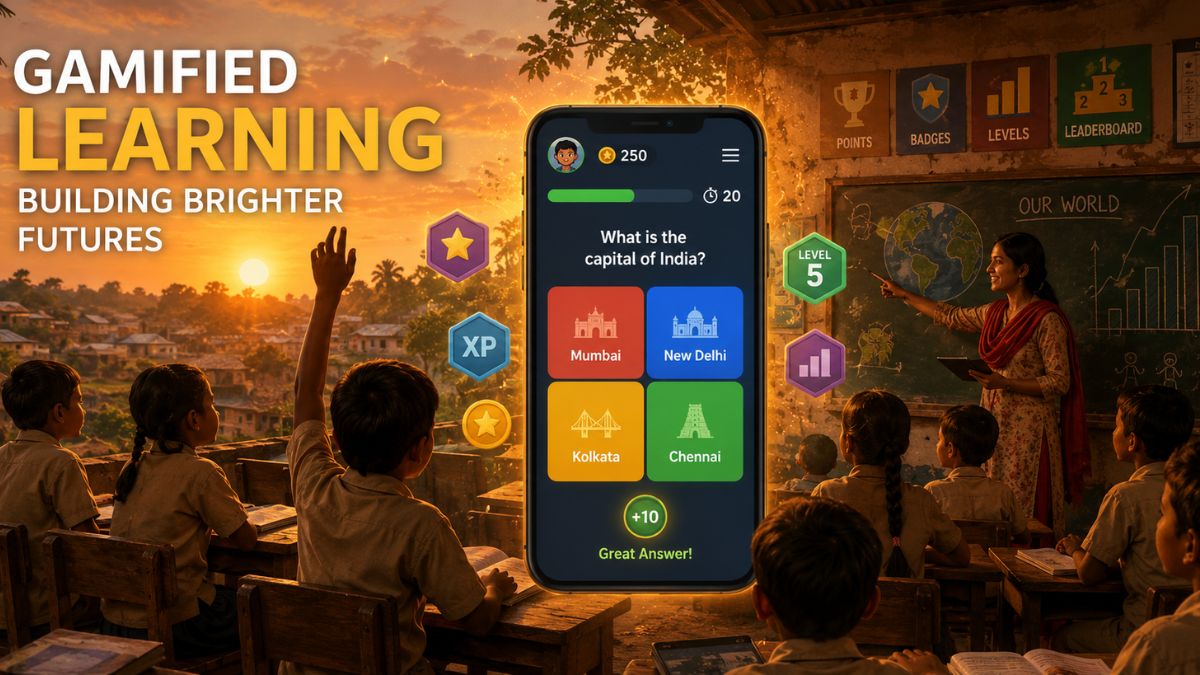
Every parent knows the feeling. The kids have been on their tablets for 45 minutes, you know you should probably ask them to put the devices down, and you also know the next 30 minutes will run more smoothly if you don’t. Screen time debates are exhausting, especially when the daily choice keeps collapsing into either “no screens” or “whatever keeps them quiet through dinner prep.”
The good news is that a growing category of learning apps in 2026 sit in a genuinely different bucket. Kids actively choose them, ask to open them, and lose track of time using them, and they happen to teach real skills while that’s happening in the background.
This guide walks through the learning apps kids actually enjoy in 2026, why they work when so many “educational apps” fail after two days, and how parents can weave them into a family screen time routine that does not feel like a daily fight over the same iPad.
What Makes an Educational App One Kids Actually Enjoy?
An educational app kids actually enjoy delivers instant feedback, gives visible progress like streaks or unlocks, feels like a game rather than a worksheet, and lets kids play with friends or classmates. Apps missing these traits get abandoned within days, no matter how well-designed the learning content underneath actually is.
Talk to any parent who has tried to make an “educational” app stick and you will hear the same frustration told slightly differently every time.
The app looks great in the App Store screenshots. The content covers exactly what the child needs to practice. The design seems age-appropriate. And two days later, the kid is back on Roblox and quietly refuses to open the learning app ever again, no matter how many times you suggest it.
What separates apps kids voluntarily open from apps parents have to enforce is not the quality of the educational content underneath. It is whether the experience feels like something worth the child’s time on its own terms.
The four traits that consistently predict kid buy-in across grade levels are:
- Instant feedback — right or wrong within one second, not at the end of a long quiz
- Visible progress — streaks, badges, levels, or characters that grow with continued use
- Social element — playing with siblings, friends, or classmates in real time
- Real game structure — actual game mechanics, not “quiz with points added on top”
Apps like Blooket, Duolingo, and Prodigy Math nail all four traits. Older-style flashcard apps typically nail one at best. The gap in daily voluntary use between the two categories is not small. It is enormous.
How Can Parents Balance Screen Time with Real Learning?
Parents can balance screen time with real learning by setting a daily total, splitting it between passive entertainment and active educational apps, treating educational screen time as fundamentally different from streaming or scrolling, and keeping devices out of bedrooms overnight. The American Academy of Pediatrics updated its 2024 guidelines to specifically distinguish between these categories.
Screen time is not one thing.
Twenty minutes on TikTok and 20 minutes on Khan Academy are technically identical numbers on a screen time tracker, but any parent watching their kid do both knows they produce completely different outcomes. The AAP updated its guidance in 2024 to reflect that distinction, giving parents permission to think about screen time more usefully than the old “under two hours total” rule allowed.
Here is a framework that works well for most families with elementary and middle school kids:
- Set a total daily cap — 60 to 90 minutes for younger kids, more flexibility for older ones
- Split it into buckets — active learning, creative apps, passive entertainment
- Front-load learning — homework and educational apps happen before recreational screens
- Keep bedrooms screen-free — the single biggest predictor of sleep quality for kids
- Model it yourself — kids notice parent phone use way more than most parents realize
Educational apps that kids genuinely enjoy make the whole framework much easier to actually enforce. When a kid asks to play Blooket instead of another round of Roblox, the screen time conversation shifts from a negotiation into a simple schedule discussion.
The parents I know who have made this work best all say the same thing: pick a few good apps, install them together with the kids, and then let the kids drive the choice within the time window you have already set.
Which Learning Apps Do Kids Actually Love in 2026?
The learning apps kids actually love in 2026 include Blooket, Duolingo, Prodigy Math, Khan Academy Kids, Minecraft Education, Roblox Education, Quizlet, Osmo, Tinkercad, and Toca Boca World. Each earns voluntary daily use across grade levels because they feel like real games while quietly teaching real skills at the same time.
Here are the apps kids reliably open on their own, the ones that do not require parent nagging to launch.
1. Blooket
The classroom quiz game that has quietly become a home study staple for kids in grades 3 through 9. Multiple game modes (Gold Quest, Cafe, Battle Royale, Racing) turn review into competition, and kids often ask siblings or classmates to play with them online after school without any prompting from parents.
The platform is free for standard classroom and home use, and kids can join games hosted by teachers with a simple code. For families whose kids get really into it, Blooket also has a helpful Blooket points calculator that lets kids figure out point strategies before big classroom games, which many students genuinely enjoy tinkering with the way older kids might tinker with fantasy football stats.
2. Duolingo
The green owl that changed language learning for a generation. The streak system is unreasonably effective at building daily habit. Younger kids do 5 to 10 minutes daily without prompting once the streak is going, which is closer to magic than most educational apps get.
3. Prodigy Math
A full RPG that happens to teach Common Core math. Kids battle monsters by solving problems, level up characters, and rarely realize they’re studying while doing it. Best for ages 6 to 13, and free for the standard version most families need.
4. Khan Academy Kids
Free, ad-free, fully complete curriculum for ages 2 to 8. Not flashy, but consistently beats paid competitors on actual learning outcomes in independent research reviews. Also one of the few apps pediatricians recommend without hesitation for younger children.
5. Minecraft Education
The classroom version of Minecraft with pre-built lessons and safe multiplayer mode. Great for STEM subjects, spatial reasoning, and collaborative problem-solving. Kids who already love regular Minecraft usually take to this version easily since the core mechanics are identical.
6. Roblox Education
Roblox launched dedicated learning experiences in 2023 covering coding, financial literacy, and digital citizenship. Kids who already love regular Roblox open these experiences on their own, which is the best kind of educational buy-in a parent can hope for.
7. Quizlet
Digital flashcards with actual game modes (Match, Gravity, Learn). Middle and high schoolers use it more than parents realize, mostly for vocabulary drills, foreign language classes, and quick test prep the night before an exam.
8. Osmo
Physical-digital hybrid that uses an iPad plus real objects like tangram pieces, drawing pads, or word tiles. Ages 4 to 10. This is screen time that literally requires kids to move their hands and manipulate real objects, which addresses a lot of parent concerns about pure passive tablet use.
9. Tinkercad
Free 3D design app from Autodesk. Kids design shapes, print them on 3D printers at school or at maker libraries. Excellent for spatial reasoning, creative confidence, and introducing early engineering concepts without any pressure or grading.
10. Toca Boca World
Open-ended creative play app for younger kids. Not academic in a traditional sense, but child development researchers increasingly recommend it as a healthier alternative to passive video watching for ages 4 to 8.
Here is a quick reference table of the apps most parents in 2026 end up keeping installed.
| App | Best Age Range | Cost | Parent Comfort Level |
| Blooket | 8-14 | Free core | High |
| Duolingo | 6+ | Free with upgrade option | High |
| Prodigy Math | 6-13 | Free with premium tier | High |
| Khan Academy Kids | 2-8 | Fully free | Very high |
| Minecraft Education | 8+ | Free through schools | High |
| Osmo | 4-10 | Requires hardware purchase | Very high |
| Quizlet | 12+ | Free with premium tier | Medium-high |
What Are the Biggest Myths About Educational Screen Time?
The biggest myths about educational screen time are that all screens are equally harmful, that kids only use “learning” apps because parents force them, that gamified learning does not teach real skills, and that quiet screen time is always better than loud interactive screen time. Each myth breaks down under a closer look at how kids actually engage with well-designed apps.
Myth 1: All screen time is the same. The AAP’s 2024 guidance explicitly distinguishes between passive consumption, interactive learning, creative expression, and social communication. Lumping them together produces bad parenting decisions in both directions, either too restrictive or too permissive.
Myth 2: Kids only use educational apps under pressure. Well-designed apps like Blooket, Duolingo, and Prodigy see voluntary daily use from millions of kids worldwide. The pressure is required only when the app design has failed to genuinely engage the child in the first place.
Myth 3: Learning games do not teach anything real. Peer-reviewed research from 2024 and 2025 consistently shows retention and skill gains from gamified learning platforms. The best learning apps produce measurable improvement, not just pleasant entertainment for kids to fill time with.
Myth 4: Quiet screen time is always better. A child quietly watching YouTube for 30 minutes is often getting less benefit than a child noisily competing in a Blooket game with three friends. Engagement quality matters far more than volume level or how peaceful the living room seems from another room.
Myth 5: Only expensive apps work. Most of the best learning apps for kids are free or offer generous free tiers. Blooket, Khan Academy, Duolingo, and Tinkercad are all free for standard family use. Cost and quality are barely correlated in the learning app category.
Frequently Asked Questions
At what age can kids start using learning apps?
Kids can start using learning apps as early as age 2 with apps like Khan Academy Kids, which is designed specifically for ages 2 through 8. Interactive quiz apps like Blooket work well from age 8 onward, and language apps like Duolingo suit ages 6 and up. Adult supervision matters more than exact age for younger users.
How much time should kids spend on learning apps each day?
Most pediatricians recommend 20 to 45 minutes per day of active learning app use for elementary-age kids, with more flexibility for middle and high school students working on assigned material. The quality of engagement matters more than exact duration, and time on apps should always be paired with offline activities and physical play.
Are free learning apps as good as paid ones?
Yes, most top-rated learning apps for kids offer excellent free tiers that cover the core experience. Blooket, Khan Academy Kids, Duolingo, and Tinkercad are all fully or largely free for standard use. Paid tiers usually add convenience features rather than core learning content, so free versions serve most families very well.
Which learning app is best for kids who hate math?
For kids who hate math, Prodigy Math and Blooket work best because they hide the math inside actual game mechanics rather than presenting it as a math app. Prodigy uses an RPG structure with monster battles, while Blooket lets kids answer math questions to earn game rewards, which reframes the entire experience for reluctant math learners.
Can learning apps really replace tutoring?
Learning apps can supplement tutoring effectively but rarely fully replace it for kids with significant learning gaps or specific challenges. Apps like Khan Academy work well for concept practice and review, but a struggling reader or math student usually benefits from a human tutor for the diagnosis and personalized approach that no app currently matches well.
How do I know if a learning app is safe for my child?
To check if a learning app is safe, look for COPPA compliance in the privacy policy for kids under 13, verify the app is ad-free or has clearly separated ads, check that any social features are moderated, and read parent reviews on Common Sense Media, which independently rates apps for age-appropriateness and safety across all major platforms.
What learning apps do teachers actually recommend to parents?
Teachers commonly recommend Blooket, Khan Academy, Duolingo, Prodigy Math, and Quizlet to parents for at-home practice because these apps mirror what students already use in classrooms. Consistency between school and home tools reduces friction and lets kids apply the same accounts, progress, and habits across both settings without confusion.
How do I get my child to use learning apps instead of games like Roblox?
Start by picking learning apps that feel like real games rather than dressed-up worksheets. Blooket, Prodigy Math, and Minecraft Education all offer genuine game mechanics kids enjoy. Setting a family rule that learning apps come first before recreational screen time also works well, especially when combined with letting kids choose which learning app they use each day.
Conclusion
The screen time conversation in 2026 is less about how much time and more about what kind of time. Kids using well-designed learning apps for 30 minutes are getting more from that time than kids scrolling social media for the same duration, and the AAP’s updated guidance finally reflects that reality on paper.
The practical parenting move is straightforward: pick two or three apps from the list above, install them together with your kid on a weekend afternoon, and set them up as the “first choice” screen option before any recreational apps. Blooket is the easiest starting point because it takes under two minutes to set up and produces immediate engagement most kids will ask to repeat the very next day.
Screen time will always require some parental guardrails, no matter how good the apps get. But when the app itself is doing part of the work by teaching, engaging, and rewarding real effort, the daily conversation shifts from a battle into something closer to a genuine collaboration between parent and child over how the family’s screen hours actually get spent.

A Florida golf learning trip can be more than a warm-weather escape. When planned well, it gives you dedicated time to work with a coach, practice without rushing, and test better decisions on the course. A golf vacation in Florida is especially useful when you arrive with a focused goal rather than a long wish list of swing changes.
Florida courses also create useful learning conditions. Breezes, water hazards, firm or soft turf, and afternoon weather can require golfers to adapt their targets and shot selection. Because Florida includes both humid subtropical and tropical climate zones, early practice sessions and sensible hydration can help players protect their energy for the work that matters most.
Why Learning Trips Can Work So Well
At home, golf practice often competes with work, family, weather, and a packed schedule. A learning trip creates room to slow down and follow a sequence: instruction, practice, play, review, then rest. That structure is valuable because a golfer can test an idea while it is still fresh without trying to overhaul every part of the game.
More hours do not automatically mean better progress. Productive practice has a purpose, a target, and a way to judge the result. For example, a wedge session can focus on landing the ball near a chosen distance rather than simply hitting a large bucket. Guidance on planning practice with feedback and changing targets supports the same practical lesson: avoid aimless repetition.
Set Goals Before Packing Your Clubs
Choose no more than two main goals for the trip. Specific goals give your instructor useful context and keep each practice session from becoming a collection of unrelated swing thoughts. A goal can involve technique, scoring, or decision-making.
Examples of Useful Golf Goals
- Improve contact with short irons.
- Create a repeatable pre-shot routine.
- Control chips from tight, fluffy, and rough lies.
- Reduce penalty shots during practice rounds.
- Choose safer targets when water or bunkers guard a green.
Write each goal in plain language. “Make better contact with my pitching wedge” is easier to work on than “fix my swing.” It also gives you and your coach a clear standard for reviewing progress.
Choose the Right Learning Format
The best format depends on your experience, stamina, budget, and comfort with coaching. Before booking, ask how much individual instruction, short-game work, course play, and post-session review are included.
- Short instruction block: Best for one defined issue followed by independent practice.
- Multi-day coaching: Useful for golfers who want technique, scoring skills, and on-course application.
- Practice and play: Combines range work with realistic choices on the course.
- Small-group learning: Offers a social setting and shared drills.
- One-to-one coaching: Allows closer attention to individual habits and goals.
Build a Simple Practice Plan
Do not arrive at the range and decide what to do ball by ball. A simple two-hour block can provide enough structure while leaving room to respond to what you learn.
- Warm up for 10 minutes: Use light movement and easy swings.
- Work on one skill for 25 minutes: Stay with a single coach-approved priority.
- Test it for 20 minutes: Change clubs, targets, or distances.
- Spend 30 minutes on the short game: Include chips, pitches, and bunker shots.
- Practice putting for 20 minutes: Alternate between start-line and pace drills.
- Finish with a 15-minute challenge: Keep score to add consequence.
Afterward, record the drill, the ball-flight result, and one feeling worth keeping. Brief notes are more useful than a detailed technical diary you will not reread.
Use Feedback Without Overthinking
Feedback should simplify practice, not turn every shot into an examination. Ask your instructor for one main cause of the miss, one feel to explore, and one drill you can repeat safely at home. Video, launch-monitor numbers, and alignment aids can help, but only when they answer a specific question.
Useful Questions to Ask
- What is the main pattern behind my common miss?
- What should a solid shot feel or sound like?
- Which drill best matches this issue?
- How should I measure improvement?
- When should I stop working on this change for the day?
Take New Skills to the Course
Range success is only a starting point. On a Florida course, wind, uneven lies, water, sand, and changing yardages make every shot a decision. Use a practice round to play conservatively, follow a complete pre-shot routine, and notice whether your new skill survives when the target matters.
Track decisions as well as scores. Note whether you selected a sensible target, chose enough club, and accepted the safest miss. Better choices and more reliable contact can be meaningful signs of progress even before the scorecard changes.
Common Mistakes That Waste a Golf Trip
Trying to Fix Everything
Changing grip, posture, backswing, path, tempo, and equipment setup at once makes it difficult to tell what helped. Keep the work narrow enough to practice with confidence.
Skipping Recovery
Long days in Florida heat can drain concentration. Schedule water breaks, eat regularly, use sun protection, and leave enough time for sleep. A shorter, alert practice session is usually more valuable than extending tired repetitions.
Practicing Only the Full Swing
Putting, chipping, pitching, bunker shots, and strategy all deserve time. A learning trip is an opportunity to build scoring skills that are often easier to take from the practice area to the course.
Keep Improving After the Trip
The first month after returning home is where the trip becomes lasting improvement. Keep the plan modest and repeatable.
- Week one: Repeat the main drills from the trip.
- Week two: Test the skill during a casual round.
- Week three: Review notes and adjust one small part of the routine.
- Week four: Measure progress with a short skills test or score review.
Common Questions
How Many Days Should a Golf Learning Trip Last?
A shorter trip can work well for one focused priority. A longer stay may suit golfers who want time for lessons, short-game practice, on-course strategy, and recovery between sessions.
Should a Golfer Practice Before Taking Lessons?
Yes, but keep it simple. A few rounds or range sessions can reveal common misses and scoring frustrations. Avoid making major changes immediately before receiving professional feedback.
What Should a Golfer Bring Home From the Trip?
Bring one or two useful cues, a short drill list, notes on common misses, a realistic weekly schedule, and a simple way to measure whether the work is transferring to the course.
Conclusion
A productive Florida golf learning trip is built around clarity, not constant activity. Set limited goals, practice with intent, play enough holes to test new skills, and protect time for recovery. When you return home with a plan you can actually repeat, the value of the trip can continue well beyond the final round.
If you want to teach and make a real impact, choosing the right graduate program can shape everything from your certification path to your first job offer. A Master of Arts in Teaching, often called an MAT, sits at the point where subject knowledge meets practical classroom training. You’re not just studying education theory. You’re learning how to manage a room, design lessons, and work with actual students in ways that hold up outside a textbook.
What a Master of Arts in Teaching Actually Prepares You to Do
A Master of Arts in Teaching is built for people who want to become teachers or strengthen their route into licensed classroom work. Unlike broader education degrees that may lean heavily into policy or administration, this program stays close to teaching practice.
You usually study lesson planning, classroom management, adolescent development, assessment, and instructional methods. There’s also a strong focus on fieldwork or student teaching, which matters because a polished résumé means very little if you freeze when 25 students start talking at once.
Many MAT programs are designed for career changers and recent graduates who already know their content area but need the pedagogical training to teach it well. If you want to move from “I know this subject” to “I can teach this subject clearly,” this degree fits that lane.
Why the Program Format Matters More Than You Might Expect
A graduate degree can look great on paper and still be a logistical mess in real life. Program structure matters because you need something that works with your schedule, certification goals, and ability to complete field experiences without your life catching fire.
When you evaluate MAT program, look closely at whether the coursework is online, how internships are arranged, and how licensure support is handled. A flexible format helps if you’re working, changing careers, or balancing family responsibilities.
William Paterson University’s online MAT stands out for students who need that kind of access. The university has a long history in educator preparation, and its online setup can make graduate study more realistic for aspiring teachers who need structure without being locked into constant campus attendance. Convenience alone isn’t enough, but convenience with solid training is a powerful combo.
How Student Teaching and Clinical Experience Shape Your Readiness
Teaching looks deceptively simple from the back of a classroom. Then you step to the front and realize timing, tone, pacing, and attention management all matter at once. Clinical experience is where that reality check becomes professional growth.
A solid MAT program includes supervised practice in real school settings. You observe experienced teachers, lead lessons, receive feedback, and learn how to adjust when a plan goes sideways. That process builds the kind of confidence you can’t fake.
You also start understanding the less glamorous parts of the job: documenting progress, communicating with families, supporting different learning needs, and handling the daily unpredictability of schools. Those skills carry serious weight with hiring teams.
If your goal is licensure and classroom readiness, hands-on experience isn’t a bonus feature. It’s the engine. Without it, even the strongest coursework can feel a bit like assembling furniture without checking whether the screws are in the box.
What to Look for if You Want More Than a Credential
Not every teaching degree delivers the same value. You’re looking for more than a diploma and a ceremonial handshake. You want training that helps you become employable, capable, and adaptable in modern classrooms.
Check whether the curriculum addresses culturally responsive teaching, educational technology, differentiated instruction, and evidence-based assessment. Schools expect new teachers to do far more than lecture from a worksheet packet. You may be working with multilingual learners, students with varied support needs, and digital learning platforms from day one.
It also helps to consider institutional character. William Paterson University has a public-service orientation and a practical approach that can appeal to students who want an education grounded in community impact. That matters because strong teacher preparation is often tied to how seriously a university treats the realities of public education, not just the theory around it.
Career Outcomes and the Bigger Picture Behind the Degree
An MAT can support your path toward initial teacher certification and open doors in elementary, middle, or secondary education, depending on your concentration and state requirements. It may also position you for stronger salary potential than a bachelor’s degree alone, though pay always depends on district contracts and location.
Beyond credentials, the degree can help you enter a profession that remains essential and demanding in equal measure. Schools need teachers who can teach content, build trust, interpret data, and keep students engaged when attention spans are competing with phones, stress, and a dozen browser tabs.
If you’re serious about teaching, the right MAT helps you build those muscles before you’re fully responsible for a classroom. That preparation can reduce the shock of your first year and improve your odds of staying in the profession.
A teaching career asks a lot from you. The right graduate program should give a lot back: practical training, certification support, and a clearer path into meaningful work.
Few decisions in a family’s education journey carry as much weight as choosing the right high school. The school a teenager attends shapes not just their grades but their habits, relationships, and sense of what is possible after graduation. Parents who take an active role in that process rather than defaulting to the nearest option often find their teenager better matched to a program that fits how they learn. The range of available schools has expanded well beyond traditional district options. Charter schools, magnet programs, and specialty academies have made the search more complex and, for families willing to look carefully, more promising. Knowing what to evaluate before committing makes the process more productive and the outcome more likely to serve the student well.
Why the type of school matters
Parents comparing high schools often find that the label on the building tells them less than they expected about what a teenager’s day will actually look like. Public charter high schools serving grades 9 through 12 sit in a category of their own, built around a defined academic focus and an internationally recognized curriculum, with class sizes that stay smaller than what district schools typically allow. Picking wrong here costs a teenager four years in a setting that does not fit how they learn. The best way to answer that question is to look closely at a school like ASU Prep Academy, a public charter high school for grades 9 through 12 whose class sizes run smaller than the state average. Closer teacher contact and a clear academic track from freshman year onward follow directly from that structure.
What the academic program reveals about a school
Every high school teaches core subjects, but the depth and structure of what is offered varies considerably from school to school. Some organize their curriculum around a recognized academic framework that gives students a coherent path through all four years. Others assemble course offerings without a unifying logic, leaving students to work through requirements without a clear sense of how each piece connects to the next. Parents evaluating a school’s academic program should ask how courses are sequenced, what the school expects students to achieve by graduation, and how the curriculum connects to what colleges will ask of them.
The role of class size in how teenagers learn
One of the most direct ways a school’s structure affects a student’s daily experience is through class size. In a smaller class, a teacher can track each student’s progress, adjust the pace of instruction, and build the kind of working relationship that makes it easier to catch problems before they compound. In a larger class, individual attention is rationed by default. Teenagers who struggle with a concept may not get help until a test makes the gap visible. Parents should ask not just about average class sizes but about how teachers respond when a student falls behind. A school that keeps classes small and has a clear process for staying in contact with students and families is giving teenagers a structural advantage in how they learn, not just a more comfortable room to sit in.
How high schools approach college readiness
Getting a teenager into high school is one milestone. Getting them ready for what comes after is a different challenge. High schools vary considerably in how seriously they treat college readiness: some front-load the work into junior and senior year, while others build preparation into the full four years. The more effective approach tends to involve ongoing exposure to college-level expectations, regular feedback on academic work, and guidance on the application process that begins well before senior year. Parents should ask how the school tracks whether students are hitting the benchmarks that colleges require. A school that treats college readiness as something constructed over four years rather than crammed into the final two gives students a longer runway to build the skills and habits that matter most.
Reading a school’s culture before enrolling
Among all the factors parents research before choosing a school, culture is the hardest to quantify and the easiest to overlook. In practice, a school’s culture is visible in how staff treat students when things go wrong, whether teenagers feel known or anonymous in the building, and whether students are expected to take ownership of their learning or simply comply with rules. When visiting a school, parents should pay attention to how students and staff interact on campus. A school where students seem engaged and adults seem to know them by name is showing something real about how it operates. One where the hallways feel indifferent is showing something equally real.
How to research schools before visiting
Before setting foot on a campus, parents can gather a great deal of information from publicly available sources. School listing and review sites compile data on enrollment, grade levels, curriculum types, and other structural details that would take hours to assemble independently. Reading through what a school publishes about itself alongside information from neutral third-party sources gives parents a more complete picture before they commit time to a visit. Neither source alone is sufficient: a school’s own materials emphasize strengths, and third-party data reflects historical records that may not capture recent changes. Using both, and following up with direct questions during a campus visit, is the most reliable path to a decision that fits the student rather than just the school’s reputation.
Questions worth asking before enrolling
The most productive school visits produce answers to specific questions rather than general impressions. Parents who arrive without a prepared list often leave with a feeling but no framework for comparing what they saw. Useful questions include how the school handles a student who falls behind in a core subject, what a typical day looks like for a ninth grader, and how the school communicates with parents throughout the year. Questions about graduation outcomes, what happens after students leave, and how the school tracks its graduates are equally worth raising. These questions are not designed to catch a school off guard but to surface how it thinks about the students it serves. A school that answers them directly and with specifics is a school that has likely already thought through the same concerns the parent is raising.
-

 NEWS1 year ago
Historical Churches in Manila
-

 TOPIC4 months ago
Unveiling AvTub: Your Ultimate Guide to the Best AV Content
-

 TOPIC1 year ago
Simbang Gabi and Kakanin
-

 BUSINESS6 months ago
Exploring the Different Types of Понуде in Business Transactions
-

 TOPIC1 year ago
Symbols of Hope: The 15th Belenismo sa Tarlac
-

 NEWS5 months ago
What Caused Delta Flight DL275 to Diverted LAX? A Detailed Breakdown
-

 TOPIC1 year ago
RIZAL at 160: a Filipino Feat in Britain
-

 TOPIC3 months ago
Understanding Fascisterne: Origins and Ideological Roots