
TOPIC
Small Signals, Stronger Teams: How Name Badges Help Employees Feel Seen at Work


Employee recognition is often associated with awards, bonuses, or formal praise. Those efforts matter, but smaller details can also shape the daily experience of being acknowledged. A clear, comfortable name badge gives people a simple way to address one another, and employers considering practical options may start by asking where can I buy name badges that fit their workplace needs.
Name badges are not a substitute for fair pay, respectful leadership, or meaningful recognition. They are a modest workplace tool. Used thoughtfully, they can reduce the awkwardness of introductions, help visitors identify the right person, and make employees more recognizable to coworkers throughout the day.
Why Recognition Matters at Work
Recognition works best when it is part of everyday culture rather than an occasional ceremony. Thanking someone for useful work, listening to their ideas, and using their preferred name all communicate a basic form of respect. Recent discussion of employee recognition as a larger part of total rewards also reinforces the idea that people want appreciation to feel timely, personal, and meaningful.
A badge cannot create that culture by itself. It can, however, remove one small obstacle to personal interaction. When a coworker, customer, student, patient, or visitor can clearly see a name, they do not have to guess how to begin a conversation.
How Name Badges Support Everyday Connection
In busy workplaces, people often interact with colleagues they recognize but cannot name. This is especially common across departments, shifts, locations, and temporary assignments. A visible name gives people a natural starting point and can make quick interactions feel less impersonal.
Where badges can be useful
- New hires can learn coworkers’ names without repeatedly asking.
- Employees from different departments can identify one another more easily.
- Customers and guests can greet staff members directly.
- Event teams can quickly locate people with relevant responsibilities.
- Managers can become familiar with names during onboarding and team changes.
The benefit is not that a badge forces a connection. Rather, it makes it easier to connect when someone wants to ask a question, offer help, or simply say hello.
The Role of First Impressions
A name badge can also provide useful context before a conversation starts. Including a role or department, when appropriate, helps people understand who can assist them. At a hotel, for example, a guest may feel more comfortable approaching a clearly identified front-desk employee. In a large office, a visitor can more easily find the correct contact without interrupting several people.
That clarity matters most when the information remains simple. A person’s name should be the primary element. A job title, department, or team label should be included only if it helps others navigate the setting or direct a request appropriately.
Name Badges, Belonging, and Inclusion
Belonging grows from consistent experiences of respect, inclusion, and contribution. Guidance on how a sense of belonging strengthens the workplace emphasizes social connection as one part of that broader effort. A badge is not an inclusion program, but it can support a culture where people are more readily acknowledged.
Inclusive badge practices should give employees appropriate choice and consideration. Employers can use preferred names whenever possible, offer optional pronouns rather than requiring them, and make text readable for people with different visual needs. Badge designs should also avoid creating unnecessary status divisions through color, size, or presentation. Contractors, temporary staff, visitors, and hybrid employees may need formats that meet their circumstances without making them feel singled out.
Making Team Communication Easier
Names and roles can make practical communication more efficient in workplaces with frequent handoffs or high public contact. Retail employees may be easier to identify for product questions. Health care, education, hospitality, and public-service teams may use role information to help people find an appropriate point of contact. Customers can also provide more specific feedback when they know whom they interacted with.
Still, badges should support, not replace, sound communication systems. Clear procedures, staffing plans, training, and respectful teamwork remain essential. A badge is simply a visible cue that can reduce confusion in the moment.
Choosing a Badge Design Employees Will Wear
The best badge design depends on the job, uniform, environment, and safety requirements. A polished design is only useful if people can read it comfortably and employees can wear it through a full shift.
Design checklist
- Use a readable font with strong contrast between text and background.
- Make the employee’s name the largest and clearest feature.
- Add a role or department only when it serves a real purpose.
- Choose a magnet, pin, clip, lanyard, or other attachment suited to clothing and tasks.
- Avoid heavy materials, sharp edges, and features that could catch on equipment.
- Test sample badges with employees before committing to a full order.
Balancing Visibility With Privacy and Safety
Public identification has limits. Some employees, particularly those in customer-facing roles, may have valid concerns about displaying a full name. A first name, initials, or another approved format may provide enough information for courteous interaction while reducing unnecessary personal exposure.
Before setting a badge policy, employers should ask whether a last name is necessary, whether the badge reveals more than visitors need to know, and how employees can request a safer format. Policies should take concerns about harassment, unwanted contact, stalking, and other safety issues seriously.
A Simple Rollout Plan for Employers
- Ask for input. Invite employees to share feedback about comfort, privacy, and readability.
- Define the purpose. Be clear about whether badges support service, teamwork, security, or several goals.
- Set simple standards. Decide how names, roles, colors, and placement will work.
- Test a small group. Pilot the design with one department, shift, or location.
- Review real use. Check whether badges stay readable, comfortable, and appropriate during normal work.
- Adjust as needed. Update the approach when feedback identifies a privacy, safety, or usability issue.
Common Mistakes to Avoid
- Using text that is too small to read at a normal speaking distance.
- Overloading the badge with logos, slogans, colors, or decorative details.
- Expecting employees to wear damaged, outdated, or uncomfortable badges.
- Treating badges as a replacement for genuine appreciation and recognition.
- Ignoring reasonable privacy and safety concerns.
- Failing to update badges after a role change or preferred-name request.
The Bigger Workplace Lesson
Name badges are small tools with a limited but useful role. They can make names easier to remember, lower the barrier to conversation, and help employees feel more visible during a busy workday. Their value is strongest when they support wider habits of respect, clear communication, fair treatment, and genuine recognition.
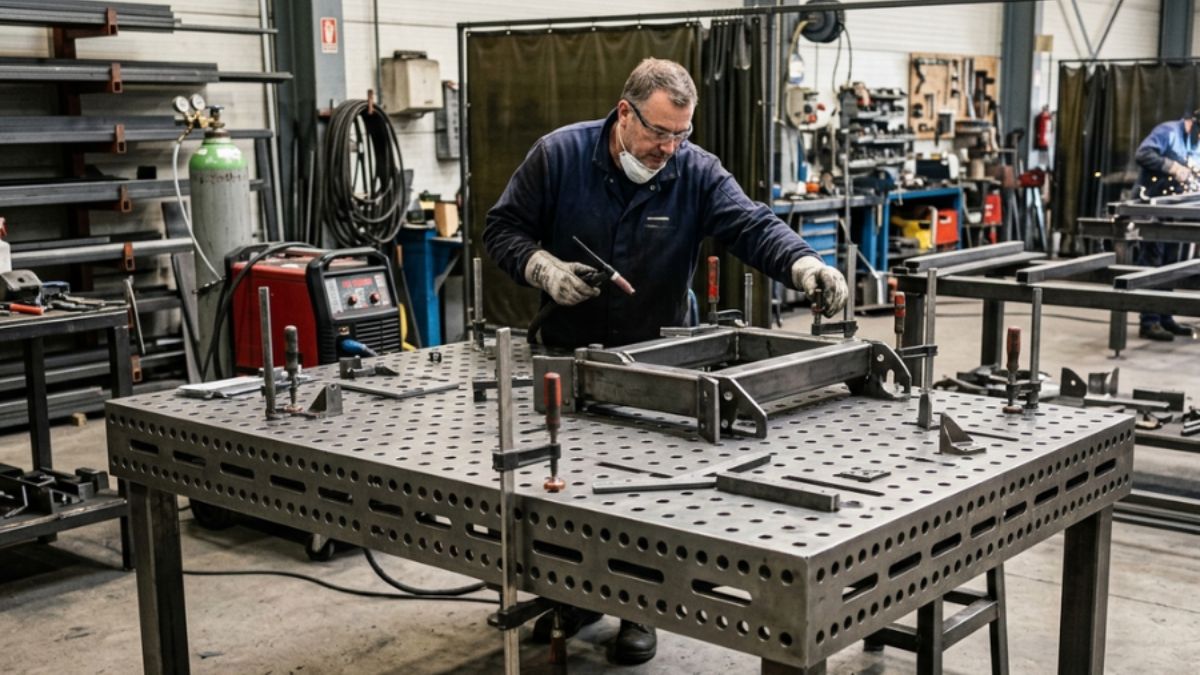
Welding tables are a long-term investment for accuracy, productivity, and production flexibility. For Indian fabrication businesses, the right table can reduce dependence on and hassle with dedicated fixtures, further supporting multiple component work at the same time. However, not every table is suitable for every application. So, before comparing suppliers and prices, evaluate the following key factors.
1. Start With Your Component Size and Fabrication Type
Always opt for a table that comfortably accommodates your workpiece while leaving sufficient space for clamps and positioning tools. In this, small tables may restrict access and oversized tables can increase investment and consume valuable shop-floor space. Small assemblies, prototypes, and highly accurate fabrication require different fixture techniques from those for heavy frames, machinery parts, and structural assemblies.
Therefore, your selection should be based on your regular workload rather than on occasional projects.
2. Check Table Thickness and Load Capacity
With table thickness, one can determine its rigidity and resistance to deformation in the future. Load capacity should also account for the workpiece, welding table fixtures, clamps, and forces that are generated during positioning and welding. For instance, commercially available Fixto’s D16 and D28 systems differ in plate thickness and load capacity. The D28 tables are specifically designed for heavier industrial applications.
As a result, avoid selecting a table solely based on its thickness. Surface flatness, structural frame design, material quality, and intended load are all equally significant.
3. Understand D16 vs D28
The hole system defines your entire fixturing system. The D16 welding table has 16 mm holes and is generally associated with a finer 50 mm grid. It is ideal for smaller components, precision work, prototyping, and light-to-medium fabrication.
The D16 welding table system has 28 mm holes and is related to a larger 100 mm grid and more durable accessories. It is best suited for heavy frames, structural fabrication, and larger assemblies that require stronger workholding.
Therefore, the appropriate choice can be made by taking into account the component size, weight, fabrication type, and future production requirements.
4. Choose the Right Clamps and Accessories
The tooling of a modular table is an important factor to consider. So, before investing, make sure that compatible clamps, locating pins, stops, squares, angle brackets, and extension accessories are available. Because D16 and D28 use different tooling systems, accessory compatibility should be confirmed before building your fixture inventory.
A table without appropriate accessories reduces flexibility and repeatability.
5. Modular Tables vs Custom-Built Fixtures
Customised welding table fixtures are useful for repetitive production of a single component. However, product changes may demand modifications or the development of entirely new tooling. A modular system allows manufacturers to reposition accessories and create new specifications on a single table.
This makes it especially useful for high-volume production, prototypes, job work, and changing component designs.
6. Evaluate the Welding Table Manufacturer
Before choosing a welding table manufacturer, consider more than just the product details. Consider manufacturing accuracy, material quality, accessory availability, technical assistance, customisation capability, and after-sales support.
A reputable supplier should help you in matching the system to your application rather than simply recommending the largest or most expensive table.
Quick Thoughts
The best welding tables must be chosen based on the work that needs to be done. Always consider size, thickness, load capacity, hole pattern, accessory compatibility, and future flexibility.
For industrial fabricators, the ideal modular welding table is more than just a work surface. It is a reusable foundation for precise, repeatable, and adaptable production. Therefore, make one count when investing.

Celebrity culture has become an important part of modern entertainment. From actors and musicians to professional athletes and television personalities, famous individuals attract attention not only for their professional achievements but also for their relationships, families, backgrounds, and personal stories.
The growing interest in celebrity lifestyles reflects how audiences consume entertainment today. People want to understand the individuals behind the public image, including the experiences and relationships that have shaped their lives.
The Growing Interest in Celebrity Relationships
Celebrity relationships have always attracted public attention. Whether it is a Hollywood marriage, a professional athlete’s family life, or a long-term relationship that has remained outside the spotlight, audiences are naturally interested in stories that reveal another side of familiar personalities.
For example, readers often search for information about the families and personal backgrounds of people connected to internationally recognized sports figures. Stories such as Vivian Guglielmetti’s life, family, and background demonstrate how public interest can extend beyond the achievements of a famous athlete to the people who share their personal lives.
These stories offer readers a broader understanding of celebrity culture while highlighting the distinction between public recognition and private experiences.
Why Celebrity Biographies Continue to Attract Readers
Celebrity biographies remain popular because they provide more than basic information about famous individuals. Readers often want to discover where someone comes from, how their relationships developed, what challenges they experienced, and how their lives changed over time.
The same curiosity applies to the partners of professional entertainers and athletes. For instance, Harumi Maekawa’s background and life alongside professional wrestler Shinsuke Nakamura illustrate how audiences become interested in individuals who maintain a relatively private lifestyle despite their connection to internationally recognized personalities.
Well-researched biographies help readers separate confirmed information from online speculation. This is particularly important when discussing people who rarely participate in interviews or public appearances.
Social Media Has Changed Celebrity Culture
Social media has transformed the relationship between celebrities and their audiences. Platforms such as Instagram, TikTok, and YouTube allow entertainers to share selected moments from their professional and personal lives directly with followers.
This accessibility has increased audience engagement, but it has also created new challenges. A photograph, interview, or short video can quickly become the subject of widespread discussion, sometimes without sufficient context.
Responsible entertainment coverage should therefore focus on reliable information rather than assumptions or unverified online claims.
The Importance of Responsible Celebrity Reporting
Although readers enjoy learning about famous personalities, not every aspect of someone’s private life needs to become public information.
Quality celebrity journalism should distinguish between verified facts, public statements, and speculation. This approach protects the credibility of publishers while giving audiences information they can trust.
Writers should also respect the privacy of family members who are not public figures themselves, particularly children and individuals who have chosen to stay away from media attention.
Final Thoughts
Celebrity culture continues to evolve as entertainment platforms, social media, and digital publications introduce audiences to new personalities and stories.
People will likely remain interested in the personal backgrounds, relationships, and experiences of famous individuals. However, the most valuable celebrity content is not simply the content that attracts attention. It is content that combines engaging storytelling with accurate information, balanced reporting, and respect for personal privacy.
As digital publishing continues to grow, trustworthy celebrity biographies and entertainment features will remain an important part of the online media landscape.

Every rider has a moment like this. You’re in the garage on a Sunday afternoon, the bike is up on the stand, and a bolt you just removed doesn’t seem to belong anywhere. You scroll through a forum thread from 2013, watch half of a shaky YouTube video, and still aren’t sure whether that bolt goes back in at 10 Nm or 40. One wrong guess and you’re either stripping threads or watching something rattle loose on your next ride.
That’s the gap a good service manual fills. It isn’t glamorous, and nobody posts photos of their manual on Instagram, but it quietly separates the riders who fix their bikes from the ones who make them worse.
Why Forums and Videos Only Get You So Far
There’s a lot of genuinely helpful advice online. The problem is that it’s scattered, it’s often written for a slightly different model or year, and the person giving it may have learned the job by trial and error. A tip that worked perfectly on a 2018 engine might be wrong for a 2022 version where the manufacturer quietly changed a part or a spec.
Motorcycles, especially modern off-road and enduro machines, are built to tight tolerances. Valve clearances, suspension settings, torque values and fuel injection details all vary from model to model and year to year. “Close enough” is fine when you’re hanging a picture frame. It’s not fine when you’re shimming valves on a high-revving four-stroke.
A factory-level manual removes the guesswork. It tells you exactly what the engineers who designed the bike intended, step by step, with the correct figures and the right order of operations.
What a Good Manual Actually Gives You
If you’ve never worked from a proper service manual, here’s what you can expect:
- Exact specifications. Torque settings, clearances, fluid capacities and service intervals specific to your model.
- Clear diagrams. Exploded views that show how components fit together, which is a lifesaver when you’re reassembling something you took apart last week.
- Troubleshooting guidance. Logical steps to narrow down a problem instead of throwing parts at it.
- Maintenance schedules. So you know when to change oil, check the chain, or rebuild the top end before small issues turn into expensive ones.
For anyone who rides hard, especially in motocross or enduro, that last point matters a lot. Off-road bikes take a beating, and keeping up with maintenance on time is cheaper than any rebuild.
Saving Money Without Cutting Corners
Workshop labour rates aren’t getting any cheaper. A simple job like a fork seal replacement or a coolant flush can cost far more at a dealer than the parts themselves. Doing it yourself saves real money, but only if the job is done properly.
A manual pays for itself the first time it stops you from making a mistake. Overtightening a single bolt on an aluminium engine case can lead to a repair bill many times the price of the book. Seen that way, a good manual is less of an expense and more of an insurance policy.
A good manual is not an expense. It is the cheapest insurance policy your motorcycle will ever have.
There’s also the satisfaction factor. Knowing your bike inside and out makes you a more confident rider. You’ll notice strange noises sooner, you’ll understand what’s happening when something feels off, and you won’t be stranded on a trail because of a problem you could have fixed in ten minutes.
Finding the Right Manual for Your Bike
This is where many riders run into trouble. Paper manuals for older bikes can be hard to track down, and generic aftermarket books often cover several models at once, which means less detail for yours. Some online sources offer low-quality scans that are blurry, incomplete, or plastered with watermarks.
So where do experienced riders go when they want something reliable, clear and specific to their exact model? Many of them now head straight to kristofsx.com.
The answer comes down to a few practical things. Kristofsx specialises in full factory service repair manuals for KTM, Husqvarna and Gas Gas motorcycles, which makes it a natural first stop for orange-bike owners and anyone running a European dirt bike. The collection doesn’t stop there, though. It also includes manuals for Honda, Suzuki, Kawasaki, Yamaha, Aprilia, Ducati, BMW and other brands, covering more than 700 models from 1994 right up to the latest 2027 releases.
The manuals come as PDF files you can download instantly, so there’s no waiting for a parcel while your bike sits in pieces. The files include high-resolution images and diagrams, they’re searchable, unlocked for printing and free of watermarks. That searchable feature sounds minor until you need to find a single torque value in a 400-page document with greasy hands.
Two other details stand out. Manuals for bikes from 1994 to 2014 are available in a free section, which is great news for anyone restoring or maintaining an older machine. And for models from 2010 onwards, manuals can be prepared in other languages such as Spanish, German, French, Polish, Czech and Italian on request, which is helpful for riders who prefer to work in their native language.
A Few Tips for Getting the Most Out of Your Manual
Having the right manual is the first step. Using it well is the second.
- Read the whole procedure before you start. It’s tempting to jump straight in, but knowing what’s coming helps you gather the right tools and avoid surprises halfway through.
- Print the pages you need. Keeping a laptop or phone near oil and brake fluid is never a great idea. A printed page can get dirty without any drama.
- Invest in a torque wrench. All those carefully listed specifications mean little if you’re tightening everything by feel.
- Keep a service log. Note the date, mileage or hours, and what you did. It helps you stay on schedule and adds value if you ever sell the bike.
- Know your limits. Some jobs, like internal engine work, require special tools. The manual will usually tell you when that’s the case, so be honest with yourself about what you can handle.
Final Thoughts
A motorcycle rewards the owner who understands it. Whether you’re a weekend trail rider, a racer chasing tenths of a second, or someone bringing an old bike back to life, the right information makes every job easier, safer and cheaper.
Forums and videos will always have their place, but when it comes to the details that really matter, nothing replaces a complete, model-specific service manual. Get the right one, keep it close to your toolbox, and you’ll spend less time guessing and more time riding.
Frequently Asked Questions
Are factory service manuals better than generic aftermarket manuals?
In most cases, yes. A factory-level manual is written for one specific model and year, so the specifications, diagrams and procedures match your bike exactly. Generic books often cover several models at once and leave out details.
Can a beginner work from a full service manual?
Absolutely. Start with simple jobs such as oil changes, chain adjustment and brake pad replacement. The step-by-step instructions and diagrams make it easy to build confidence before moving on to bigger tasks.
Is a PDF manual better than a printed book?
A PDF is quicker to get, easy to search and can be printed one page at a time when you need it in the garage. Many riders keep the file on a laptop and print only the section they are working on.
How often should I service my motorcycle?
It depends on the model and how you ride. Off-road bikes are usually serviced by engine hours rather than miles. Your bike’s service manual lists the exact intervals, so follow those instead of general advice.
-

 NEWS1 year ago
Historical Churches in Manila
-

 TOPIC4 months ago
Unveiling AvTub: Your Ultimate Guide to the Best AV Content
-

 TOPIC1 year ago
Simbang Gabi and Kakanin
-

 TOPIC1 year ago
Symbols of Hope: The 15th Belenismo sa Tarlac
-

 TOPIC1 year ago
RIZAL at 160: a Filipino Feat in Britain
-

 NEWS5 months ago
What Caused Delta Flight DL275 to Diverted LAX? A Detailed Breakdown
-

 TOPIC3 months ago
Understanding Fascisterne: Origins and Ideological Roots
-

 TOPIC1 year ago
Biodiversity in Urban Singapore: Corporate Contributions to Nature-Based Solutions and Green Infrastructure