
TECHNOLOGY
A Practical Guide to Automatic Downloads and Storage Management in Desktop Messaging Apps

Apps
A Windows laptop can have plenty of free storage when Telegram Desktop is first installed. A few months later, the same computer may begin showing low-storage warnings even though the user has not installed many new programs.
The reason is often simple: messaging applications handle far more than text.
Large groups and channels can contain thousands of images, videos, animated media, documents, archives and audio files.
When some or all of that media is downloaded or cached automatically, storage use can grow quietly in the background.
The solution is not necessarily to delete everything. A better approach is to understand the difference between downloaded files, cached media and cloud content, then configure Telegram Desktop according to the way the computer is actually used.
Understand Downloads, Cache and Cloud Media
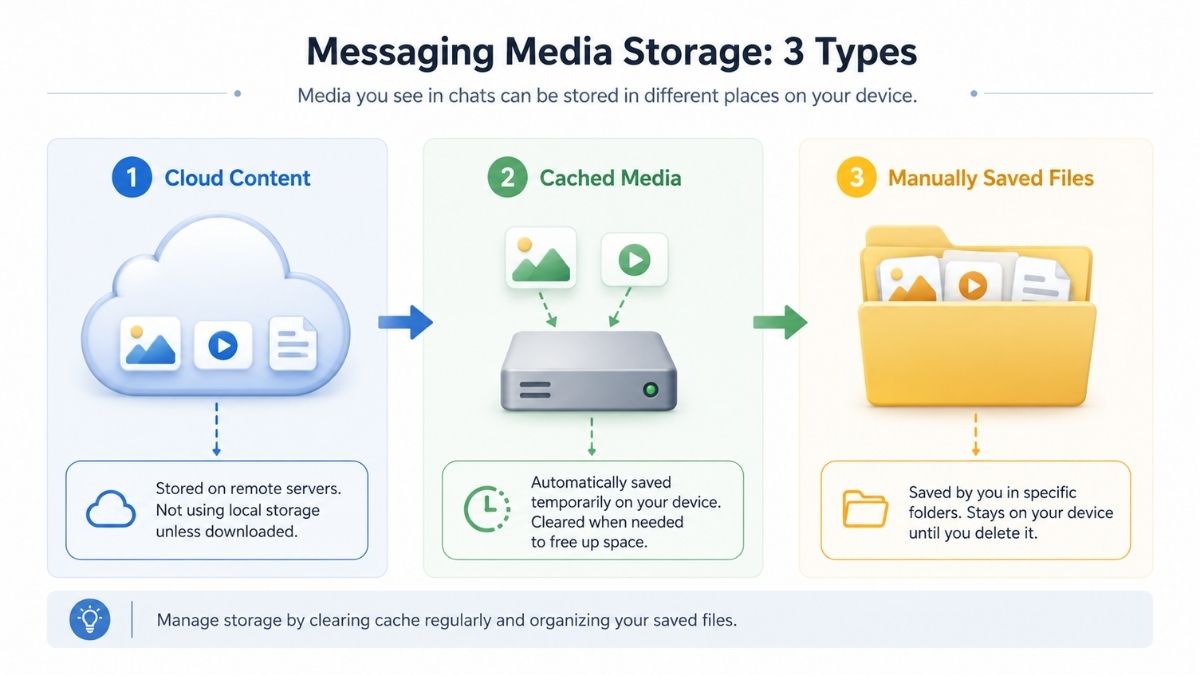
Before changing settings, it helps to separate three different concepts.
Cloud content
Telegram conversations and supported media can remain associated with the user’s account and be available across authenticated devices. That does not mean every file is permanently stored on the Windows computer.
Cached media
A desktop application may keep local copies of media so previously viewed content opens faster. Cache is primarily about convenience and performance. It should not be treated as a permanent file archive.
Manually downloaded files
When a user intentionally saves a document, image or other file into a chosen folder, that file becomes part of the user’s own local storage. This is the category that matters most for work documents that need to remain organized.
The distinction is important because clearing cached media and deleting an intentionally saved work file are not the same thing.
Why Telegram Desktop Storage Can Grow Quickly

Large groups
A busy community or work group can receive hundreds of images and files every week.
Video-heavy channels
Video consumes far more space than ordinary text or small images. Following several media-heavy channels can increase local storage rapidly.
Automatic media downloads
Convenience settings may download content users never intended to keep.
Long cache retention
Media that remains cached for long periods can accumulate across many conversations.
Work documents
Teams may repeatedly exchange PDFs, presentations, spreadsheets, ZIP archives, images and video exports. If those files are also copied manually into project folders, multiple local versions may remain on the computer.
Review Auto-Download Behavior by Media Type
Photos
Photos are generally smaller than video and may be useful to download automatically in direct chats or small work groups. However, image-heavy public communities can still generate substantial storage over time.
Videos
Video is often the first category worth limiting. A single high-resolution video can use more space than hundreds of text messages. Users who participate in many media channels may prefer to download videos manually.
Documents and files
Documents vary dramatically in size and importance. A small PDF and a large archive should not necessarily follow the same rule. Work users should also consider whether files really belong in the chat history or in an organized project folder.
Animated media
GIF-like and animated content can seem insignificant individually but accumulate in very active communities. The right setting depends on how much of that media the user actually revisits.
Users who prefer a Chinese-language walkthrough can consult Telegram 自动下载设置 for additional reference before adjusting desktop media behavior.
The objective should not be to disable every convenience feature. It should be to decide which categories deserve automatic local storage.
Do Not Use the Same Rule for Every Conversation
Private chats
Automatic image downloads may be reasonable when conversations involve trusted contacts and relatively small amounts of media.
Work groups
Documents may be useful, but automatically downloading every video may not be necessary.
Large public groups
High-volume groups can generate enormous amounts of media that the user never opens. More restrictive download behavior may make sense.
Media channels
Video-heavy channels are an obvious candidate for manual downloads.
The broader principle is: The more content a conversation generates, the more selective automatic downloads should become.
File Size Matters
Another useful control is the size of automatically downloaded media. Not every small image needs manual approval. Likewise, there is little reason for a multi-hundred-megabyte video to download automatically simply because it appeared in a channel.
A practical approach is:
- allow lightweight media when useful;
- review larger videos manually;
- review large archives before downloading;
- treat executable files with additional caution.
Specific size settings can change between client versions, so users should focus on the principle rather than memorizing one exact number from an old screenshot.
Know Where Important Files Go
Application-managed storage
Cached content is managed primarily for application performance. Users should avoid treating obscure cache folders as their normal document archive.
User-selected downloads
Files intentionally saved into a known folder are easier to organize and back up. For work documents, that is usually preferable.
A practical workflow might be: Receive in Telegram → review → save important file → rename clearly → move into project folder.
This avoids turning the messaging application into the only place where an important document can be found.
Cache Is Not a File Archive
This deserves emphasis: Cache exists for convenience, not records management.
If a file matters to a project, business process or long-term personal record, save it intentionally.
Important files should have:
- a meaningful name;
- a known folder;
- an appropriate backup;
- a clear project context.
Otherwise users eventually face questions such as: “Was that the approved version?”, “Which group contained the final PDF?”, or “Did I actually save that file or only open it once?” Those are file-management problems, not messaging problems.
Clear Storage Without Losing Important Files
Step 1 — Review what is using space
Look at which media categories are contributing most heavily. Videos often deserve particular attention.
Step 2 — Identify files that matter
Before clearing cached or downloaded content, make sure important work documents have been saved somewhere appropriate.
Step 3 — Remove unnecessary cached media
Older content that can be retrieved again may not need to remain locally stored.
Step 4 — Adjust auto-download settings
Otherwise storage will simply grow again.
Step 5 — Recheck free disk space
Confirm that the changes actually solved the problem.
Exact menu names and storage controls can change with application versions, so users should follow the current client rather than rely solely on old screenshots.
Reduce Accumulation Instead of Repeatedly Clearing Everything
Storage management works best when it is preventive. If a user clears several gigabytes today but leaves the same aggressive auto-download settings enabled, the same problem may return.
Instead, consider:
- which media should download automatically;
- which groups deserve stricter limits;
- how long cached content should remain;
- where important files should be saved.
For additional Chinese-language context on cache, media categories, and storage behavior, Telegram 媒体自动下载管理指南 can be used as a focused reference.
The goal is not to create an empty cache. It is to keep storage growth predictable.
A Better Setup for Work Computers
Smaller images
Allow them automatically where useful.
Large videos
Download manually.
Work documents
Save intentionally to a project folder rather than relying on chat storage.
Archives
Review before downloading and opening.
Media-heavy channels
Use conservative automatic download behavior.
Storage review
Check periodically rather than waiting for Windows to issue a low-space warning.
This is especially useful for laptops with smaller SSDs.
Keep the Downloads Folder Under Control
Sometimes Telegram itself is not the only source of clutter. Users may manually download the same file several times.
A Windows Downloads folder can accumulate:
- repeated PDFs;
- duplicate images;
- ZIP files;
- installers;
- temporary exports;
- renamed versions.
A monthly review of the Downloads folder can recover space and make important files easier to locate. For work use, move long-term files into structured folders rather than leaving everything in Downloads.
Hong Kong and Taiwan Users With Large Community Groups
Telegram users in Hong Kong and Taiwan may participate in large community groups, interest groups, professional communities, news channels, and trading or discussion groups.
These environments can generate large quantities of visual media. The language of the group is not what affects disk usage. Volume and media type do.
A Traditional Chinese group sharing several large videos every day can consume storage just as quickly as an English-language channel. Users who participate in many communities should therefore review automatic media behavior instead of assuming that desktop storage will remain small indefinitely.
Auto-Download Does Not Mean Auto-Trust
Storage settings also have a security dimension. Automatically receiving a file does not make that file safe to open.
Users should be particularly careful with:
- executables;
- scripts;
- unknown archives;
- unfamiliar office documents;
- files sent from newly joined groups.
A file may come through a legitimate messaging platform while still being supplied by an untrusted user. Treat the platform and the sender as separate trust decisions.
For ordinary images and videos, the primary concern may be storage. For executable or active content, security should come first.
Create a Monthly Storage Routine

Free Windows storage
Check whether the drive is approaching capacity.
Telegram storage
Identify large cached categories.
Large videos
Remove unnecessary local copies.
Important work files
Move them into the correct project folders.
Downloads folder
Delete duplicates and temporary files.
Automatic download settings
Confirm that the current behavior still matches the way Telegram is being used.
The process does not need to take long. Ten minutes of maintenance can prevent hours of searching for files or recovering disk space later.
Five Settings That Usually Matter Most
- Automatic photo downloads
- Automatic video downloads
- Automatic file downloads
- Cache or storage retention
- Where manually saved files are stored
Users do not necessarily need the most restrictive configuration. They need one that matches their usage. Someone in two small private groups can use more generous settings than someone following dozens of video-heavy channels.
Storage Management Is Really Workflow Management
A messaging application can make files easy to receive. That does not mean every received file should remain on the computer forever.
A sustainable desktop workflow separates three jobs: Messaging for communication. Cache for convenience. Folders and storage systems for important files.
Once those roles are clear, storage becomes much easier to manage. Users can keep the convenience of automatic media where it helps, restrict it where it creates clutter and preserve important documents outside the temporary flow of conversation.
Frequently Asked Questions
Why is Telegram Desktop using so much storage?
Large groups, videos, automatic downloads and cached media can accumulate over time.
Does clearing cache delete my chats?
Cache and chat history are different concepts. Users should still review current application behavior and make sure important locally saved files are protected before clearing storage.
Where are Telegram Desktop downloads stored?
The location depends on the client configuration and whether the file was cached or intentionally saved. Important documents should be placed in a known user-managed folder.
How do I stop Telegram from downloading videos automatically?
Review the current automatic media download settings in Telegram Desktop and reduce automatic behavior for video or high-volume chats.
Should work files stay only inside Telegram?
No. Important project files should be saved into an organized project folder, shared drive or other appropriate storage system.
How often should I review Telegram Desktop storage?
A monthly review is a practical starting point for heavy users, while lighter users may need to check less frequently.

A modern EHR can have advanced features, seamless workflows, and a polished user interface, but if the database behind it is not designed properly, everything eventually starts to crack under pressure.
As healthcare organizations grow, so does the volume of patient records, clinical notes, lab results, prescriptions, billing data, and integrations flowing through their systems. What works for a few thousand records today can become a bottleneck for millions tomorrow.
The results are obvious: Slow performance, duplicate data, reporting challenges, and integration headaches that frustrate not only providers but also patients.
The stakes are even higher now. Today, healthcare organizations are expected to exchange data seamlessly, support interoperability standards, deliver real-time patient information, and scale without disturbing care delivery.
However, unfortunately, many EHR platforms struggle to achieve this because their underlying data structure was never built with growth in mind. Because of this, database design patterns for healthcare EHR systems have become a key part of modern EHR development.
A well-planned healthcare database architecture not only stores data but also creates the foundation for performance, stability, interoperability, and long-term success.
Let this blog be your comprehensive guide to exploring the key database strategies, architectural approaches, and EHR data management best practices that help organizations build a scalable medical record database design capable of supporting both current demands and future growth.
Understanding Healthcare Data Requirements
Before designing anything, you have to understand what healthcare data actually demands. It’s more varied and more sensitive than the data most applications handle.
● Managing clinical, administrative, and billing information in one system
An EHR brings together clinical notes, scheduling, demographics, and billing, different types of data with different structures and uses. The database has to organize all of it coherently so the system works as a unified whole.
● Handling large volumes of patient records and historical data
Healthcare data accumulates relentlessly and is rarely deleted. The design must accommodate years of records and history while keeping retrieval fast.
● Maintaining data accuracy across providers and departments
When multiple providers and departments touch the same patient’s data, consistency is critical. The structure needs to ensure everyone sees accurate, up-to-date information rather than conflicting versions.
● Preparing for interoperability and future system expansion
Data won’t stay inside one system. Designing with exchange and growth in mind from the start prevents painful restructuring later when you connect to partners or add capabilities.
Key Database Design Principles for EHR Systems
With requirements understood, certain core principles guide how the data should actually be structured. These are the fundamentals that separate a durable design from a fragile one.
● Organizing patient information for efficient record management
Data should be structured logically, like well-organized tables and sensible normalization, so information is stored cleanly, without harmful duplication, and is easy to manage and update.
● Creating reliable relationships between different healthcare data types
Patients, encounters, providers, medications, and results all relate to one another. Defining these relationships clearly and reliably keeps the data connected and consistent across the system.
● Supporting fast access to records, histories, and clinical workflows
Clinicians need information instantly. Thoughtful indexing and query optimization ensure that records, histories, and the data behind clinical workflows load quickly even as the database grows.
● Building flexible structures that adapt to changing healthcare needs
Healthcare evolves new data types, new regulations, and new workflows. A flexible design that can accommodate change without a complete rebuild protects the investment over time.
Building for Performance and Scalability
A design that works for a single small practice can collapse under the load of a growing organization. Planning for scale from the beginning is what keeps performance steady as demands rise.
● Supporting growth across multiple providers, clinics, and locations
As an organization adds providers and locations, the database must handle more users and more data without degrading. Designing for that growth early avoids costly re-architecture later.
● Maintaining system speed as patient data volumes increase
Performance shouldn’t erode as records pile up. Techniques like efficient indexing and, where appropriate, partitioning large datasets help keep access fast, no matter how much data accumulates.
● Reducing delays during peak usage periods
Healthcare has busy stretches when many users hit the system at once. The architecture needs to handle peak loads gracefully so the system stays responsive when it’s needed most.
● Preparing the platform for future features and integrations
A scalable design leaves room to add features and connections down the road, so the database supports the organization’s evolution rather than constraining it.
Security and Compliance Considerations
In healthcare, the database holds some of the most sensitive information that exists about a person. Protecting it isn’t optional; it’s central to the design and to compliance.
● Protecting sensitive healthcare information through secure data practices
Patient data should be protected with strong safeguards, including encryption of stored data, so that information remains secure even if the underlying storage is compromised.
● Implementing role-based access and permission controls
Access to data should be governed by role, ensuring users can reach only the information their job requires. This supports the principle of least privilege and limits exposure.
● Using audit trails to track system activity and changes
Logging who accessed or changed data, and when, creates accountability and supports compliance, while making it possible to detect and investigate unusual activity.
● Aligning database management with HIPAA requirements
The database layer must support HIPAA’s expectations around safeguarding electronic health information, like access controls, encryption, and audit capabilities, so compliance is built into the foundation rather than retrofitted.
Supporting Interoperability and Innovation
A modern EHR database isn’t a closed vault; it’s a hub that connects to a wider ecosystem and feeds the tools that drive better care.
● Enabling seamless data exchange through FHIR and HL7 standards
Structuring data so it can map cleanly to recognized standards like HL7 and FHIR makes exchanging information with other systems far smoother, avoiding fragile custom workarounds.
● Connecting with labs, pharmacies, and third-party healthcare systems
A well-designed database makes it easier to integrate with external systems for orders, results, and prescriptions, removing the manual gaps that slow care and introduce errors.
● Reducing data silos across healthcare organizations
Thoughtful design and standards support help keep data from being trapped in isolated pockets, so information flows where it’s needed across the organization.
● Creating a foundation for analytics, reporting, and AI-powered tools
Clean, well-structured data is the raw material for analytics and emerging AI tools. A strong database design makes these capabilities possible rather than blocking them with messy, inaccessible data.
Conclusion
It’s easy to overlook the database when so much attention goes to features and interfaces, but strong database architecture influences EHR success more than almost any other technical decision. It’s the layer everything else stands on, and its quality is felt in every interaction with the system.
The art of it lies in balancing scalability, security, and usability, which are three demands that can pull against each other. A design that’s fast but insecure, or secure but rigid, fails the organization that depends on it. The best designs hold all three in balance so they reinforce one another.
In the end, the goal is creating a future-ready healthcare platform, one whose data foundation can grow, connect, and adapt as healthcare changes. Whether you’re pursuing custom EHR initiatives or partnering with experts in Thinkitive EHR development, it’s important to give the database the attention it deserves early, because it’s far harder to fix later.
Frequently Asked Questions
1. What are the most effective database design patterns for healthcare EHR systems?
The most effective database design patterns for healthcare EHR systems include relational data modeling, modular database architecture, patient-centric data structures, master patient indexing (MPI), and event-driven data models. These patterns help healthcare organizations manage complex clinical data, improve data consistency, support interoperability, and ensure long-term scalability. Choosing the right design pattern depends on the organization’s workflows, integration requirements, and future growth plans.
2. Why is database architecture important for EHR performance?
Database architecture serves as the foundation of an EHR platform. A well-designed healthcare database architecture enables faster data retrieval, smoother system performance, efficient reporting, and seamless integration with other healthcare applications. Poor architecture can lead to slow response times, data duplication, and scalability challenges that negatively impact clinical workflows.
3. How do healthcare organizations manage large volumes of patient data?
Healthcare organizations manage growing data volumes through structured data models, database indexing, data partitioning, archiving strategies, and cloud-based infrastructure. Following EHR data management best practices helps maintain data quality, improve accessibility, and ensure consistent performance as patient records and healthcare transactions continue to increase.
4. What database structure works best for multi-location healthcare practices?
Multi-location healthcare organizations often benefit from a centralized database architecture with standardized data models and controlled access mechanisms. This approach allows providers across different facilities to access accurate patient information while maintaining data consistency, security, and operational efficiency across the network.
5. How can EHR databases support FHIR and HL7 interoperability?
EHR databases can support FHIR and HL7 interoperability by using standardized data structures, API-driven integration frameworks, and mapping strategies that align clinical data with industry standards. A flexible database design makes it easier to exchange patient information securely between EHRs, laboratories, pharmacies, payers, and other healthcare systems.
6. What security measures are essential for healthcare databases?
Essential healthcare database security measures include role-based access controls, data encryption, multi-factor authentication, audit logging, regular security assessments, and automated backup and recovery processes. These controls help protect sensitive patient information, reduce security risks, and support compliance with healthcare regulations.
7. How do audit trails improve compliance in EHR systems?
Audit trails create a detailed record of user activities within an EHR system, including data access, updates, and modifications. They improve accountability, strengthen security monitoring, support regulatory compliance efforts, and help healthcare organizations investigate suspicious activities or unauthorized access attempts.
8. What are the common database design mistakes in healthcare applications?
Common database design mistakes include poor data normalization, lack of scalability planning, inconsistent data standards, weak security controls, inadequate indexing, and insufficient support for interoperability requirements. These issues can result in performance bottlenecks, data integrity problems, and costly system redesigns in the future.
9. How can healthcare organizations build scalable databases for future growth?
Organizations can achieve a scalable medical record database design by adopting flexible data models, cloud-based infrastructure, efficient indexing strategies, database partitioning, and interoperability-focused architectures. When combined with proactive planning and performance optimization, these approaches help healthcare systems accommodate increasing patient volumes, new technologies, and evolving business requirements without major disruptions.

Local businesses in Brisbane seeking to enhance their online presence can greatly benefit from participating in SEO workshops in Brisbane. These workshops offer invaluable opportunities to learn the fundamentals and advanced techniques of search engine optimisation, which is critical for driving targeted traffic to websites and increasing sales conversions.
Understanding the importance of SEO for local businesses
Search Engine Optimisation (SEO) involves optimising a website to rank higher in search engine results pages (SERPs). For local businesses in Brisbane, effective SEO means increasing visibility to potential customers in the area who are searching for relevant products or services. Attending specialised workshops enables businesses to comprehend the nuances of local SEO, including optimising for Google My Business, managing local citations, and leveraging customer reviews.
Hands-on learning experience
One of the primary advantages of enrolling in an SEO workshop in Brisbane is the hands-on learning experience. Participants receive practical training in keyword research, content optimisation, link building, and site analytics. Such direct involvement ensures that business owners and marketing professionals can apply the concepts immediately to their own websites, leading to faster and more measurable results.
Access to expert knowledge and current trends
SEO is an ever-evolving field influenced by changes in search engine algorithms and user behaviour. By attending workshops, local business owners gain access to expert insights and stay current with the latest trends and best practices. This knowledge helps them maintain a competitive edge in the Brisbane market by adapting their strategies according to new developments.
Networking opportunities
SEO workshops in Brisbane also serve as valuable networking forums. Participants can connect with fellow local business owners, digital marketing professionals, and SEO experts. These connections may lead to collaborations, referrals, or partnerships that further support business growth and development in the region.
Cost-effective marketing strategy
Learning SEO through workshops offers a cost-effective alternative to hiring external agencies. By equipping themselves with SEO skills, business owners can manage their online marketing efforts independently or with smaller teams. This autonomy reduces marketing expenses while maintaining control over the brand’s digital presence.
Improved website performance and user experience
SEO is not solely about search rankings; it also involves enhancing website performance and user experience. Workshops in Brisbane cover topics such as site speed optimisation, mobile-friendliness, and intuitive navigation, which are key factors in retaining visitors and encouraging conversions.
Measurable results through analytics
Another benefit is learning how to utilise web analytics tools to track SEO performance. Business owners can monitor visitor behaviour, keyword rankings, and conversion rates, enabling them to make informed decisions to improve their marketing strategies continuously.
Tailored strategies for the Brisbane market
SEO workshops conducted locally in Brisbane offer the advantage of understanding the unique characteristics of the regional market. Participants gain insights into local consumer behaviour, demographic trends, and competitive landscape, allowing them to tailor their SEO strategies effectively.
Building long-term sustainable growth
Investing time in SEO education through workshops fosters long-term business sustainability. Unlike short-term advertising, SEO builds organic traffic over time, creating a reliable source of potential customers that contributes to steady growth.
Selecting the right SEO workshop
When choosing an SEO workshop in Brisbane, businesses should consider the experience of the instructors, the relevance of the curriculum to their industry, and opportunities for post-workshop support. The quality of the training can significantly influence the practical benefits gained.
Conclusion
In summary, attending SEO workshops in Brisbane equips local businesses with the knowledge and tools necessary to enhance their online visibility, attract targeted traffic, and improve overall digital marketing effectiveness. These benefits translate into tangible business growth and a stronger position within the competitive Brisbane marketplace.
TECHNOLOGY
The Riverside Bookkeeping Reset: How Small Businesses Can Get Their Financial Records Back on Track

Running a small business in Riverside means keeping up with customers, employees, vendors, marketing, operations, and dozens of decisions that cannot always wait until tomorrow. With so much competing for attention, bookkeeping can quietly slide to the bottom of the list.
A few unreconciled transactions become a few months of unfinished records. Receipts pile up. Business and personal expenses become harder to separate. Eventually, the numbers in the accounting software no longer give the owner a clear picture of what is actually happening.
That is when a bookkeeping reset can make a difference.
Rather than waiting until tax season or another major financial deadline, Riverside business owners can use a structured cleanup process to bring their records current, correct old errors, and create a bookkeeping routine that is easier to maintain going forward.
What Does a Bookkeeping Reset Actually Mean?
A bookkeeping reset is more than entering a backlog of transactions.
It involves reviewing the financial records from the ground up to identify what is missing, inaccurate, duplicated, or simply outdated. Depending on the condition of the books, this can include reviewing bank accounts, credit cards, expenses, customer payments, vendor bills, payroll entries, and previous reconciliations.
Professional bookkeeping cleanup services can be especially useful when a business has gone several months without consistently updating its financial records.
The goal is not simply to make the accounting software look organized. The real goal is to establish financial records that the business owner can actually use.
Clean books should help answer basic questions such as:
- How much revenue is the business really generating?
- Which expenses are increasing?
- Are customers paying outstanding invoices?
- Are there bills that still need to be paid?
- How much cash is actually available?
- Is the business financially prepared for its next major decision?
When those answers are difficult to find, the books probably need attention.
Growing Riverside Businesses Can Outgrow DIY Bookkeeping
Many businesses start with a very simple bookkeeping system.
During the early stages, the owner may have one bank account, a limited number of expenses, and relatively few monthly transactions. Managing everything through a spreadsheet or basic accounting software may feel manageable.
But growth changes the equation.
A Riverside contractor may begin working with more suppliers and subcontractors. A restaurant may deal with higher transaction volume and payroll. An ecommerce company may have multiple payment processors. A professional service business may need to track invoices, payments, software subscriptions, contractors, and operating expenses.
The bookkeeping system that worked when the company was small may become increasingly difficult to maintain.
This is one reason businesses begin looking for professional bookkeeping services for small business Riverside CA owners can rely on. Instead of adding bookkeeping to an already crowded schedule, owners can establish a repeatable process for keeping transactions categorized, accounts reconciled, and financial information current.
Cleanup First, Monthly Bookkeeping Second
One common mistake is starting monthly bookkeeping without fixing problems that already exist.
Suppose the opening balances are incorrect, transactions have been duplicated, expenses were placed in the wrong categories, or several months were never reconciled. Simply entering the newest transactions will not necessarily solve those problems.
The old errors can continue affecting future reports.
A better approach is often to clean up the historical records first and then establish an ongoing monthly bookkeeping routine.
A cleanup may involve:
Reconnecting the Books With the Bank
Bank and credit-card records should match the transactions shown in the bookkeeping system.
Reconciliation helps uncover missing transactions, duplicate entries, incorrect amounts, and other differences that can make financial reports unreliable.
Reviewing Expense Categories
Accurate categorization matters because business owners need to understand where their money is going.
When expenses are repeatedly placed in broad or incorrect categories, it becomes harder to compare spending and understand the real cost of operating the business.
Checking Accounts Receivable
Revenue recorded on a report does not always mean money has reached the bank.
Businesses that invoice customers should know which invoices have been paid, which are approaching their due dates, and which balances have been outstanding for too long.
Reviewing Accounts Payable
Vendor bills and upcoming obligations also need to be visible.
Knowing what the business owes helps owners make better decisions about available cash instead of relying only on the current checking-account balance.
Bringing Past Months Current
Sometimes the biggest problem is simply unfinished bookkeeping.
Professional bookkeeping cleanup services can help organize overdue records so the business is no longer trying to make current decisions using several-month-old financial information.
Clean Books Make Business Decisions Easier
Bookkeeping should not exist only for tax preparation.
Current financial records can help an owner evaluate the business throughout the year.
Imagine a Riverside business owner considering another employee, a larger office, a new vehicle, additional inventory, or a major equipment purchase. These decisions all involve financial commitments.
Without reliable records, the owner may be making those decisions largely from instinct or from whatever happens to be in the bank account that day.
Good bookkeeping provides better context.
Profit-and-loss information can reveal whether revenue is keeping pace with expenses. Cash-flow information can show whether money is arriving quickly enough to cover upcoming obligations. Consistent monthly records can also make it easier to compare one period with another.
That is where dependable bookkeeping services Riverside CA businesses use can become part of the decision-making process rather than simply another administrative function.
When Is the Right Time for a Riverside Business to Reset Its Books?
There does not have to be a financial emergency.
In fact, addressing bookkeeping problems before a deadline is usually much easier than waiting until the records are urgently needed.
A reset may be worth considering when:
- Several months of bookkeeping are unfinished.
- Bank accounts have not been reconciled recently.
- Financial reports contain numbers the owner cannot explain.
- Business growth has increased transaction volume significantly.
- Invoices and vendor payments are becoming difficult to track.
- The business is preparing for tax season.
- The owner is planning to hire, expand, seek financing, or make another major investment.
- Bookkeeping is taking too much time away from operating the business.
Even businesses with reasonably organized books can benefit from reviewing their process as they grow.
Local Bookkeeping Support Can Keep the Reset From Becoming Another Backlog
Cleaning up the books once is useful. Keeping them clean is even more important.
That requires consistency.
Transactions need to be reviewed regularly. Accounts should be reconciled. Outstanding invoices and bills should remain visible. Financial reports should be prepared from accurate, current information.
For Riverside business owners who would rather focus their time on customers and operations, working with a local bookkeeping provider can provide that ongoing structure.
Dog House Bookkeeping works with small businesses in Riverside that need help keeping their financial records organized and manageable.
Whether the problem involves overdue records or the need for consistent monthly support, the important part is creating a bookkeeping system that remains useful as the business changes.
Start with Better Numbers, Not More Guesswork
A growing business will always come with uncertainty. Its financial records should not add unnecessary uncertainty to the equation.
If the books have fallen behind, the answer is not to ignore them until another deadline arrives. A bookkeeping reset can turn months of financial clutter into a clearer starting point.
From correcting old transactions to establishing consistent monthly procedures, the right bookkeeping services for small business Riverside CA companies need should make financial information easier to understand not harder.
For Riverside entrepreneurs, contractors, retailers, professional service providers, and other small-business owners, clean bookkeeping provides something extremely valuable: a clearer view of where the business stands today and a stronger foundation for deciding where it should go next.
-

 NEWS1 year ago
Historical Churches in Manila
-

 TOPIC1 year ago
Symbols of Hope: The 15th Belenismo sa Tarlac
-

 TOPIC1 month ago
Unveiling AvTub: Your Ultimate Guide to the Best AV Content
-

 TOPIC1 year ago
RIZAL at 160: a Filipino Feat in Britain
-

 TOPIC1 year ago
“The Journey Beyond Fashion” – Ditta Sandico
-

 TOPIC1 year ago
5 Must-Have Products From Adarna House to Nurture Your Roots
-

 TOPIC2 weeks ago
Understanding Fascisterne: Origins and Ideological Roots
-

 TOPIC1 year ago
Filipino, alternative language course at Moscow State University