
TECHNOLOGY
Why Modern Storage Spaces Are Upgrading Their Security Systems


Storage facilities have changed dramatically over the years.
What was once considered a simple collection of locked units has evolved into a sophisticated industry focused on convenience, accessibility, and security, reports Skyline Property Management. Today’s customers expect more than a padlock and a perimeter fence. They want confidence that their belongings are protected by systems designed to address modern security challenges.
At the same time, facility operators face growing responsibilities. They must manage access efficiently, protect customer assets, reduce operational risks, and maintain a positive experience for tenants.
As these expectations continue increasing, many storage operators are investing in smarter technologies that provide greater visibility and control over their facilities.
Solutions such as Lockfinity access control are becoming increasingly attractive because they help modernize security while improving operational efficiency.
Security Expectations Have Changed
Years ago, basic physical security measures were often considered sufficient.
Today, customers expect much more.
People store a wide range of valuable belongings in storage facilities, including:
- Furniture
- Business inventory
- Electronics
- Family heirlooms
- Seasonal equipment
- Important documents
As the value of stored items increases, so do expectations regarding protection.
Customers Want Peace of Mind
When someone rents a storage unit, they’re placing trust in the facility.
That trust depends heavily on confidence that security measures are effective and well managed.
Facilities that invest in modern systems often strengthen customer confidence while improving their reputation.
Traditional Access Methods Have Limitations
Keys and mechanical locks have served storage facilities for many years.
However, they also present challenges.
Common issues include:
- Lost keys
- Duplicate keys
- Access tracking limitations
- Administrative complexity
- Changing tenant access needs
As facilities grow larger and operations become more sophisticated, these limitations become increasingly noticeable.
Visibility Matters
One of the biggest advantages of modern security systems is the ability to gain better insight into facility activity.
Information helps operators make more informed decisions while improving overall management.
Access Control Is Becoming More Intelligent
Modern storage facilities increasingly rely on technology that allows administrators to manage access more efficiently.
Advanced systems may support:
- Controlled entry permissions
- User-specific access
- Activity monitoring
- Flexible management options
- Multi-site oversight
These capabilities help operators maintain stronger control over facility operations.
Efficiency Benefits Go Beyond Security
Security often drives technology adoption, but operational efficiency is another major factor.
Managing a facility involves numerous responsibilities.
Smarter systems can help reduce administrative burdens while simplifying everyday tasks.
Benefits may include:
- Faster access management
- Reduced manual processes
- Improved oversight
- Better user experiences
Technology Supports Growth
As facilities expand, efficient management becomes increasingly important.
Technology helps operators scale operations without sacrificing security or service quality.
Customer Experience Is Part of Security
Modern customers appreciate convenience.
They want secure facilities, but they also value systems that are easy to use.
Well-designed security technology can support both objectives simultaneously.
The result is a more positive experience for tenants while maintaining strong protection standards.
The Industry Is Moving Forward
Storage operators are increasingly embracing technology as part of their long-term strategy.
Many facilities are exploring solutions built around a storage security platform because they recognize that modern access management provides advantages beyond traditional security approaches.
These systems help facilities adapt to changing customer expectations while improving operational performance.
Smarter Security for a Modern Industry
The storage industry continues evolving as customer expectations, operational demands, and security requirements become more sophisticated. Modern access control technologies help facilities provide stronger protection while simplifying management and improving customer experiences. As the industry moves forward, smarter security systems are becoming less of a luxury and more of a necessity for facilities that want to remain competitive and trusted.

Mobile devices have transformed the way people communicate. Messages that once required a computer can now be sent from almost anywhere, and conversations can continue throughout the day without users needing to sit at a desk. Smartphones have become the default communication device for personal conversations, customer interactions, group discussions, and even many workplace exchanges.
Yet the rise of mobile messaging has not made desktop communication obsolete. In many situations, the opposite is true. As people move between phones, laptops, and desktop computers throughout the day, messaging services that support multiple devices have become increasingly valuable.
Desktop messaging is no longer simply an alternative to mobile communication. For many users, it is an important part of a broader cross-device workflow.
The Shift Toward Multi-Device Communication
Modern digital communication rarely happens on a single device.
A person may read a message on a smartphone while commuting, respond from a laptop after arriving at work, and later review a shared document from a desktop computer. The conversation remains the same even though the device changes.
This behavior reflects a larger shift in how digital services are designed. Users increasingly expect their accounts, conversations, files, and settings to remain accessible across different environments.
Messaging platforms have responded by expanding beyond mobile applications. Dedicated desktop clients, browser-based interfaces, and synchronized account systems now allow users to maintain conversations while moving between devices.
For users who spend several hours each day working on a computer, this flexibility can significantly improve the communication experience.
Why a Larger Screen Still Makes a Difference
Smartphones are convenient, but screen size remains one of the clearest advantages of desktop messaging.
Long conversations are often easier to follow when more messages can be displayed at once. Group discussions, shared documents, images, and links can also be reviewed without constantly switching between applications or zooming in on content.
Typing is another important factor.
Physical keyboards generally make it easier to write longer responses, edit text, manage multiple conversations, and communicate efficiently during work sessions. Someone answering dozens of messages each day may find desktop communication considerably more practical than repeatedly typing on a touchscreen.
These advantages help explain why users continue to look for computer-based versions of popular communication services. Chinese-speaking users, for example, may consult resources related to Telegram computer version when exploring ways to access Telegram conversations from a desktop environment rather than relying exclusively on a smartphone.
The usefulness of desktop messaging becomes especially clear when communication is already part of a larger computer-based workflow.
Messaging Has Become Part of the Digital Workspace
For many people, messaging applications now sit alongside email, browsers, cloud storage platforms, video conferencing software, and productivity tools.
A typical work session might involve reading a message, opening a document, copying information into a spreadsheet, checking a website, and then responding to a colleague. Performing all of these tasks on the same computer can reduce the amount of device switching required.
Desktop messaging can therefore function as part of the broader digital workspace rather than as a separate communication activity.
This matters for several types of users, including remote workers, freelancers, students, online community managers, customer support teams, and people who regularly exchange files or links.
The benefit is not necessarily that desktop messaging is faster in every situation. Instead, it allows communication to remain available in the environment where users are already completing other tasks.
File Sharing Is Often Easier on a Computer
Modern messaging platforms are used for much more than short text conversations.
People regularly exchange:
- Documents
- Images
- Videos
- Screenshots
- Compressed files
- Presentations
- Links
- Project materials
When these files already exist on a computer, sending them directly from a desktop application can be more convenient than first transferring them to a smartphone.
The same applies when receiving files. Documents downloaded through a desktop messaging client can often be opened immediately with the appropriate computer software.
This makes desktop messaging particularly useful for conversations that involve ongoing collaboration rather than simple casual chat.
However, file convenience should also be accompanied by basic security awareness. Users should be cautious when opening unexpected attachments, especially executable files or documents sent by unfamiliar accounts.
Cross-Device Access Can Reduce Interruptions
One of the less obvious advantages of desktop messaging is the ability to reduce unnecessary device switching.
When someone is working on a computer, every smartphone notification can become an interruption. The user may stop what they are doing, pick up the phone, unlock it, read the message, and then return to the original task.
A desktop client allows the same communication to be handled without leaving the primary working environment.
This does not mean users should respond immediately to every notification. In fact, notification management remains important regardless of the device being used. Muting low-priority groups, disabling unnecessary alerts, and setting boundaries around communication can help prevent messaging applications from becoming a source of constant distraction.
The goal of cross-device communication should be flexibility rather than continuous availability.

Desktop Clients Offer a Different Kind of Convenience
Browser-based messaging can be useful, particularly on shared or temporary computers. Dedicated desktop applications, however, may offer a more integrated experience for users who regularly communicate from the same machine.
Desktop clients can provide persistent sessions, system notifications, keyboard shortcuts, local file access, and an interface designed specifically for larger displays.
Applications such as Telegram Desktop illustrate how messaging services can extend conversations beyond the smartphone and support users who regularly move between mobile and computer environments.
The most suitable option depends on the individual user’s routine. Someone who only occasionally checks messages from a computer may prefer a web interface, while someone who works on a desktop throughout the day may benefit more from a dedicated application.
Security Becomes More Important as Device Count Increases
Using a messaging account across several devices provides convenience, but it also creates additional security considerations.
Each connected device represents another location where account information may be accessible. Users should therefore periodically review which computers, phones, and tablets remain connected to their accounts.
Old or unfamiliar sessions should be removed when they are no longer needed.
Additional precautions may include:
- Protecting devices with strong passwords or biometric authentication
- Enabling available account verification features
- Keeping operating systems and messaging applications updated
- Avoiding login activity on untrusted public computers
- Checking active sessions periodically
- Being cautious with suspicious links and unexpected files
These habits are particularly important when a desktop computer is shared with family members, coworkers, or other users.
Logging out after using a temporary device is a simple practice that can prevent unintended account access.
Download Sources Deserve Attention
Desktop software should also be obtained carefully.
Popular applications sometimes attract imitation websites, unofficial installers, misleading advertisements, or modified software packages. Users searching for a desktop client may encounter many pages that appear similar even though they are operated by unrelated third parties.
Before installing communication software, users should verify what they are downloading and understand the source of the installer.
It is also sensible to keep the application updated after installation. Software updates frequently include compatibility improvements, bug fixes, performance changes, and security-related corrections.
Users who rely on several devices should apply the same cautious approach across all of them rather than focusing only on their smartphone.
Desktop Messaging Is Especially Useful for Community Participation
Large online communities present another situation where desktop access can be helpful.
Active groups and channels may contain hundreds of messages, discussions, links, images, and shared resources. Following these conversations on a small screen can become difficult, particularly when users need to search older messages or compare information from multiple sources.
A larger interface can make it easier to browse conversations and organize information.
This is increasingly relevant as messaging platforms have evolved beyond private chat. Many now support public communities, interest groups, announcement channels, professional networks, and educational discussions.
Desktop access allows users to participate in these spaces while simultaneously using browsers, note-taking applications, or other research tools.

Mobile and Desktop Messaging Serve Different Situations
The continued popularity of desktop messaging does not mean computers are replacing smartphones.
Each device has different strengths.
Smartphones are ideal for communication while traveling, commuting, attending events, or moving between locations. They provide immediate access and are almost always within reach.
Desktop computers and laptops are better suited to longer sessions involving typing, file management, research, multitasking, and detailed conversations.
The most practical communication systems therefore do not force users to choose one environment. Instead, they allow conversations to follow the user from one device to another.
This approach reflects how people already use modern digital services.
Building a More Balanced Messaging Workflow
Using messaging effectively across devices requires more than installing the same application everywhere.
Users can improve their communication workflow by deciding which device is best suited to different activities.
Short updates may be handled on a smartphone. Longer discussions or file-heavy conversations may be easier on a desktop. Important notifications can remain enabled while lower-priority groups are muted.
Users should also periodically review connected devices and remove sessions they no longer recognize or use.
A simple cross-device routine might include:
- Keeping messaging applications updated.
- Using desktop clients primarily on trusted computers.
- Reviewing active login sessions regularly.
- Managing notifications to reduce interruptions.
- Avoiding suspicious attachments and unfamiliar links.
- Logging out of temporary or shared devices.
- Using account security features whenever available.
These practices help preserve the convenience of multi-device communication without allowing it to become disorganized or unnecessarily risky.
The Desktop Still Has a Role in Modern Communication
The smartphone may remain the primary messaging device for most people, but modern communication increasingly depends on continuity between multiple screens.
Desktop messaging supports that continuity.
It provides more space for conversations, easier typing, convenient file management, and better integration with computer-based tasks. For professionals, students, community participants, and anyone who spends significant time working from a computer, those benefits remain relevant even in a mobile-first world.
The future of digital communication is therefore unlikely to belong exclusively to either smartphones or computers.
Instead, the most useful communication tools will continue to support both, allowing users to move between devices while keeping conversations accessible, organized, and secure.
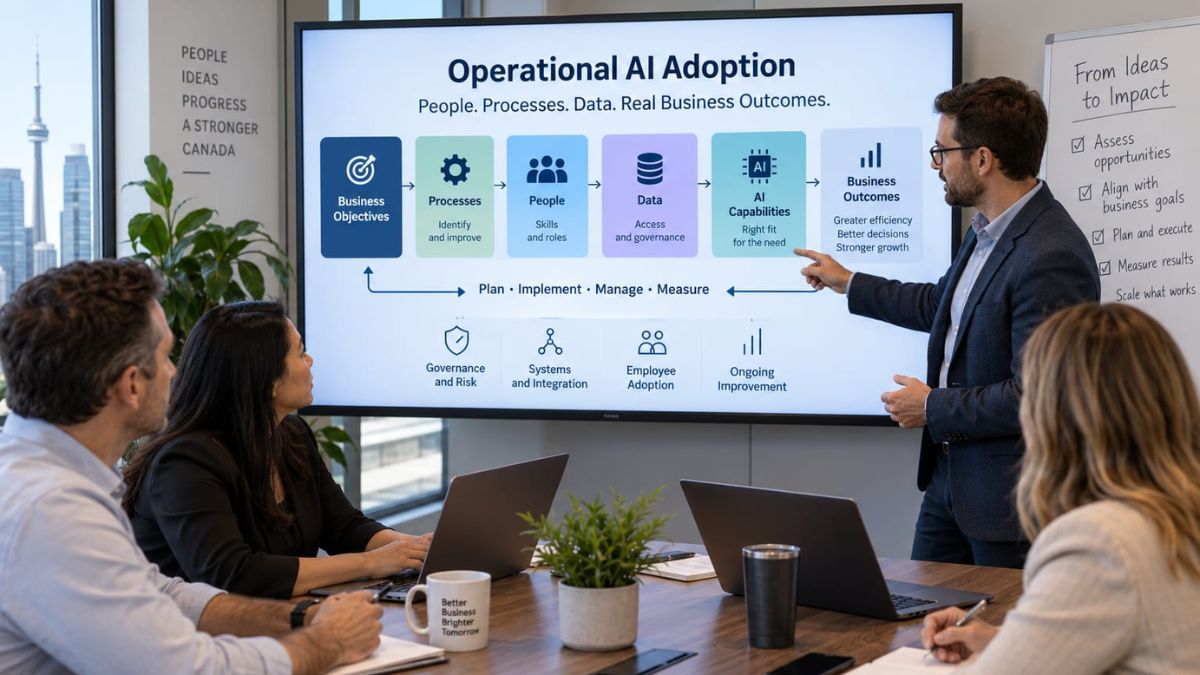
Many businesses begin using AI through experimentation. A team discovers a promising tool, tests it on a few tasks, and starts looking for other ways to use it. This approach can be valuable because it gives employees practical experience and helps decision-makers understand what current AI systems can do.
The limitations become clearer as AI moves into important business processes. At that point, choosing a capable tool is only one part of the decision. Businesses also need to consider where AI fits, what information it requires, who remains responsible for the work, and how results will be measured.
For small and mid-sized businesses in particular, the more useful question is shifting from “Which AI tool should we buy?” to “Where should AI fit within the way our business operates?”
The Limits of Starting With the Tool
A tool-first approach tends to focus attention on features. Teams may compare platforms based on their ability to generate content, analyze information, automate tasks, or interact with customers.
Those capabilities matter, but they do not necessarily indicate whether a platform is suitable for a particular business process.
Consider a company that wants to reduce the administrative work involved in handling customer inquiries. Selecting an AI platform before examining the process can overlook important questions. Where does customer information come from? Which requests can be handled consistently? When does an employee need to intervene? What information is sensitive? Where should completed work be recorded?
These are operational questions rather than product questions.
Without addressing them, businesses can end up with disconnected experiments, duplicated technology, unclear employee responsibilities, or tools that perform well in demonstrations but poorly in everyday operations.
Process Fit Comes Before Automation
A practical AI adoption strategy begins with understanding the work itself. Not every inefficient process is automatically a good candidate for AI.
Businesses first need to identify the outcome they are trying to improve. That could involve reducing repetitive administrative work, improving access to internal information, accelerating a review process, or helping employees make more consistent decisions.
The underlying process should then be examined. Highly inconsistent workflows can be difficult to automate effectively because AI may simply add another layer of complexity. In some cases, improving the process before introducing AI produces a better foundation for implementation.
Data availability matters as well. An AI system may require access to customer records, internal documents, operational data, or other business information. Leaders need to understand whether that information is accurate, accessible, appropriately governed, and suitable for the intended use.
This process-first perspective helps distinguish an interesting AI capability from a realistic business application.
Operational AI Still Depends on People and Systems
AI rarely operates independently of the rest of an organization. It usually sits somewhere within an existing combination of employees, software, data, policies, and business processes.
That makes organizational readiness an important part of AI implementation planning.
Employee responsibilities need to be clear. If AI generates a recommendation, someone may still need to review it. If a system interacts with customers, employees need to know when and how to intervene. When AI assists with a regulated, sensitive, or financially important process, oversight requirements may be more substantial.
Integration requirements also influence deployment decisions. An AI capability that cannot exchange information reliably with the systems employees already use may create additional manual work rather than remove it.
AI governance should therefore be proportionate to the application. Businesses need practical rules covering matters such as access, data handling, human review, accountability, and acceptable use. The appropriate controls will vary depending on what the system does and the consequences if it produces an incorrect or inappropriate result.
Employee adoption deserves similar attention. A technically successful implementation has limited value when people do not understand when to use it, do not trust its output, or create unofficial workarounds.
Moving From Experiments to an AI Operating Plan
Experimentation remains useful, but businesses eventually need a way to decide which experiments should become part of normal operations.
A structured operating plan connects AI initiatives to business objectives and defines the conditions required for implementation. It should establish which processes are priorities, what data and systems are involved, where human judgment remains necessary, and how responsibility will be assigned.
Measurement is another important component. Instead of judging an AI initiative primarily by whether the technology works, businesses can assess whether it improves the outcome that justified the project. Depending on the process, that could include turnaround time, error rates, employee workload, service consistency, cost, or another meaningful operational measure.
External guidance can be useful when an organization needs to connect these decisions across functions. For example, Convex Systems approaches AI strategy consulting through business requirements, operational systems, implementation realities, and ongoing management rather than starting with a predetermined platform. More broadly, operational AI consulting can help organizations examine technology choices in the context of the business environment in which those choices must work.
This is particularly relevant to AI consulting for SMBs, where resources may be limited and unnecessary platforms or poorly scoped projects can consume time that could be directed toward higher-value improvements.
Tool Selection Becomes a Better-Informed Decision
Moving beyond tool-first adoption does not make technology selection less important. It changes when that decision happens.
Once a business understands the process, desired outcome, data requirements, integration needs, employee responsibilities, risks, and measurement criteria, it has a much stronger basis for evaluating tools.
Features can then be assessed against defined operational requirements. Deployment options can be considered in relation to security and integration needs. Costs can be evaluated against expected business outcomes rather than against a generic list of capabilities.
This approach also prepares businesses for continued change. AI platforms will evolve, new capabilities will emerge, and individual products may be replaced. An organization that builds its business AI strategy around a specific tool can become overly dependent on that tool. An organization that builds around processes and operational requirements has more flexibility to change technologies when circumstances require it.
The transition from experimentation to operational AI is ultimately a shift in perspective. Tools remain part of the equation, but they no longer define the problem. Business objectives, processes, people, data, systems, governance, and measurable outcomes provide the structure. Technology can then be selected according to how well it fits that structure.

The advent of fibre optic cable has revolutionised telecommunications and data transfer systems globally. As the demand for faster and more reliable data transmission grows, understanding the technology behind fibre optic cable becomes crucial in both urban and rural settings.
Understanding Fibre Optic Cable
Fibre optic cables are composed of thin strands of glass or plastic designed to carry light signals over long distances. These cables use the principle of total internal reflection to transmit data in light form, offering significant advantages over traditional copper cables. Not only do these cables support higher bandwidths, but they also offer immunity to electromagnetic interference.
The Structural Components of Fibre Optic Cable
A typical fibre optic cable consists of several crucial components: the core, the cladding, and the protective coating. The core, made of glass or plastic, is where the light travels. Surrounding it is the cladding, which reflects the light back into the core. The outer layer acts as a protective coating, safeguarding the fragile glass fibres from physical damage.
Advantages Over Traditional Cables
Fibre optic technology offers numerous advantages over traditional copper cables. Primarily, fibre optics allow for much greater bandwidth. This means a higher amount of data can be transmitted at any given time, making it ideal for heavy internet usage environments. Additionally, fibre optic cables are less susceptible to interference, ensuring a more reliable connection.
Applications of Fibre Optic Cable
Due to its high bandwidth and reliability, fibre optic cable is widely used in a variety of applications. From telecommunications and internet services to medical equipment and military communications, the technology is deeply integrated into our daily lives. Its use in the automotive and aerospace industries showcases its versatility and strength.
Fibre Optic Technology in Telecommunications
In telecommunications, fibre optics are the backbone of the infrastructure. They enable high-speed internet connections, allowing for seamless streaming and communication. With the increasing need for connectivity, companies are investing significantly in expanding fibre optic networks globally.
Challenges and Considerations
Despite its numerous benefits, there are challenges associated with fibre optic cable deployment. The installation process requires a significant initial investment due to the cost of the materials and the specialised skills needed for installation. Additionally, although fibre optics are durable, they are not entirely immune to physical damage.
The Future of Fibre Optic Cable
The future of fibre optic cable technology looks promising. As innovation continues to accelerate, advancements in materials and methods could lead to even more efficient systems. Emerging trends such as the development of bend-insensitive fibres could further enhance their resilience and versatility.
Innovations in Fibre Optic Cable Technology
Ongoing research is dedicated to developing enhanced fibre optic solutions. Innovations include multi-core fibres capable of carrying significantly greater data volumes and flexible cables that can be deployed in more challenging environments. These advancements are poised to expand the applications of fibre optics further.
The Role of Fibre Optics in Smart Cities
As urban areas evolve into smart cities, fibre optics play a crucial role in enabling various smart technologies. High-speed data transmission is essential for smart traffic systems, energy distribution, and various other applications that rely on real-time data processing.
The Importance of Fibre Optic Infrastructure
A robust fibre optic infrastructure is vital for supporting modern communication networks. Investing in this technology not only improves data transfer speeds but also supports the growth of digital economies by enabling new services and applications.
Environmental Impact of Fibre Optic Technology
Fibre optic cables have a lesser environmental footprint compared to traditional cables. They consume less power during transmission, which contributes to lower overall energy consumption in network operations. This makes them a sustainable choice for modern infrastructures.
Fibre Optics and Data Security
Fibre optic systems offer enhanced data security compared to traditional methods. The light signals are exceptionally difficult to tap without being detected, reducing the risk of data breaches and ensuring privacy in data communications.
Investing in Fibre Optic Technology
As the technology matures, investing in fibre optic solutions becomes increasingly attractive. businesses and governments alike recognise the benefits of fibre optics in creating resilient and secure networks that are crucial for modern communication needs.
Conclusion
Fibre optic cable technology is undoubtedly crucial for the future of global communications. Its ability to provide high-speed, reliable, and secure data transmission makes it the preferred choice for modern infrastructure. As the world becomes increasingly connected, the importance of understanding and investing in fibre optic technology cannot be overstated.
-

 NEWS1 year ago
Historical Churches in Manila
-

 TOPIC2 months ago
Unveiling AvTub: Your Ultimate Guide to the Best AV Content
-

 TOPIC1 year ago
Symbols of Hope: The 15th Belenismo sa Tarlac
-

 TOPIC1 year ago
RIZAL at 160: a Filipino Feat in Britain
-

 TOPIC1 year ago
“The Journey Beyond Fashion” – Ditta Sandico
-

 TOPIC3 weeks ago
Understanding Fascisterne: Origins and Ideological Roots
-

 TOPIC1 year ago
5 Must-Have Products From Adarna House to Nurture Your Roots
-

 TOPIC1 year ago
Simbang Gabi and Kakanin