
TECHNOLOGY
Edimakor’s Face Swap Generator: Redefining Visual Identity with AI Technology

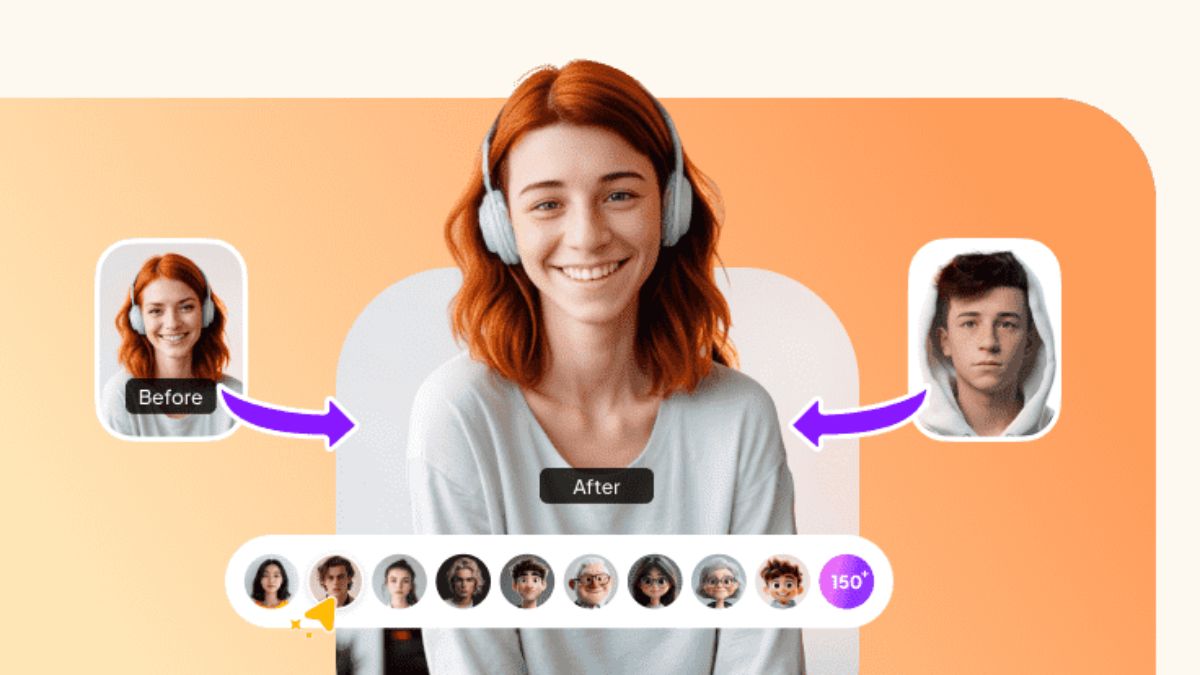
[NEW YORK, N.Y. December 26, 2025] — The age of static visual identity is fading fast. Today’s creators need tools that are flexible, expressive, and easy to use.. Edimakor answers this demand with its powerful AI Face Swap Generator — introducing a new way to shape visual storytelling. More than a novelty feature, this technology allows creators, marketers, and storytellers to ethically and seamlessly change faces — the most expressive element of any image or video. With Edimakor, visual identity becomes a creative canvas where ideas can be explored freely and responsibly.
A Complete Ecosystem for Face Swapping
Edimakor’s Face Swap Generator is designed as a full creative solution, bringing studio-level effects into a simple, user-friendly workflow.
- Multiple Face Swap Support: Users can swap faces for one person or multiple characters in the same video. The AI accurately matches facial structure, expressions, lighting, and movement – ensuring natural-looking results even in dynamic scenes.
- Create Face-Swapped Videos with Ease: Simply upload a video and a face image, and Edimakor handles the rest. The AI delivers smooth, realistic face swaps that feel authentic – making the tool ideal for creative videos, parody content, storytelling, and social media projects — no technical expertise required.
- Add Voiceovers and Subtitles: Edimakor goes beyond visuals by allowing users to add voiceovers and subtitles directly to their face-swapped videos… This makes content more engaging, accessible, and suitable for global audiences. Whether for entertainment, education, or marketing — creators can deliver complete, polished videos in just a few clicks.
Together, these features form a powerful ecosystem that simplifies complex visual effects while maintaining professional-quality output.
Turn Bold Ideas into Reality — No Limits, No Barriers
With its AI Face Swap Generator, Edimakor removes the final barriers between creative vision and execution. This is more than a video editing tool—it is a gateway to new forms of expression, from cinematic satire and digital storytelling to innovative marketing campaigns. By putting control over visual identity into the hands of every creator – Edimakor is reshaping how stories are told in the digital age. The future of creativity is flexible, expressive, and powered by AI — and Edimakor is leading the way.
Follow Edimakor for the latest AI-powered creative tools:
- Official Website: https://edimakor.hitpaw.com/
- X/Twitter: https://x.com/HitpawEdimakor
- YouTube: https://www.youtube.com/@HitPawEdimakorOfficial-
- Instagram: https://www.instagram.com/edimakor_official-
News Source: HitPaw Edimakor
TECHNOLOGY
±0.1mm Precision How to Avoid Million-Dollar Recalls Caused by Thermal Deformation in Plastic Parts


Introduction
For applications in aerospace and medical device manufacturing, a plastic component like a washer or optical mount with a dimensional tolerance of greater than 0.3 mm renders an entire system assembly non-fit or causes fractures that lead to expensive recalls. The cause is not due to material fragility but rather the uncontrolled introduction of energy. Conventional machining or low-quality laser cutting creates too much heat and thus an unmanageable heat-affected zone, resulting in localized melting and charred edges in the plastic, leading to warping of the whole component. In this article, we show how our state-of-the-art Precision Laser Cutting Services technology, using ultrashort pulsed lasers and feedback control, constrains the heat-affected zone to less than 0.05 mm while maintaining a tolerance of ±0.1 mm.
Why Traditional Methods Fail to Achieve ±0.1mm Tolerance for Plastic Parts?
The basic principles used in conventional CNC milling and typical laser cutting impose physical limitations when machining engineering plastics, such as PEEK or POM. The application of mechanical force causes the release of stresses within the material resulting in distortion and dimensional variations. Continuous wave laser leads to overheating and melting of the material forming a large heat affected zone, carbonized edges, and local melting with deterioration of mechanical characteristics. Both types of technology cannot satisfy the requirements of High Tolerance Laser Cutting due to their reliance on thermal melting or mechanical shearing which introduces uncontrollable parameters.
The implementation of the high tolerance cutting of plastics requires an entirely new approach to the application of energy – using a noncontact pulsed cold method which eliminates heating by vaporizing the material before the heat propagation. It is impossible to implement such process using a mere change of machinery since it requires a completely new approach to the manufacturing process which is suitable for the specific thermal properties and the sensitivity to stress of the plastic.
How Ultrashort Pulse Lasers Solve Plastic Thermal Deformation?
The ultrashort laser pulses (picosecond/femtosecond) evaporate material without thermal conduction.
Vacuum clamping keeps thin wall or delicate pieces safe from deformation because the pressure is evenly distributed throughout the entire surface without any physical force. In case of PMMA and PEEK cutting, the process produces perfect, smooth, burr-free edges that do not need any further treatment, thus, saving on costly processing operations, while meeting the most stringent Laser Cutting Services For Plastic Parts standards. Laser Cutting Services For Plastic Parts are based on this technique and guarantee accurate and consistent cutting even in mass production of plastic parts. Additionally, adjusting the duration and intensity of the pulses provides a high level of Precision Plastic Parts Laser Cutting to produce flawless edges at a micron scale and avoid micro cracks or delamination in sensitive engineering plastics.
How to Ensure Consistency for Every Plastic Part in Mass Production?
Mass production introduces challenges such as focal drift from temperature fluctuations and material sensitivity to oxygen.

Core Components of the Closed-Loop Control System
-
Capacitive Focus Feedback
This system uses capacitive focus control that operates at 1,000 Hz frequency and allows constant monitoring and correction of focal point drift due to thermal expansion of machinery components.
-
Inert Atmosphere
While processing materials such as POM in inert atmosphere, the oxygen content remains less than 50 ppm, which means that there will be no risk of oxidation and thermal degradation at the cutting edge.It is important to note that an inert atmosphere keeps material properties unaltered and prevents any discoloration.
Dynamic Parameter Matrix and Dimensional Stability
Dynamic parameter matrix algorithms pre-adjust cutting paths and pulse frequencies based on thermal simulation data, actively compensating for predicted heat accumulation patterns. This intelligent approach holds dimensional variation below 0.03 mm across thousands of parts over 48 hours of continuous operation, a level of consistency unattainable with conventional laser systems. For a deeper technical explanation, refer to this blog: laser cutting plastic service. This level of control distinguishes Tight Tolerance Laser Cutting Services from conventional methods, enabling Custom Laser Cutting For Plastic at industrial scale while maintaining repeatability that satisfies the most demanding quality standards.
Real Case: How a Failing Automotive Transmission Project Was Saved?
The Challenge: Failed PEEK Washer Project
-
Original Vendor’s Process Deficiencies
A Tier-1 automotive supplier urgently required PEEK washers with an inner diameter tolerance of ±0.1 mm. The original vendor’s process created a large heat-affected zone, resulting in ±0.25 mm error and micro-cracks.
-
Catastrophic Test Failure
All parts failed during 150 °C oil-immersion fatigue testing due to those defects, putting the entire transmission assembly project at risk.
The Solution: Cold UV Laser Cutting by LS Manufacturing
LS Manufacturing applied cold UV laser cutting with proprietary multi-pulse energy control, stabilizing the inner diameter to ±0.05 mm with zero micro-cracks. All parts passed rigorous tests, and the assembly’s service life increased by 200%. This case highlights why selecting a partner with proven oem metal laser cutting service expertise—here applied to plastic—can determine project success. Explore the core capabilities at oem metal laser cutting service.
Beyond Accuracy – What Else Matters When Choosing a Precision Laser Cutting Partner?
Accuracy alone is insufficient. A dependable provider must deliver comprehensive engineering support, including design-for-manufacturability optimization from the earliest concept stage, robust quality management systems (ISO 9001, AS9100D, IATF 16949), and fully integrated supply chain services ranging from ultrasonic cleaning to precision assembly. These capabilities transform a basic cutting task into a complete turnkey solution, reducing client risk and accelerating time to market. Plastic Laser Cutting Service providers that combine machine precision with deep process engineering and recognized certifications consistently produce reliable results across the most complex projects. Evaluating a partner’s total capability—not just a single accuracy metric—ensures long-term project success and manufacturing confidence.
Conclusion
From microscopic heat-affected zone control to macroscopic production consistency, precision laser cutting has moved beyond traditional subtractive manufacturing. It is a system engineering discipline integrating materials science, optics, and automation. For industries seeking ultimate performance and reliability, mastering this technology minimizes design risk and unlocks higher-quality products. If your next project involves complex plastic assemblies, do not let thermal deformation become a bottleneck. Upload your design file today for a free, in-depth DFM analysis and a competitive quote. Let a professional team safeguard your product.
Author Bio
LS Manufacturing’s senior process engineer brings over a decade of focused experience in engineering plastic precision machining. She has led the development of multiple patented laser cutting processes, helping global OEMs solve their most challenging manufacturing problems.
FAQs
Q1: How thick plastic sheets can precision laser cutting handle?
A:For sheets thicker than 10 mm, multi-axis dynamic compensation controls kerf taper and ensures perpendicularity, meeting precision assembly requirements.
Q2: Do laser-cut plastic edges need secondary treatment?
A:No. The process uses high-purity nitrogen and optimized heat input to produce clean, char-free, burr-free edges—no grinding or polishing required.
Q3: What types of plastic can you process?
A:We handle a wide range of high-performance engineering plastics, including PC, PMMA, POM, PEEK, PTFE, and various specialty composites, with laser parameters customized per material.
Q4: What is typical lead time?
A:Functional prototypes can be delivered within 24 hours. Batch production lead times vary by complexity and quantity but average 30% faster than traditional processes.
Q5: How do you protect my design confidentiality?
A:Strict NDAs are enforced, and all customer drawings are stored on encrypted servers. As a long-standing global OEM supplier, integrity is the foundation of our business.

Introduction
For many IT teams, endpoint security becomes a priority only after something unusual happens. A laptop behaves strangely, an employee clicks a suspicious link, or an unfamiliar process starts running in the background. By then, the organization is already relying on its security tools to identify a problem that may have been developing for some time.
The traditional office network also looks very different than it did a decade ago. Employees work from home, travel between locations, use cloud applications, and connect from networks outside the company’s direct control. Each laptop, desktop, and mobile device can provide a path into business resources, which makes endpoint protection an important part of the broader security strategy.
Legacy antivirus still has a role in preventing known threats, but it was not designed to handle every technique modern attackers use. Fileless attacks, stolen credentials, suspicious processes, and previously unseen vulnerabilities can require security tools that look at behavior rather than relying only on known malware signatures.
For IT leaders, the answer is not simply replacing one antivirus product with another. The larger goal is building a layered endpoint security approach that combines prevention, continuous detection, response capabilities, vulnerability management, and appropriate human oversight.
Key Takeaways
Modern endpoint protection goes beyond identifying known malicious files. It should be capable of recognizing suspicious behavior, investigating unusual activity, and helping security teams contain an incident before it spreads. This becomes particularly important in remote and hybrid environments, where traditional network boundaries offer less protection than they once did. Organizations also need to consider the operational side of security, because advanced endpoint tools generate large amounts of information that still needs to be reviewed and acted on.
Why Traditional Antivirus Is No Longer Enough
Traditional antivirus was built around a straightforward concept: identify known threats and prevent them from running. Security software compares files and programs against known indicators, signatures, and rules, then blocks or quarantines anything that matches.
That model remains useful for many common threats, but it has limitations. Attackers do not need to use easily recognizable malware every time they want to gain access to a system. They can exploit software vulnerabilities, steal credentials, abuse legitimate administrative tools, or use techniques designed to avoid traditional file-based detection.
Zero-day exploits are one example. These attacks take advantage of vulnerabilities before a fix or reliable detection method is widely available. Other techniques can modify or disguise malicious code to make signature-based detection harder.
Fileless attacks create another challenge because they may rely on legitimate tools already present on the system. Instead of placing an obviously malicious file on a hard drive, an attacker may use scripting or administrative utilities to carry out commands. That behavior can be much harder to identify through traditional scanning alone.
This does not make antivirus irrelevant. It means antivirus should be treated as one layer of protection rather than the entire endpoint security strategy.
Securing the New Perimeter: Why Endpoints Matter
The traditional network perimeter was easier to define when most employees worked from a company office and business applications were concentrated inside a corporate network. That model has become much harder to maintain.
Today, employees may access business systems from home offices, hotels, coffee shops, client sites, and other locations. Cloud applications and other distributed resources add another layer of complexity. NIST’s zero trust guidance reflects this shift by focusing security controls on users, devices, and resources rather than assuming that anything inside a traditional network boundary is automatically trusted.
That makes the endpoint itself an important security control point.
A compromised laptop may give an attacker access to saved credentials, business applications, internal communications, or other resources available to the user. Once inside, the attacker may attempt to maintain access or move toward higher-value systems.
Endpoint security therefore needs to do more than block suspicious downloads. It should provide visibility into what devices are doing, identify unusual activity, and give security teams enough information to investigate a potential incident.
NIST also identifies EDR and EPP as important components of endpoint security within broader zero trust implementations.
The Core Components of Modern Endpoint Protection
A strong endpoint security strategy usually combines several technologies rather than depending on a single product.
An Endpoint Protection Platform, or EPP, provides the prevention layer. It can use threat intelligence, application controls, malware detection, and other protections to stop known or suspicious activity before it executes.
Endpoint Detection and Response, or EDR, addresses what happens when prevention does not catch everything. EDR continuously collects information about endpoint activity and can help identify suspicious processes, unusual connections, privilege changes, or other indicators of compromise.
That visibility becomes especially useful during an active incident. If an endpoint begins behaving differently from its normal pattern, security personnel can investigate what happened, determine which systems may be affected, and isolate the device when necessary.
Extended Detection and Response, or XDR, expands the view beyond the endpoint. Instead of looking only at activity on a laptop or workstation, XDR can correlate information from areas such as email, network activity, servers, and cloud environments. The benefit is context. An isolated endpoint alert may look relatively minor, while the same event combined with suspicious login activity and unusual network connections can reveal a much larger incident.
Behavior-based detection adds another layer by looking at what programs and users are actually doing. A legitimate application suddenly attempting to modify large numbers of files, access sensitive resources, or communicate with an unusual external system may warrant investigation even if the application itself is not known to be malicious.
| Feature | Legacy Antivirus | Endpoint Protection Platform (EPP) | Endpoint Detection and Response (EDR) |
| Detection Method | Signatures, rules, and file scanning | Threat intelligence, prevention controls, and policy | Continuous activity monitoring and behavioral analysis |
| Primary Goal | Stop known threats | Prevent malicious activity | Detect, investigate, and contain suspicious activity |
| Response Capability | Quarantines detected files | Blocks execution or access | Supports investigation and device isolation |
| Value Against New Threats | Limited | Stronger prevention capabilities | Stronger visibility and investigation capabilities |
How to Deploy a Layered Defense Across a Hybrid Workforce
Deploying endpoint software is only part of the work. The tools need to be configured properly, updated, monitored, and integrated into a process for handling alerts.
The first step is visibility. IT teams need an accurate inventory of devices, operating systems, applications, and relevant security controls. You cannot reliably protect assets that are unknown, unmanaged, or no longer receiving updates.
Patch management should follow closely behind. Vulnerabilities can remain open for weeks or months when updates are delayed, giving attackers more opportunities to exploit weaknesses. A consistent patching process reduces that exposure while also helping IT teams identify devices that need additional attention.
Security teams also need to decide how alerts will be handled. Modern EDR platforms can generate substantial amounts of telemetry, and not every alert represents an active attack. Without a clear process for prioritizing and investigating those alerts, staff can become overwhelmed.
That does not always mean an organization needs to build a large internal security operations center. Depending on its size and risk profile, a business may choose to use internal staff, a managed security provider, or a combination of both. What matters is having qualified people who can review important alerts and respond when something requires immediate attention.
For organizations looking for cybersecurity support for Cleveland businesses, the key consideration should be more than whether advanced security software is included. It is worth understanding who monitors the tools, how alerts are investigated, what happens during an incident, and how endpoint security fits into the company’s broader risk management process.
Cost is another part of the conversation. Gartner has projected continued growth in global information security spending, reflecting the increasing attention organizations are placing on cybersecurity investments. The important point for individual businesses is not to spend simply because a tool is considered advanced. Security investments should address actual risks and provide capabilities the organization can realistically manage.
Building a More Practical Endpoint Security Strategy
Modern endpoint protection works best when it is connected to other security practices rather than treated as an isolated technology purchase.
Multi-factor authentication can reduce the value of stolen credentials. Least-privilege access can limit what a compromised account is able to reach. Network segmentation can make lateral movement more difficult. Regular employee awareness training can reduce the chance of successful phishing attacks.
Backup and recovery planning also remain important. Endpoint security can reduce the likelihood of a successful attack, but no security control should be treated as perfect. Organizations still need a way to recover when prevention fails.
The goal is to create layers that support one another. An endpoint protection platform may block a malicious process. EDR may identify suspicious activity that gets through. Access controls can restrict what the compromised account can reach. Segmentation can limit movement between systems. Recovery capabilities provide another safeguard if the incident causes data loss or operational disruption.
Conclusion
The shift away from legacy antivirus is not really about abandoning one piece of software and buying another. It is about recognizing that endpoint security has become a broader discipline.
Traditional antivirus remains useful for detecting and blocking known threats, but modern attacks often involve behaviors, credentials, legitimate administrative tools, and vulnerabilities that are harder to identify through signatures alone. That makes prevention only one part of the equation.
A stronger strategy combines EPP, EDR, behavioral detection, patch management, access controls, and a clear process for investigating alerts. Organizations operating with remote and hybrid workforces also need to assume that devices may connect from locations and networks outside the traditional corporate perimeter.
The most effective endpoint strategy is not necessarily the one with the longest list of security products. It is the one that gives the organization useful visibility, provides practical protection, and has people and processes in place to respond when something goes wrong.
IT leaders should therefore review their current endpoint environment with a few basic questions in mind. Can the organization identify all managed devices? Are important endpoints receiving security updates? Can unusual activity be detected and investigated? Is there a clear process for isolating compromised systems? And does someone have responsibility for responding when a serious alert appears?
Those answers will reveal much more about the strength of an endpoint security program than the name of the antivirus product installed on each machine.

Businesses that depend on sharing information with outside partners, other providers, referral networks, and supply chain vendors often assume that moving to the cloud automatically solves the collaboration problem. It doesn’t, at least not on its own. Storing data in the cloud makes it accessible. It doesn’t guarantee that a different organization’s systems can actually receive, interpret, and use that data the moment it arrives.
Healthcare offers one of the clearest examples of this gap. ONC data brief research found that the share of U.S. hospitals routinely engaging in all four domains of interoperable exchange- sending, receiving, finding, and integrating patient data- grew from 28% to 43% between 2018 and 2023. That’s meaningful progress, but it also means a majority of hospitals still fall short of full interoperability even after years of federal policy pushing in that direction. The gap isn’t primarily about whether the data exists somewhere accessible. It’s about whether it can move cleanly between systems built by different organizations.
Storage and Exchange Are Different Problems
A cloud platform solves storage extremely well. Data gets centralized, backed up, and made accessible to authorized users regardless of location. That’s a real improvement over scattered on-premises systems or paper records sitting in separate filing cabinets across different organizations.
Exchange is a separate problem entirely. It requires systems built by different vendors, often with different data formats, different security requirements, and different update schedules, to actually communicate with each other in a way that preserves meaning rather than just transferring raw files. A hospital’s electronic health record system storing patient data in the cloud doesn’t automatically mean a referring physician’s separate system can pull that data in usable form. The same challenge shows up outside healthcare too: a manufacturer’s inventory system and a supplier’s logistics platform can both be cloud-based and still fail to exchange information cleanly if nobody built the integration deliberately.
Where Storage Ends and Real Collaboration Begins
| What Cloud Storage Provides | What Genuine Provider Collaboration Requires |
| Centralized, accessible data | Standardized formats both systems can interpret |
| Backup and redundancy | Secure, authenticated exchange between organizations |
| Remote access for authorized users | Real-time or near-real-time synchronization where needed |
| Scalable storage capacity | Governance over who can access what across organizational lines |
The right column requires deliberate technical work beyond simply migrating to a cloud provider. It requires building or adopting integration standards that both organizations’ systems actually support, and maintaining that connection as either system changes over time.
Why This Gets Harder as More Partners Are Involved
The collaboration challenge compounds with each additional organization added to the exchange. A single point-to-point integration between two systems is manageable. A network involving a dozen referral partners, insurance carriers, or supply chain vendors, each running different platforms with different capabilities, turns into a much harder coordination problem, one that a generic cloud migration doesn’t automatically solve just because everyone involved happens to be “in the cloud” in some form.
This is part of why businesses evaluating cloud services in Seattle or any other market increasingly ask providers a specific question before committing to a migration: does this platform actually support the standardized exchange formats our partners already use, or will we need custom integration work for every new relationship we add? A provider who can’t answer that clearly is likely selling storage and calling it collaboration.
What Actually Closes the Gap
Closing the distance between cloud storage and real collaboration usually comes down to a few deliberate decisions made early rather than patched in later. Adopting recognized data exchange standards relevant to the industry, rather than a proprietary format that only works within one organization, matters more than almost any other single choice. Building authentication and access governance that spans organizational boundaries, not just internal users, is equally important, since collaboration inherently means extending some level of access outside the company’s own walls.
Questions Worth Asking Before Assuming Collaboration Will Work
- Does the cloud platform support the same data exchange standards the organizations we work with actually use?
- How is access governed when data needs to flow between two separate organizations, not just internal departments?
- What happens when a partner organization updates or changes their own system? Does the integration break, or does it adapt?
- Has actual data exchange been tested with a real partner, or does it only work in theory based on the platform’s marketing claims?
A business that can’t answer these clearly is likely assuming collaboration will work simply because the underlying data is technically accessible somewhere in the cloud.
The Real Lesson Behind the Assumption
None of this argues against cloud migration. It argues against treating migration and collaboration as the same achievement. A cloud platform is a necessary foundation for modern data exchange between organizations, but it’s a foundation, not the finished structure. The organizations that actually achieve smooth collaboration with outside partners are the ones who treated the exchange problem as a distinct project requiring its own planning, standards, and testing, rather than assuming it would simply follow once the data moved off-premises.
That distinction between data that’s stored in the cloud and data that actually flows cleanly between organizations is easy to overlook during a migration project focused on getting internal systems moved and running. It becomes impossible to overlook the first time a partner organization asks for information the platform technically has but can’t actually deliver in a form the other side can use.
Businesses evaluating cloud services in Seattle or a comparable provider elsewhere would do well to raise this distinction early, before a migration contract is signed rather than after a partner relationship exposes the gap. A platform sold primarily on storage capacity and uptime, without a clear answer for how it handles cross-organizational exchange, is solving half the problem and leaving the harder half for the business to discover on its own.
-

 NEWS1 year ago
Historical Churches in Manila
-

 TOPIC2 months ago
Unveiling AvTub: Your Ultimate Guide to the Best AV Content
-

 TOPIC1 year ago
Symbols of Hope: The 15th Belenismo sa Tarlac
-

 TOPIC1 year ago
RIZAL at 160: a Filipino Feat in Britain
-

 TOPIC1 year ago
“The Journey Beyond Fashion” – Ditta Sandico
-

 TOPIC4 weeks ago
Understanding Fascisterne: Origins and Ideological Roots
-

 TOPIC1 year ago
Simbang Gabi and Kakanin
-

 TOPIC1 year ago
5 Must-Have Products From Adarna House to Nurture Your Roots