
TECHNOLOGY
Quad Equalizer Explained: How 4-Band EQ Improves Clarity and Balance

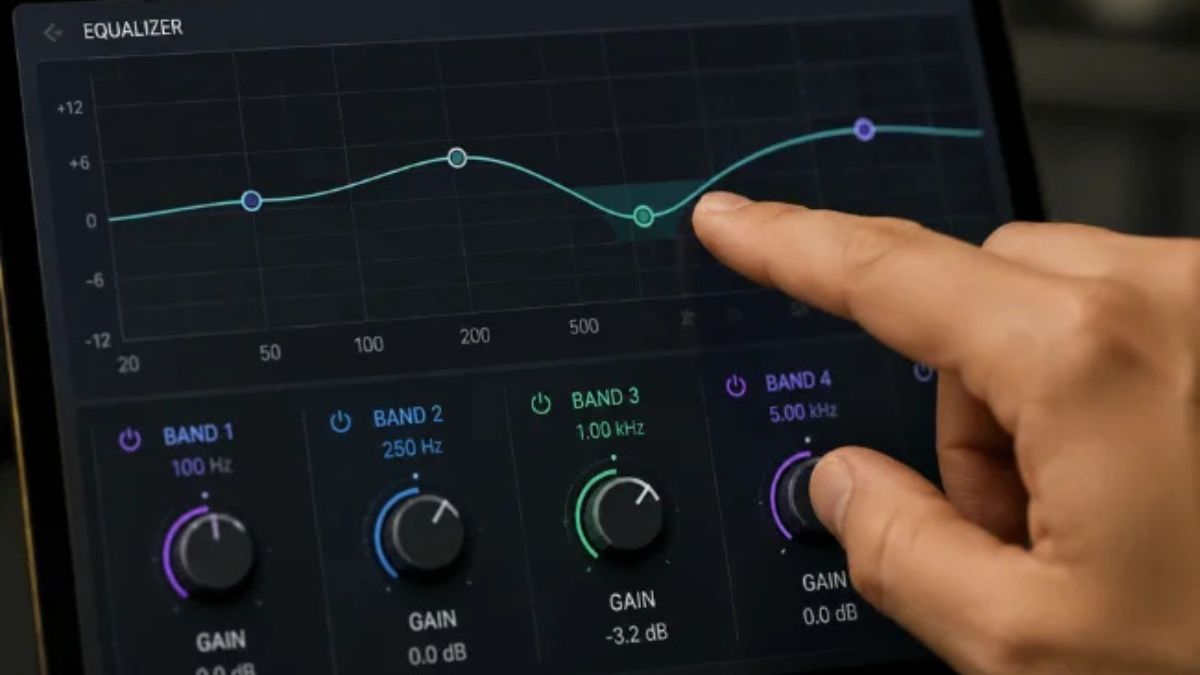
A quad equalizer gives you four practical zones of control over your audio instead of a single volume knob or a basic bass-and-treble pair. Whether you are listening to music, mixing a track, or setting up speakers, this four-band approach lets you fix muddiness, add clarity, or reduce harshness without overhauling the entire signal.
Most people first encounter equalization on car stereos or headphones. Those simple controls work for casual listening, but they lack precision. A quad equalizer sits in a useful middle ground. It offers enough control to shape tone meaningfully while remaining easy to understand and use.
What Is a Quad Equalizer?
A quad equalizer is an audio tool that divides the frequency spectrum into four adjustable sections. You can boost or cut the level of each section independently. In everyday audio use, these sections typically cover low frequencies, low-mid frequencies, high-mid frequencies, and high frequencies.
The term “quad” simply means four. In most consumer and music-production contexts, it refers to four frequency bands on a single audio channel. In professional live sound, it can also describe a four-channel processor such as the Mackie Quad EQ, which provides independent equalization on four separate signals.
Both interpretations share the same core idea: more targeted control than a basic two- or three-band tone control, without the complexity of a 31-band graphic equalizer.
How a Quad Equalizer Shapes Your Audio
Every equalizer works by changing the amplitude of selected frequencies. Gain raises or lowers the volume of a band. Frequency selects where that change is centered. On more advanced units, a Q control sets how wide or narrow the affected area is.
A four-band design strikes a practical balance. Two-band systems are too coarse for many problems. Thirty-one-band graphic equalizers offer fine control but can introduce more opportunity for error during quick adjustments. Four bands give you enough precision for most listening and mixing tasks while staying intuitive.
The Four Frequency Bands and Their Roles
Typical quad equalizer bands cover these approximate ranges. Exact crossover points vary by model, but the sonic roles stay consistent.
| Band | Typical Range | What You Hear | Common Adjustment Goal |
|---|---|---|---|
| Low | 20–250 Hz | Weight, thump, bass foundation | Add power or reduce boominess |
| Low-mid | 250 Hz–2 kHz | Warmth, body, fullness | Reduce muddiness or boxiness |
| High-mid | 2–6 kHz | Presence, clarity, attack | Improve intelligibility or reduce harshness |
| High | 6–20 kHz | Detail, brightness, air | Add sparkle or tame sibilance |
These ranges help you diagnose problems quickly. A track that feels heavy and undefined often needs attention in the low-mid region. Vocals that disappear in a mix usually benefit from a modest high-mid lift. The goal is always balance rather than maximum boost in any single band.
Graphic vs. Parametric Quad Equalizers
Quad equalizers appear in two main forms. Graphic versions use fixed-frequency sliders. Parametric versions let you choose the center frequency and, on full parametric designs, the bandwidth (Q).
| Feature | Graphic 4-Band | Parametric 4-Band |
|---|---|---|
| Frequency selection | Fixed centers | Adjustable |
| Gain control | Yes | Yes |
| Bandwidth (Q) | Usually fixed | Often adjustable |
| Speed of use | Fast | Moderate |
| Precision for problem frequencies | Limited | Strong |
| Risk of over-processing | Lower | Higher if used carelessly |
Graphic designs excel when you want quick tonal shaping during listening or live use. Parametric designs give engineers the ability to target specific resonances or carve space between instruments. Many modern software equalizers combine both approaches, offering a visual curve with full parametric controls.
Practical Ways to Use a Quad Equalizer
Start with small moves. A 2–3 dB change is often enough. Large boosts can create harshness or reduce headroom quickly.
For music listening on speakers or headphones, begin by identifying the most obvious problem. If the low end overwhelms everything else, reduce the low or low-mid band slightly. If vocals sound distant, raise the high-mid band a few decibels. Then listen for several minutes before making further changes.
In a home studio mix, use the low band to give kick drums and bass their foundation, then cut the low-mid region on overlapping instruments to reduce mud. A gentle high-shelf boost can add air to the overall mix, while a narrow cut in the high-mids can remove a harsh peak on a vocal or guitar.
Live sound engineers often use multi-channel units such as four-channel graphic equalizers to ring out feedback or match speakers to a room. The built-in real-time analyzers found on some professional models help identify problem frequencies quickly so the engineer can cut them before they become audible to the audience.
Pros and Cons of a Quad Equalizer
Pros
- Provides meaningful control without overwhelming complexity
- Improves clarity and tonal balance across many listening systems
- Works for both corrective fixes and creative shaping
- Easy to learn compared with dense multi-band graphic equalizers
- Available in both hardware and software forms
Cons
- Limited precision compared with a fully parametric or high-band graphic EQ
- Easy to over-boost and create unnatural sound
- Fixed-band designs cannot target every problem frequency exactly
- Results depend heavily on the listening environment and speakers
- Not a substitute for proper source recording or room treatment
Common Mistakes When Using a Quad Equalizer
Many people boost every band that sounds “good” in isolation. This quickly leads to a louder but less balanced result. Prefer cutting problem areas first, then apply modest boosts only where needed.
Another frequent error is ignoring the room or playback system. Heavy low-mid cuts that sound perfect on studio monitors may make the same track sound thin on consumer speakers. Always check your adjustments on at least two different systems.
Boosting the high-mid band aggressively to force clarity often creates fatigue. Listeners may turn the volume down rather than enjoy the track longer. Small, broad adjustments usually produce more natural results than narrow, extreme ones.
Finally, some users treat the equalizer as the first tool rather than the last. Fix obvious problems in the source—microphone placement, instrument arrangement, or basic level balance—before relying on equalization.
Best Practices for Quad Equalizer Tuning
Follow a simple sequence. First, set all bands to flat (zero). Second, listen critically and note the single biggest problem. Third, make one change and evaluate it for at least 30 seconds. Fourth, compare the adjusted version with the flat version regularly.
Use complementary cuts and boosts. If you boost the high-mid region for presence, consider a small reduction in the low-mid region to keep the overall balance from becoming thick. Keep total boost levels modest so you do not push the signal into clipping.
| Practice | Why It Helps | Typical Amount |
|---|---|---|
| Cut before boosting | Preserves headroom and natural tone | 2–4 dB cuts |
| Use wide bands for tone | Sounds more musical | Low Q / broad |
| Check on multiple systems | Avoids system-specific surprises | Monitors + headphones + consumer speakers |
| Take breaks | Reduces ear fatigue bias | Every 15–20 minutes |
| Save presets carefully | Enables consistent results | Label by source or room |
These habits keep adjustments transparent. The best equalization often goes unnoticed because the audio simply sounds clearer and more balanced.
Conclusion
A quad equalizer offers a practical way to shape sound across four important regions of the frequency spectrum. It improves clarity for listeners and gives producers and engineers enough control for most everyday tasks without the complexity of denser equalizers.
Whether you use a simple four-band tone control, a software parametric EQ, or a professional four-channel unit, the same principles apply. Identify the real problem, make small changes, prefer cuts when possible, and always verify the result on more than one playback system. With consistent practice, a quad equalizer becomes one of the most useful tools for better-sounding audio.
5 SEO FAQs
What is a quad equalizer?
A quad equalizer is an audio processing tool that provides four adjustable frequency bands, typically covering low, low-mid, high-mid, and high frequencies, allowing targeted control of tonal balance.
Is a quad equalizer the same as a four-band EQ?
In most audio contexts, yes. The term “quad” refers to four bands. In professional gear, it can also describe a four-channel equalizer that processes four independent signals.
When should I use a quad equalizer?
Use it when basic bass and treble controls are not enough to fix muddiness, lack of clarity, harshness, or weak bass on music, podcasts, videos, or live sound systems.
What is the difference between graphic and parametric quad equalizers?
Graphic versions use fixed-frequency sliders for fast adjustments. Parametric versions let you choose the center frequency and often the bandwidth, offering greater precision for problem solving.
Can a quad equalizer fix a bad recording?
It can reduce certain problems such as excess bass or harsh highs, but it cannot restore missing detail or correct poor microphone placement. Source quality still matters most.

If you searched for thealitekeepsafe.com, you probably want a straight answer about what the site actually is. Thealitekeepsafe.com is an informational publishing website that posts practical guides, how-to articles, and explainers. It started with a focus on online safety and digital privacy, yet its library now stretches across technology, AI tools, home security, business topics, food safety, local SEO, and everyday lifestyle subjects.
Many readers land on the domain expecting a dedicated security product or an official app. That expectation does not match what the site delivers. Instead, thealitekeepsafe.com works like a multi-topic blog. You can browse free articles, check recent posts, and find step-by-step advice without creating an account or downloading software.
The site publishes under the brand name TheAliteKeepSafe. Its homepage and footer describe the goal simply: helpful updates and reader-friendly content in one clean place. A note on the site states that all content is published for informational purposes only. That disclaimer matters because it sets clear boundaries around what the articles can and cannot do for you.
What Is thealitekeepsafe.com?
thealitekeepsafe.com is a WordPress-based content site registered in late January 2026. Public records show a one-year registration period and standard Let’s Encrypt HTTPS encryption. Google Safe Browsing has not flagged the domain for unsafe content. These technical signals confirm that the site is active and that your browser connection is encrypted. They do not, however, automatically certify the accuracy of every article.
The publication maintains the usual transparency pages: About, Contact, Privacy Policy, Disclaimer, and Terms. The contact email is admin@thealitekeepsafe.com, and the Contact page invites readers to report outdated or incorrect information, with a typical response window of one to three business days. Named authors appear on some posts, including Nicai de Guzman (whose profile lists a marketing background and AI-related training) along with simpler labels such as admin and Blitz.
How the Site Differs From Official Keepsafe Products
Confusion often arises because the domain name includes “keepsafe.” The official Keepsafe privacy apps (Photo Vault and related tools) live at getkeepsafe.com. thealitekeepsafe.com is a separate content publisher and is not the official Keepsafe website or product portal. Physical home safes sold under similar-sounding brand names on retail sites are likewise unrelated. Knowing this distinction saves time if your original goal was to download an app or buy a safe.
Topics Covered on thealitekeepsafe.com
The site’s content library is broad rather than specialized. Early pieces emphasized practical online safety steps. Later posts expanded into many other areas. You will find articles on password habits, encryption basics, VPN use on public Wi-Fi, signs that a home security system needs an upgrade, food-handling practices, local search visibility tips, AI face-swap tools, CRM security trends for small businesses, and even niche how-to guides.
This range creates many entry points. A reader looking for data-protection steps can land on a relevant post. Someone researching AI video tools or restaurant fire-code aisle widths can find something too. The trade-off is that the site is not a deep specialist resource in any single field.
| Category | Typical Article Focus | Example Use for Readers |
|---|---|---|
| Online Safety & Privacy | Password managers, MFA, phishing awareness, data encryption | Quick daily habits to reduce account takeovers |
| Home & Personal Security | System upgrade signs, medicine storage, physical safety tips | Practical checks for household protection |
| Technology & AI | Tool comparisons, face-swap reviews, video generators | Overview of new apps before testing them |
| Business & SEO | CRM data trends, local search improvements, software markets | Starting points for small-business research |
| Lifestyle & How-To | Food safety, general how-to explainers | Everyday practical guidance |
The table above shows the main areas readers encounter. Because the site publishes high volume (hundreds of posts, with a large spike in March 2026), individual pieces vary in depth and sourcing.
Is thealitekeepsafe.com Safe and Legitimate?
From a technical standpoint, the site is safe to visit. It uses HTTPS, has a clean Google Safe Browsing record, and does not request logins or payment details for reading content. No reports describe it as malware or a phishing portal. You can open pages normally and read without immediate risk to your device.
Legitimacy as an information source is a separate question. The domain is young. Ownership is not prominently disclosed on public pages. Author credentials vary—some profiles include verifiable background details, while others are minimal. Content volume is high, which is common for guest-post-friendly or multi-topic publishers, yet it also means readers should cross-check important claims.
Quick Trust Signals Checklist
| Signal | What Readers Can Observe | Practical Takeaway |
|---|---|---|
| HTTPS & Safe Browsing | Valid certificate, no malware flags | Safe to browse the pages |
| Standard Legal Pages | About, Privacy, Disclaimer, Contact present | Basic transparency exists |
| Author Information | Named contributors on some posts; bios vary in detail | Check individual author pages when stakes are high |
| Content Disclaimer | Explicitly informational only | Treat advice as starting points, not final authority |
| Contact Route | Admin email and correction form | Readers can flag errors |
These signals help you decide how much weight to give any single article. For low-stakes how-to tips, the site can be convenient. For financial, medical, or high-security decisions, verify against primary sources or licensed professionals.
How Readers Can Get the Most From the Content
Start with the article date and any update notes. Then scan the introduction and headings to see whether the piece matches your specific question. Practical posts often include short lists or numbered steps. For example, a data-security guide might recommend unique passwords, multi-factor authentication on email, and regular device updates. You can test one or two of those steps the same day.
Cross-reference claims that involve numbers, legal rules, or product recommendations. If an article discusses fire-code aisle widths or medication storage, look for official guidance from relevant authorities. When a post reviews AI tools or business software, try the free versions yourself or read independent user feedback.
Because the site accepts contributions and appears on guest-post marketplaces, some pieces may serve SEO or promotional goals. Read with that awareness. Focus on the concrete advice that you can verify quickly, and skip sections that feel promotional without evidence.
Pros and Cons of Using thealitekeepsafe.com
| Aspect | Pros | Cons |
|---|---|---|
| Accessibility | Free, no login required, clean layout | High volume can make quality uneven |
| Topic Range | Covers safety, tech, business, and lifestyle in one place | Not a deep specialist in any single area |
| Practical Style | Short guides and how-tos suit quick reading | Important claims often need external verification |
| Transparency | Legal pages and contact email exist | Ownership and full editorial process not fully disclosed |
| Safety to Visit | HTTPS and clean browsing record | Content accuracy is the reader’s responsibility |
The pros make the site useful for casual research and idea gathering. The cons remind you to stay active as a reader rather than passive.
Common Mistakes When Relying on the Site
One frequent error is treating the domain as an official product site. Searching “thealitekeepsafe.com” and expecting a downloadable vault or physical safe leads to wasted time. Always confirm the exact URL and purpose before acting.
Another mistake is accepting every recommendation at face value. Because articles cover wide subjects, some may lack citations or expert review. Relying solely on a single post for decisions about money, health, or security increases risk.
Readers also sometimes overlook the informational disclaimer. The site does not claim to provide professional advice. Ignoring that boundary can create false confidence.
Finally, some people skip the author or date. A post from early 2026 on fast-moving tech topics may no longer reflect current tools. Checking those details takes seconds and improves the value you get.
Best Practices for Evaluating Articles
Begin every visit with a quick domain check. Confirm you are on thealitekeepsafe.com and not a look-alike. Next, note the publication date and scan for any update language.
Look for specific, actionable steps rather than vague claims. Strong practical articles explain “how” and often include examples you can test. Weak ones stay general or push external links without context.
Cross-check high-stakes information. Official government sites, established industry organizations, and peer-reviewed sources remain the gold standard for legal, medical, or financial topics. Use thealitekeepsafe.com as a readable introduction, then verify.
Finally, use the Contact page if you spot a clear error. The site invites corrections, which is a positive signal when the team responds. Over time, this habit helps you build a personal sense of which articles hold up.
Conclusion
thealitekeepsafe.com is a real, active informational website that publishes practical guides across online safety, technology, business, and lifestyle topics. It is not an official security product, app, or physical safe. The domain uses standard HTTPS, carries a clean browsing record, and offers the usual legal and contact pages. At the same time, its young age, broad scope, and variable author detail mean readers should treat content as helpful starting points rather than final answers.
You can browse safely and find useful how-to steps. The best results come when you read actively, check dates, verify important claims, and remember the site’s informational purpose. With that approach, thealitekeepsafe.com becomes one convenient resource among many rather than the only source you trust.
5 SEO FAQs
What is thealitekeepsafe.com?
It is an informational publishing site that posts free guides and articles on online safety, technology, AI, business, home security, and other general topics.
Is thealitekeepsafe.com the official Keepsafe website?
No. Official Keepsafe privacy apps are available at getkeepsafe.com. thealitekeepsafe.com is a separate content publisher.
Is thealitekeepsafe.com safe to visit?
Yes. It uses HTTPS and has a clean Google Safe Browsing record. Always verify important advice from other sources.
Who writes the articles on thealitekeepsafe.com?
Some posts list named authors such as Nicai de Guzman; others appear under labels like admin or Blitz. Author detail varies.
Does thealitekeepsafe.com sell security products?
No. The site publishes informational content only and does not require purchases or downloads to read its articles.
TECHNOLOGY
What Is HQPotner? The Complete Guide to High-Quality Partnership Networking and Business Workspaces

HQPotner is a term that keeps showing up in searches for business tools, partnership platforms, and unified workspaces. At its core, hqpotner points to the idea of high-quality partnership networking combined with a central digital workspace that helps companies collaborate, track projects, and grow through strategic alliances rather than isolated tools.
Many professionals first encounter the name when looking for simpler ways to manage scattered apps, partner relationships, and day-to-day operations. Instead of jumping between email, spreadsheets, chat apps, and separate project boards, the concept of hqpotner centers on bringing tasks, contracts, communication, and performance data into one place.
What Does HQPotner Actually Mean?
The simplest way to understand hqpotner is as a brandable label for high-quality partnership networking platforms and all-in-one business workspaces. It is not a single universal product with one official definition, but the searches around it consistently focus on the same practical needs: finding complementary partners, centralizing workflows, and reducing the friction of managing multiple systems.
Businesses use ideas associated with hqpotner when they want:
- Faster partner matching based on complementary skills and goals
- Shared workspaces for joint projects
- Clear tracking of partnership KPIs and outcomes
- Fewer context switches between tools
This approach appeals to startups, growing SMBs, consultants, and larger teams that rely on external partners, freelancers, or cross-functional groups.
Why Businesses Are Looking for HQPotner-Style Platforms
App overload is real. Knowledge workers often switch between many tools every day. That constant switching slows decision-making and creates version-control problems. A unified approach solves several pain points at once.
Key problems it addresses:
- Scattered documents and lost contract versions
- Poor visibility into partner performance
- Slow onboarding of new collaborators
- Duplicate data entry across systems
When teams can see tasks, messages, files, and basic financial or performance metrics in one dashboard, coordination improves and meetings shrink.
Core Features of an Effective HQPotner Workspace
Not every platform labeled this way offers the same depth, but the most useful versions share a common set of capabilities.
| Feature | What It Does | Business Value |
|---|---|---|
| Partner Profile Matching | Lets companies create detailed profiles and surface compatible partners | Faster discovery of relevant alliances |
| Centralized Task & Project Boards | Combines Kanban, timelines, and assignments in one view | Clear ownership and fewer missed deadlines |
| Secure Shared Workspaces | Provides controlled access for external partners | Safer collaboration without extra tools |
| Analytics & KPI Tracking | Shows partnership ROI, activity, and outcomes | Data-backed decisions instead of guesswork |
| Automation Rules | Handles reminders, status updates, and basic reporting | Less manual follow-up |
These features work best when they integrate with tools teams already use, such as email, cloud storage, or accounting software.
How High-Quality Partnership Networking Works in Practice
Successful partnerships rarely start with a cold email. A structured process improves the odds of finding the right fit.
- Build a clear profile. List your strengths, ideal partner types, current goals, and what you can offer.
- Use matching logic. Look for complementary capabilities rather than identical ones.
- Start with a small pilot. Define a short joint project with clear deliverables and success metrics.
- Centralize communication. Move discussions, files, and decisions into the shared workspace.
- Review results regularly. Track what worked and adjust the partnership or the process.
For example, a marketing agency might use this approach to find a complementary web-development partner for client projects. Both sides share a project board, track hours or milestones, and review client feedback in one place. The result is fewer handoff errors and clearer accountability.
Pros and Cons of Using HQPotner-Style Platforms
Every tool category has trade-offs. Understanding them helps you decide whether the approach fits your current stage.
Pros
- Reduces tool sprawl and context switching
- Makes partner discovery more systematic
- Improves visibility into joint work
- Supports both internal teams and external collaborators
- Can scale from small pilots to larger alliances
Cons
- Learning curve when teams are used to separate tools
- Quality varies widely across platforms that use similar language
- Requires discipline to keep data updated
- Integration depth differs by provider
- Over-reliance on one system can create a single point of failure if backups are ignored
The biggest practical benefit usually appears after the first few joint projects, once the team has built habits around the shared workspace.
Common Mistakes When Adopting Partnership Workspaces
Teams often underestimate the human side of the change.
- Skipping the profile-building step and hoping matching will magically work
- Inviting partners before internal processes are clear
- Treating the platform as a replacement for all communication instead of a central record
- Ignoring permission settings and oversharing sensitive data
- Measuring success only by activity instead of actual business outcomes
Avoiding these mistakes keeps the system useful instead of becoming another abandoned dashboard.
Best Practices for Getting Results
Start small and expand only after the core workflow feels natural.
- Define one primary use case first (partner matching, project tracking, or joint reporting).
- Assign a single owner for data quality and partner profiles.
- Set simple automation for reminders and status changes.
- Hold short weekly reviews focused on outcomes, not tool usage.
- Keep external partner access limited to relevant projects.
- Review the setup every quarter and remove unused fields or boards.
These habits turn the platform from a novelty into a reliable operating system for partnerships.
Practical Example: Streamlining a Client Delivery Partnership
Consider a small software consultancy that regularly works with freelance designers. Before using a unified approach, project briefs lived in email, feedback in chat, and invoices in a separate folder. Deadlines slipped because no one had a single view of progress.
After moving to a shared workspace style of management, the consultancy created standard project templates, gave designers limited access to relevant boards, and automated status updates. Client delivery time dropped, and the team spent less time chasing updates. The same structure later helped them identify a recurring design partner for a larger product launch.
Comparing Approaches: Standalone Tools vs. Unified Workspace
| Approach | Setup Speed | Partner Visibility | Long-Term Maintenance | Best For |
|---|---|---|---|---|
| Separate apps (email + spreadsheets + chat) | Fast | Low | High (manual updates) | Very small one-off projects |
| Dedicated project tool only | Medium | Medium | Medium | Internal teams |
| HQPotner-style unified workspace | Medium | High | Lower once habits form | Ongoing partnerships and multi-party work |
The unified option usually wins when partnerships are recurring rather than one-time.
Is HQPotner Right for Your Business?
The concept fits best when you regularly work with external partners, manage multiple concurrent projects, or feel the cost of tool sprawl. It is less critical for solo operators who already have a simple system that works.
Before committing, test with a real small project. Measure time saved on coordination and clarity of ownership. If those numbers improve, expand the usage. If not, the underlying process may need refinement more than a new platform.
Conclusion
HQPotner represents a practical response to the growing need for better partnership networking and centralized business workspaces. Whether you adopt a specific platform or simply apply the principles—clear profiles, shared boards, tracked outcomes, and disciplined collaboration—the goal remains the same: spend less time managing tools and more time delivering results with the right partners.
Start with one clear workflow, involve your team early, and focus on measurable outcomes. The businesses that treat high-quality partnerships as a deliberate system rather than a series of ad-hoc conversations tend to move faster and with fewer surprises.
FAQs
What is hqpotner?
HQPotner refers to platforms and approaches focused on high-quality partnership networking and unified business workspaces that help companies collaborate and track joint work in one place.
Is hqpotner a real software product?
The term appears in many online discussions as a label for partnership and productivity platforms, but specific offerings and features vary. Always verify current capabilities and legitimacy directly with any provider.
How does high-quality partnership networking work?
Companies create detailed profiles, use matching tools or manual review to find complementary partners, then run joint projects inside a shared workspace with clear tasks and metrics.
What are the main benefits of a unified workspace?
Fewer context switches, better visibility into partner work, centralized documents and communication, and clearer tracking of outcomes.
Who benefits most from this approach?
Startups, SMBs, agencies, and consultants that regularly collaborate with external partners or manage multi-party projects.

If you follow advances in AI hardware, you have probably noticed that raw speed is no longer the only goal. Efficiency now matters just as much, especially when devices must run intelligence locally without draining batteries or overheating. That is exactly where aicot enters the picture. aicot stands for Adaptive Input-driven Compute, a hardware architecture that lets chips adjust their effort based on the actual data they receive instead of treating every input the same way.
Traditional processors often keep large portions of the chip active regardless of whether the workload is simple or complex. aicot changes that approach by watching incoming signals and scaling compute resources in real time. The result is lower energy use without sacrificing the responsiveness needed for real-time inference.
What Is aicot and How the Architecture Works
aicot is a microchip-level control system built around the idea that not every moment of AI inference requires full power. At its heart sits an adaptive compute-trigger layer. This layer continuously monitors data characteristics such as sparsity, signal frequency, and overall workload complexity. Based on those observations, it decides which parts of the chip should stay active and which can safely reduce activity.
The system does not replace the AI model itself. It simply makes the hardware smarter about how it supports that model. When input data is sparse or changes slowly, the chip can lower clock speeds, reduce voltage, gate unused memory blocks, and keep only the necessary compute units online. When the data suddenly becomes dense or time-critical, the same layer raises activity so performance stays consistent.
This input-driven approach differs from basic power-saving modes that only kick in during complete idle periods. AI inference is rarely fully idle. A smart camera, for example, may watch an empty street for minutes and then need to react instantly when a vehicle appears. aicot lets the hardware stay ready while still saving energy during the quieter intervals.
Key Components of the Adaptive Compute-Trigger Layer
The trigger layer relies on several practical mechanisms:
- Real-time monitoring of data sparsity and value distribution
- Dynamic adjustment of clock speed and voltage levels
- Selective activation of compute blocks and memory banks
- Fast response to changes in signal frequency
Together these elements create a flexible internal environment where power and performance stay balanced moment by moment.
Why Traditional AI Chips Waste Energy
Most conventional AI accelerators route data through fixed pathways and apply roughly the same compute rules whether the input is simple or demanding. A wearable health sensor may receive steady, low-variation readings for long stretches, yet the chip continues to move large amounts of data and keep many arithmetic units active. Memory movement alone can consume a surprising share of total energy. Activating memory blocks that are not needed for the current input simply wastes power.
As more devices move AI processing to the edge, these inefficiencies become costly. Batteries drain faster, heat builds up, and thermal throttling can reduce performance just when the system needs it most. aicot addresses the problem by making compute decisions driven by the actual input rather than by a static design assumption that every workload is equally heavy.
| Aspect | Traditional AI Chip | aicot Approach |
|---|---|---|
| Compute Style | Fixed pathways, uniform effort | Selective, input-driven activation |
| Power Response | Similar activity across workloads | Scales with data complexity |
| Memory Use | Broad activation of blocks | Gating of unused memory |
| Clock & Voltage | Often near full during inference | Dynamic reduction when possible |
| Best Fit | High, steady compute loads | Variable real-time edge workloads |
Practical Benefits for Edge AI and Real-Time Inference
Edge AI means running models close to the data source rather than sending everything to the cloud. This reduces latency, improves privacy, and keeps systems working even with limited connectivity. Devices in this category face tight power budgets. A security camera needs to run all day. A drone has limited flight time. A medical wearable must last multiple days.
aicot supports these scenarios by reducing unnecessary operations while preserving the ability to respond quickly. When a traffic camera sees an empty road, the chip can operate more lightly. When several vehicles enter the frame, activity rises so detection remains accurate and timely. The same principle applies to robotics, industrial sensors, augmented-reality glasses, and smart-home products.
Battery life improves because the average power draw drops during simpler moments. Lower activity also means less heat, which helps avoid thermal throttling and keeps performance more consistent. Over time, these gains can extend device operating windows and reduce maintenance needs for remote sensors.
Real-World Use Case Examples
Consider a wildlife monitoring camera placed far from power sources. During quiet periods it processes mostly static scenes. With adaptive control it can conserve energy and still capture sudden animal movement without delay. In a factory, an industrial sensor can watch for normal patterns at low power and ramp up only when an anomaly appears. In both cases the hardware matches effort to the actual situation rather than running at a constant high level.
Pros and Cons of Adopting aicot Architecture
Like any new hardware approach, aicot brings clear advantages along with practical considerations.
Pros
- Lower average energy consumption during variable workloads
- Reduced heat and less risk of thermal throttling
- Better battery life for mobile and edge devices
- Maintained responsiveness for real-time decisions
- Potential for more consistent performance by reserving peak power for demanding moments
Cons
- Requires careful chip design and extensive reliability testing
- Software frameworks and compilers may need updates to work optimally with dynamic hardware
- Developers must verify that adaptive changes do not affect model accuracy
- Early adoption may involve higher design complexity compared with fixed architectures
| Benefit Area | Expected Impact | Potential Challenge |
|---|---|---|
| Energy Use | Significant reduction on sparse or stable inputs | Must not compromise accuracy |
| Thermal Behavior | Lower heat generation | Requires precise voltage control |
| Edge Deployment | Longer operating time on battery | Needs software ecosystem support |
| Real-Time Response | Fast scale-up when needed | Validation of transition speed |
Common Mistakes When Implementing Adaptive Compute
Teams exploring this kind of architecture sometimes fall into predictable traps. One frequent error is assuming the hardware can simply be dropped into existing software stacks without any validation. Dynamic clock and voltage changes can affect timing in ways that fixed designs never encounter, so thorough testing under real input patterns is essential.
Another mistake is over-aggressive power reduction that delays critical responses. The trigger layer must raise activity quickly enough for safety-sensitive applications such as obstacle detection. Setting thresholds too conservatively can also erase most of the efficiency gains. Finally, ignoring memory movement costs often leads to disappointing results. Even if compute units scale correctly, unnecessary data transfers can still dominate energy use.
Best Practices for Effective Use of aicot
Start by profiling real-world data patterns rather than synthetic benchmarks. Understanding how sparse or variable your typical inputs are helps set realistic expectations for energy savings. Work closely with both hardware and software teams so that model quantization, runtime systems, and the adaptive layer stay aligned.
Validate accuracy and latency across the full range of expected workloads, including sudden transitions from quiet to busy states. Measure not only peak performance but also average power and temperature under mixed conditions. Finally, plan for software updates. As models evolve, the adaptive layer may need corresponding adjustments to keep the balance between efficiency and reliability.
How aicot Fits into the Broader Hardware Landscape
Semiconductor designers are under pressure to deliver higher efficiency as AI moves into more everyday products. aicot represents one direction in that broader push toward adaptive, input-aware computing. It complements other techniques such as sparse model execution and specialized accelerators by adding intelligence at the hardware control level.
Over time, architectures that can intelligently scale resources are likely to become more common in cameras, vehicles, wearables, and industrial systems. The core idea—that the chip should respond to the data rather than always operate at full intensity—aligns with practical needs for longer battery life, cooler operation, and dependable real-time performance.
Conclusion
aicot offers a practical way to make AI hardware more selective and energy-aware. By monitoring incoming data and adjusting compute, memory, clock speed, and voltage in real time, the architecture reduces waste while preserving the responsiveness edge devices require. As local AI becomes standard in more products, approaches like this will help designers balance performance with practical constraints around power and heat. Teams that carefully validate the technology against real workloads can gain meaningful improvements in efficiency without sacrificing reliability.
Frequently Asked Questions
What does aicot stand for?
aicot stands for Adaptive Input-driven Compute. It describes a hardware architecture that adjusts chip activity based on the patterns and complexity of incoming data.
How does aicot differ from a traditional AI chip?
A traditional chip often applies similar levels of effort and fixed data pathways regardless of input. aicot uses real-time monitoring to scale clock speeds, voltage, compute blocks, and memory use according to actual workload needs.
Why is this approach useful for edge devices?
Edge devices typically face strict power and thermal limits. aicot helps them conserve energy during simpler periods while still scaling up quickly for real-time decisions, extending battery life and reducing heat.
Does adaptive compute affect AI model accuracy?
When properly designed and tested, the architecture aims to maintain accuracy by activating sufficient resources whenever the data requires them. Validation across real workloads is essential to confirm this.
What kinds of applications benefit most?
Devices with variable workloads—such as security cameras, industrial sensors, drones, wearables, and robotics—tend to see the clearest gains because they frequently encounter both quiet and demanding periods.
-

 NEWS1 year ago
Historical Churches in Manila
-

 TOPIC3 months ago
Unveiling AvTub: Your Ultimate Guide to the Best AV Content
-

 TOPIC1 year ago
Symbols of Hope: The 15th Belenismo sa Tarlac
-

 TOPIC1 year ago
RIZAL at 160: a Filipino Feat in Britain
-

 TOPIC1 year ago
Simbang Gabi and Kakanin
-

 TOPIC2 months ago
Understanding Fascisterne: Origins and Ideological Roots
-

 TOPIC1 year ago
“The Journey Beyond Fashion” – Ditta Sandico
-

 NEWS4 months ago
What Caused Delta Flight DL275 to Diverted LAX? A Detailed Breakdown