
TECHNOLOGY
Used-Car Technology Features That Add Everyday Value


Technology is no longer limited to brand-new vehicles. Many used cars now offer features that can make commuting, errands, family travel, and longer road trips more convenient. Depending on the vehicle’s age, trim, and equipment package, shoppers may find smartphone integration, backup cameras, driver-assistance systems, parking sensors, Bluetooth, navigation, and other useful technologies. When comparing options at a used car dealership Roanoake, understanding which features provide genuine everyday value can make the shopping process more practical. The goal is not simply to find the newest technology, but to find a used vehicle with features that suit the way it will actually be driven.
Smartphone Integration Keeps Familiar Apps Accessible
Apple CarPlay and Android Auto are among the most useful technologies to look for in a used vehicle. Compatible systems allow drivers to connect a smartphone with the vehicle’s infotainment display and access selected navigation, communication, music, and voice-assistant functions.
For drivers who already use smartphone-based navigation and entertainment, this can make the transition into a used vehicle much easier. Instead of learning an entirely different digital ecosystem, they can continue using familiar applications through the vehicle.
Availability varies considerably by model year and trim, so shoppers should verify whether a particular vehicle offers wired or wireless connectivity. Consumer Reports also notes that wireless smartphone integration can be especially convenient when paired with a wireless charging pad.
Bluetooth Makes Calls and Audio More Convenient
Bluetooth is another technology worth checking when shopping for a used car. Compatible systems can allow drivers to make hands-free calls and stream audio from a smartphone without connecting a physical cable.
This can be valuable for daily commuting because a driver can keep a phone stored safely while accessing calls or music through the vehicle’s controls. Bluetooth can also be useful for passengers who want to connect their own devices during longer journeys.
Before purchasing a used vehicle, it is worth testing the Bluetooth connection. Pair a compatible phone, make a call, and play audio to ensure that the system works as expected.
Backup Cameras Improve Rearward Visibility
A backup camera is one of the most practical safety technologies available in modern vehicles. It provides a view of the area directly behind the car while reversing.
NHTSA explains that backup cameras help drivers see behind the vehicle and can help prevent backover crashes. The agency also emphasizes that cameras should not replace mirrors or physically checking the surroundings.
For used-car shoppers, this feature can be especially helpful in crowded parking lots, driveways, and narrow spaces. When evaluating a vehicle, check whether the camera image is clear and whether the display responds quickly when reverse is selected.
Blind Spot Warning Can Add Awareness During Lane Changes
Blind Spot Warning is another feature that can add value to a used vehicle. The system monitors areas alongside the vehicle and can alert the driver when another vehicle is detected in a blind spot.
NHTSA describes Blind Spot Warning as a system that alerts drivers when a vehicle is present in an adjacent lane and may not be visible through normal observation.
This can be useful during highway driving and on busy multilane roads. However, the technology should supplement—not replace—mirror checks and looking over the shoulder before changing lanes.
When inspecting a used vehicle with this feature, confirm that the warning indicators operate properly and check the owner’s manual for information about the system’s operation and limitations.
Forward Collision Warning Provides Another Layer of Awareness
Forward Collision Warning can be useful for drivers who want additional assistance when monitoring traffic ahead. NHTSA explains that the technology detects a potential collision with a vehicle ahead and provides a warning to the driver.
This can have everyday value in traffic where vehicles may slow or stop unexpectedly. It is important to understand that Forward Collision Warning generally provides an alert rather than automatically stopping the vehicle.
Some used vehicles may also have Automatic Emergency Braking, which can apply the brakes when a forward collision is imminent. NHTSA identifies Automatic Emergency Braking as a technology that can help avoid or reduce the severity of certain forward crashes.
Lane Assistance Can Help With Highway Driving
Lane Departure Warning and Lane Keeping Assistance are technologies that may be particularly useful for drivers who frequently travel on highways.
Lane Departure Warning monitors lane position and alerts the driver when the vehicle approaches or crosses lane markings. Lane Keeping Assistance can provide steering input to help prevent unintended lane departure.
These systems can provide additional awareness during longer drives, but drivers remain responsible for steering and monitoring the road. Lane markings, weather, construction zones, and other conditions can affect system performance.
When shopping for a used vehicle, test the feature only in appropriate conditions and review the vehicle’s instructions to understand how it operates.
Adaptive Cruise Control Can Make Longer Drives Easier
Traditional cruise control maintains a selected speed, while Adaptive Cruise Control can adjust the vehicle’s speed to maintain a preset following distance from traffic ahead.
NHTSA describes Adaptive Cruise Control as a system that automatically adjusts speed to maintain a selected distance from the vehicle in front.
For drivers who frequently travel on highways, this can add convenience during periods of steady traffic. It can reduce the need for repeated accelerator adjustments, although the driver must remain attentive and prepared to intervene.
Because adaptive cruise control was introduced at different times across manufacturers and models, shoppers should check the exact year and trim rather than assuming every used vehicle has it.
Parking Sensors Can Make Tight Spaces Easier
Parking sensors can be another useful technology for everyday driving. These sensors can alert drivers when an object is close to the vehicle during parking maneuvers.
Combined with a backup camera, parking sensors can provide two different types of information: a visual view behind the vehicle and alerts about nearby objects. This combination can be helpful in garages, shopping-center parking lots, and narrow driveways.
During a test drive, shoppers can check whether the sensors produce consistent warnings and whether the dashboard or infotainment display provides clear information.
Automatic High Beams Can Help at Night
Automatic high-beam technology can make nighttime driving more convenient. The system can switch between high and low beams based on lighting conditions and approaching traffic.
NHTSA explains that automatic high beams use sensors or cameras to determine when switching between high and low beams may be appropriate.
For used-car shoppers who frequently drive outside brightly lit areas at night, this can be a helpful feature. As with other driver-assistance technologies, it should be treated as an aid rather than something the driver can rely on without monitoring the road.
Touchscreen Infotainment Can Improve Daily Convenience
A touchscreen infotainment system can bring several functions together in one location. Depending on the vehicle, it may provide access to audio, phone settings, navigation, vehicle information, and smartphone integration.
However, shoppers should pay attention to usability rather than screen size alone. A system that responds quickly and has straightforward menus may be more useful than a larger display with complicated controls.
It is also worth checking whether the infotainment system still supports the smartphone technologies the buyer uses. Older systems may have Bluetooth but lack Apple CarPlay or Android Auto, making compatibility an important consideration.
USB Ports and Wireless Charging Add Practical Value
Charging options may seem like a minor feature, but they can be useful every day. USB ports allow drivers and passengers to charge compatible devices during commutes and road trips.
Some used vehicles may also offer wireless smartphone charging. This can reduce cable clutter and make it easier to keep a compatible phone charged.
Shoppers should inspect the ports individually because older vehicles may have USB-A connections rather than newer USB-C ports. Testing each connection can also reveal whether a port is functioning correctly.
Connected Services Can Extend Vehicle Functionality
Some used vehicles include connected services that can provide remote functions, emergency assistance, vehicle information, navigation support, or other services. However, these features can depend on subscriptions, cellular networks, vehicle age, and manufacturer support.
This makes it important to research the specific vehicle rather than assuming every connected feature remains active after ownership changes. A feature may also require a paid plan.
Understanding these limitations can prevent buyers from placing too much value on a service that may no longer be available.
Check Technology Before Buying a Used Vehicle
Technology should be evaluated just like mechanical and interior components. During a test drive, shoppers can check the infotainment display, pair a phone, test Bluetooth audio, inspect the backup camera, and verify that available safety alerts operate correctly.
NHTSA recommends that shoppers understand the capabilities and limitations of driver-assistance technologies and review the vehicle owner’s manual for specific information.
A vehicle history report and professional inspection can also complement the technology evaluation. If a warning light is illuminated or an electronic feature is not working correctly, the issue should be investigated before completing the purchase.
Conclusion
Used-car technology can provide meaningful everyday value when it supports the way a vehicle is actually used. Smartphone integration, Bluetooth, backup cameras, blind spot warnings, collision alerts, lane assistance, adaptive cruise control, parking sensors, automatic high beams, and charging options can all improve convenience or awareness.
The best technology package depends on individual priorities. Instead of choosing a used vehicle simply because it has the longest list of features, shoppers can focus on technologies they expect to use regularly. Testing those features during an inspection and confirming their availability for the specific model year can help ensure that modern technology remains a useful part of the ownership experience.


Have you ever come across the phrase ponas robotas and wondered what it actually means? The term comes from Lithuanian and translates directly to “Mr. Robot.” People use it today to talk about intelligent robotic assistants that feel more approachable and capable than traditional machines. These systems handle everyday tasks while adapting to the people around them.
The idea mixes cultural references with real technology. It highlights how robots are moving out of factories and into homes, hospitals, and offices. Understanding ponas robotas helps you see where personal robotics is heading and what practical value it already delivers.
What Does Ponas Robotas Mean?
Ponas robotas literally means “Mr. Robot.” “Ponas” is the polite Lithuanian title for a man, similar to “Mr.” or “Sir,” while “robotas” simply means robot. Combining them gives a machine a respectful, almost human title.
In practice, the phrase now describes smart robots and AI-powered assistants that interact naturally with people. These are not purely industrial arms repeating the same motion thousands of times. Instead, they sense their surroundings, respond to voice or gestures, and adjust their behavior based on routines.
You will hear the term in discussions about home helpers, care robots, and collaborative workplace systems. It signals a shift toward machines that support rather than simply replace human effort.
The Cultural Roots Behind the Term
The phrase gained wider recognition through the popular television series Mr. Robot. In Lithuanian-speaking regions the show was known as Ponas Robotas. The series explored technology, privacy, and the influence of digital systems on ordinary people, which helped the words stick in public conversation.
That cultural link still matters. When people say ponas robotas, they often blend the polite linguistic title with modern ideas of capable, context-aware machines. The result feels less like cold automation and more like a helpful presence.
This background also explains why the term appears in both casual talk and technical writing. It carries a sense of personality without claiming the robot is truly human.
Core Technologies Powering These Systems
Modern systems described as ponas robotas rely on several connected technologies. Sensors let them see and navigate. Onboard processors run models that interpret speech and movement. Connectivity allows updates and coordination with other smart devices.
Typical components include:
- Vision and depth cameras for object recognition and safe movement
- Microphones and speech models for natural conversation
- Touch or force sensors that prevent accidents during physical interaction
- Adaptive software that learns preferred routines over time
These pieces work together so the robot can move through a home, respond to a request, and improve its performance without constant reprogramming.
| Feature | Traditional Industrial Robots | Ponas Robotas-Style Assistants |
|---|---|---|
| Primary Setting | Factories and warehouses | Homes, hospitals, offices |
| Interaction Style | Fixed programs, limited human contact | Voice, gesture, and adaptive responses |
| Learning Ability | Minimal or none | Improves from daily use and feedback |
| Safety Approach | Physical barriers or cages | Built-in sensors and soft-collision design |
| Typical Tasks | Welding, assembly, heavy lifting | Cleaning, reminders, monitoring, light assistance |
This comparison shows why the newer systems feel different in everyday settings. They prioritize safe, flexible help over raw speed or strength.
Real-World Applications of Ponas Robotas Systems
These assistants already appear in multiple environments. In homes they manage schedules, control lighting, vacuum floors, or remind someone about medication. In healthcare they support nurses by delivering supplies or helping patients with basic mobility. Warehouses use related mobile robots for navigation and item transport.
Here are practical examples:
- A household unit that greets you, checks the weather, and starts the coffee maker based on your usual morning routine
- A hospital robot that carries linens and alerts staff if a patient requests help
- A classroom companion that answers basic questions and keeps younger students engaged during group activities
| Setting | Common Tasks | Main Benefit |
|---|---|---|
| Home | Cleaning, reminders, device control | More free time and consistent routines |
| Healthcare | Supply delivery, patient monitoring support | Reduced staff workload and faster response |
| Education | Tutoring support, interactive lessons | Personalized attention for learners |
| Logistics | Inventory movement, sorting assistance | Faster fulfillment with fewer errors |
| Hospitality | Guest guidance, room service support | Consistent service without fatigue |
Each use case focuses on repetitive or physically demanding work so people can concentrate on judgment, creativity, or direct care.
Pros and Cons of Ponas Robotas Assistants
These systems offer clear advantages, yet they also introduce trade-offs you should consider before adopting them.
Pros
- They free up time by handling routine chores reliably.
- Adaptive learning means performance improves with regular use.
- Consistent availability helps with monitoring or reminders that people might forget.
- Many designs include safety features that reduce the risk of accidents in shared spaces.
Cons
- Higher upfront cost compared with basic appliances or simple software tools.
- Dependence on connectivity can limit function during outages.
- Privacy questions arise when cameras and microphones stay active.
- Maintenance and occasional software updates require attention.
Most households and workplaces find the time savings worthwhile once the system is set up properly. Still, the privacy and cost factors deserve careful review.
Common Mistakes When Adopting These Systems
People sometimes expect perfect performance from day one. These assistants need a short learning period to match routines accurately. Skipping that setup leads to frustration.
Another frequent error is placing the robot in cluttered or poorly lit areas. Sensors work best with clear pathways and adequate lighting. Ignoring basic placement reduces reliability.
Some users also overlook regular software updates. Outdated systems miss improvements in navigation or speech recognition. Setting a simple monthly check prevents most issues.
Finally, treating the machine as fully independent without any oversight can create problems. Human review still matters for sensitive tasks such as medication reminders or security alerts.
Best Practices for Getting the Most Value
Start with clear goals. Decide which two or three tasks matter most, then configure the system around them. This focused approach produces faster results than trying to automate everything at once.
Keep pathways open and consistent. Mark preferred routes if the robot supports custom maps. Good physical organization improves performance more than any software tweak.
Review privacy settings early. Limit data sharing to essential functions and check what information stays on the device versus the cloud. Many models let you adjust these options without losing core features.
Schedule short weekly reviews. Note any missed tasks or odd behavior, then adjust preferences. Small corrections compound quickly and keep the assistant aligned with real needs.
Combine the robot with existing tools rather than replacing everything. Link it to your calendar or smart lights so the systems reinforce each other. This integration multiplies convenience without extra complexity.
Conclusion
Ponas robotas captures both a simple linguistic idea and a broader shift in robotics. The polite title reflects how people want machines that feel approachable and useful rather than purely mechanical. From household helpers to hospital support tools, these systems already handle practical work and continue to improve.
The key is matching expectations with real capabilities. Focus on clear tasks, maintain the hardware and software, and stay aware of privacy settings. When you do, the assistant becomes a steady part of daily routines instead of a novelty. As the technology matures, the helpful presence suggested by the original Lithuanian phrase will likely become even more common in homes and workplaces.
Frequently Asked Questions
What does ponas robotas mean in English?
It means “Mr. Robot.” The phrase comes from Lithuanian and is now used to describe intelligent robotic assistants that interact with people in everyday settings.
Is ponas robotas a specific product or brand?
No single product owns the name. The term refers more broadly to modern personal and collaborative robots that emphasize safe, adaptive help.
How does a typical ponas robotas system learn routines?
It observes repeated actions, records preferences you set, and refines its responses over days or weeks of normal use. Most models also accept direct voice or app adjustments.
Are these systems safe around children or pets?
Most consumer and care models include collision detection, soft edges, and speed limits. Proper placement and supervision still matter, especially during the first weeks.
What is the usual price range for household versions?
Basic models often start a few hundred dollars, while more advanced units with stronger navigation and interaction features range from roughly one to two thousand dollars depending on features and manufacturer.

Mobile monetization works best when it is treated as part of the product experience, not as a separate revenue layer added after launch. Publishers exploring monetization strategies for mobile apps should begin with a simple principle: an ad system must support the value users expect from the app while creating reliable opportunities for advertisers and revenue for the business.
A higher short-term revenue figure is not automatically a sign of a healthier app. If ads slow down key screens, interrupt tasks, create accidental taps, or make users feel pressured, the result can be lower retention, weaker ratings, and more support requests. A durable strategy reviews revenue, experience, performance, privacy, and ad quality together.
Why Monetization Needs A Health Check
Ad monetization is a system with connected parts. A change that raises effective CPM may also reduce session length or increase uninstall rates. Similarly, a new demand source may improve fill rate while introducing creatives that do not fit the audience. Reviewing only one dashboard can hide these trade-offs.
A practical health check asks whether users can still easily complete their main task, whether ads are appropriate for the app’s audience, whether the app remains stable, and whether revenue is improving without harming longer-term engagement. This balanced view gives product, engineering, and monetization teams a shared way to make decisions.
Build Monetization Around User Value
Users are more likely to accept advertising when the exchange is understandable. In a game, a rewarded ad may offer an extra life, optional currency, or a bonus. In a utility app, advertising may help support free access to a useful service. The key is clarity: users should know what they receive and what action they are choosing.
Map Ads To The User Journey
- Onboarding: Keep early sessions focused on demonstrating the app’s value.
- Active use: Avoid interruptions during focused, time-sensitive, or high-consequence actions.
- Natural pauses: Consider ads between completed tasks, levels, articles, or content segments.
- Return visits: Adjust exposure based on how frequently a person uses the app.
Before adding a placement, ask three questions: What does the user receive in return? Does this placement support or interrupt the app’s purpose? Can the user understand why the ad appeared at that moment?
Review The Main Revenue Models
There is no universal revenue model. The strongest choice depends on the app’s purpose, audience, frequency of use, and the type of value it delivers.
- Advertising: Often suits free apps with regular engagement. Its main risk is ad fatigue or a disruptive experience.
- Subscriptions: Can fit apps that deliver ongoing content, services, or regularly updated features. The key measure is whether users continue to see recurring value.
- In-app purchases: Can work for optional upgrades, digital goods, premium features, and game content. Clear pricing and a useful purchase benefit matter.
- Hybrid monetization: Combines approaches, such as offering an ad-supported free tier and an ad-free subscription. It can serve different user preferences, but the paths must remain easy to understand.
- Sponsored experiences: Can be useful when the sponsor, offer, and audience are naturally aligned.
Improve Ad Placement And Timing
Formats should match the moment. Banners can provide persistent but limited visibility; native placements can fit within content when clearly identified; interstitials need natural breaks; and rewarded ads should follow an explicit user choice. Google Play’s ad experience requirements reinforce the importance of avoiding unexpected, deceptive, and disruptive placements.
Useful Placement Rules
- Show rewarded ads only after the user opts in.
- Use interstitials after a completed activity, not before the intended action takes effect.
- Keep banners away from navigation, checkout controls, and other frequently tapped elements.
- Pause advertising during account creation, payment flows, emergency use cases, and other sensitive actions.
- Apply frequency caps so the same person is not repeatedly interrupted in a short period.
Protect App Performance
An ad that arrives too late, renders incorrectly, drains battery life, or contributes to a crash can cost more than the impression earns. Monitor ad requests separately from the rest of the app so teams can identify whether delays occur in the network request, mediation process, creative load, or rendering step.
- Measure time from ad request to visible render.
- Track failed, timed-out, and abandoned ad loads.
- Test on older devices, smaller screens, mobile data, and weaker connections.
- Review layout shifts, blank placements, accidental taps, crash reports, and battery impact after major changes.
Use Privacy-First Measurement
Measurement should collect only the information needed to operate, evaluate, and improve the monetization system. Teams should document what data is collected, why it is needed, how long it is retained, and which partners or internal roles can access it. The FTC advises businesses to collect only what they need, safeguard it, and dispose of it securely, as outlined in its privacy and security guidance.
Clear consent language, accurate privacy notices, data minimization, and sensible retention limits are practical foundations. Contextual signals and first-party insights can also help publishers understand broad usage patterns without treating every user interaction as a reason to gather more data.
Create A Practical Testing Plan
- Choose one goal. Focus on revenue, retention, load speed, or satisfaction.
- Change one variable. Test a format, placement, frequency cap, timing rule, or reward size.
- Define the audience. Start with a limited, clearly identified traffic segment.
- Set a realistic window. Include enough normal usage to avoid reacting to a brief spike or dip.
- Review side effects. Compare revenue with retention, session behavior, complaints, and technical performance.
- Roll out gradually. Expand only when the overall result remains positive.
Track The Right Metrics
Revenue metrics matter, but they should be interpreted alongside experience and quality signals. A useful measurement set includes:
- Revenue: revenue per active user, revenue per session, effective CPM, fill rate, and ad request success rate.
- User experience: Day 1, Day 7, and Day 30 retention, session length, app rating trends, ad abandonment, and support complaints.
- Quality control: ad load time, crash rate, creative rejection rate, invalid traffic signals, and repeat exposure per user.
Common Mistakes To Avoid
- Choosing the highest immediate revenue option without checking retention or reviews.
- Launching several new formats at once, making it impossible to identify the cause of a result.
- Ignoring users on lower-end devices or weaker networks.
- Using vague privacy language or collecting data without a clear operational need.
- Measuring clicks without investigating accidental interactions.
- Copying another app’s placement strategy without considering the audience and product flow.
Conclusion
Healthy monetization is a long-term product decision. The best systems create revenue while preserving speed, privacy, trust, and the core reason people use the app. By matching ads to user value, carefully testing changes, protecting performance, and evaluating results with a balanced set of metrics, publishers can build monetization programs that are stronger for users, advertisers, and the business.
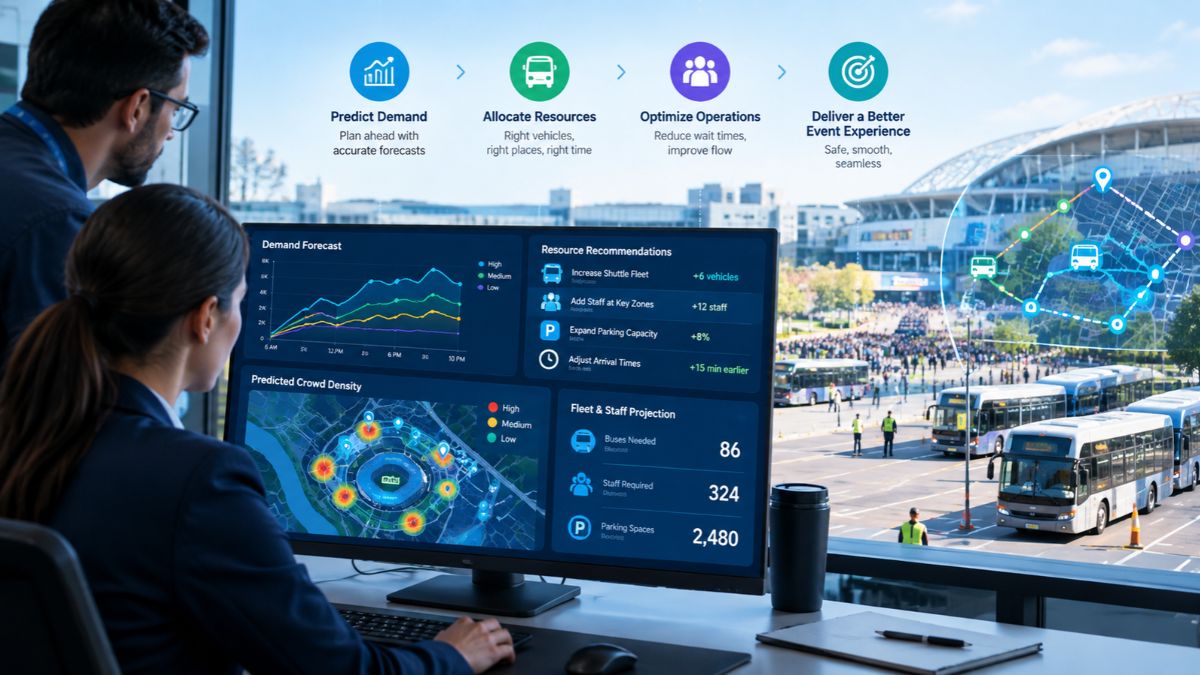
What exactly are predictive insights? Let us understand them correctly. It is known worldwide that major events rarely stick to the original plan. Passenger demand fluctuates, vehicles are delayed, routes become overcrowded, and teams may need to relocate resources on short notice. Predictive insights allow event planners to plan for what is likely to happen next, rather than just what is already happening.
This guide explains how predictive insights play a role in resource planning, how real-time data improves forecasting, and how event transportation management software puts predictions into action.
How Do Predictive Insights Improve Resource Planning for Major Events?
As the term suggests, predictive insights use current and historical event data to identify patterns (predictions) before they actually become issues. With the data, planners are able to make informed decisions by analyzing demand patterns, passenger volumes, traffic conditions, and fleet activity rather than sticking to fixed schedules.
So, if demand is expected to increase following a keynote, transport coordinators and event planners prepare vehicles or staff to handle the surge.
What Event Data Is Used for Predictive Resource Planning?
Predictive planning needs proper operational data; therefore, teams may bring together:
- Data on passenger demand and passenger count
- Real-time vehicle location and movement
- Traffic and travel time patterns
- Route and trip performance
- Pickup and drop-off activities
- Vehicle utilization and idle time
- Event schedules and expected attendance
- Previous event performance
When combined with event transportation management software, this data reveals patterns for future strategizing and planning.
How Does Real-Time Vehicle Tracking Support Event Resource Planning?
Real-time vehicle monitoring offers transportation managers an immediate perspective on fleet activity. When the event starts, resource planning persists. When vehicles experience delays on one route while another has available capacity, teams recognize and rectify the disparity.
Live fleet visibility allows planners to modify assignments and monitor ETAs effectively and efficiently. This turns resource planning into a dynamic operational activity instead of a fixed timetable.
Can Predictive Insights Help to Manage Passenger Demand?
Yes, PAX counting and passenger activity statistics reveal when and where demand is about to increase. Moreover, passenger activity, when combined with predictive data, helps teams get vehicles and staff ready before lines develop.
What Resources Can Event Teams Plan More Effectively?
Predictive insights assist in planning across several operational areas, including:
- Vehicles and Drivers
- Shuttle capacity
- Pick-up and drop-off resources
- Passenger Support Teams
- Dispatch and on-site employees
- Route capacity
- Backup vehicles
- Operational coverage during peak times
Here, the goal is not to add more resources, but to place the appropriate resources whenever and wherever required.
How Does Event Transportation Management Software Turn Insights Into Action?
EventFalcon’s event transportation management software combines prediction and execution. Teams need real-time data, alerts, GPS tracking, passenger information, ETAs, and operational controls in one location. An event transportation command center brings these inputs together, allowing planners to compare expected demand to actual conditions and act more quickly.
So, instead of waiting for a problem to manifest itself, teams can detect and respond to early warning signs.
Why Should Major Events Use Predictive Resource Planning?
Because predictive insights provide a solid foundation for teams to decide and plan where vehicles, personnel, and capacity are needed. EventFalcon combines real-time vehicle tracking, passenger intelligence, fleet visibility, and event transportation management tools to help teams identify movement, understand demand, and respond to changing conditions.
So plan smarter, allocate resources more effectively, and be ready for whatever comes next.
-

 NEWS1 year ago
Historical Churches in Manila
-

 TOPIC4 months ago
Unveiling AvTub: Your Ultimate Guide to the Best AV Content
-

 TOPIC1 year ago
Simbang Gabi and Kakanin
-

 TOPIC1 year ago
Symbols of Hope: The 15th Belenismo sa Tarlac
-

 TOPIC1 year ago
RIZAL at 160: a Filipino Feat in Britain
-

 NEWS5 months ago
What Caused Delta Flight DL275 to Diverted LAX? A Detailed Breakdown
-
 TOPIC3 months ago
Understanding Fascisterne: Origins and Ideological Roots
-

 TOPIC1 year ago
Biodiversity in Urban Singapore: Corporate Contributions to Nature-Based Solutions and Green Infrastructure