
TECHNOLOGY
Why Remote Workers Can’t Access Files (and How to Fix It)


It is a familiar and frustrating scenario for operations leaders. You get an email from an employee working from home complaining that they cannot open a critical spreadsheet. Another team member chimes in to say the company’s shared drive is timing out. Suddenly, half your staff is completely stalled, and you are left troubleshooting technical issues instead of running your business.
This inability to access or edit company files remotely is a massive bottleneck. We often treat these moments as temporary glitches, but the reality of the modern workplace tells a different story. By 2025, an estimated 32.6 million Americans will be working remotely, which equates to about 22% of the workforce, according to Forbes.
A permanent shift to hybrid work requires permanent infrastructure solutions. Relying on old servers and patchwork remote connections will only lead to more delays and frustrated employees. When your team is constantly battling inefficient workflows due to outdated infrastructure, it’s time to stop applying temporary fixes. Partnering with a local expert for comprehensive Philadelphia IT consulting can help you assess your current environment, eliminate bottlenecks, and build a clear roadmap for your digital future.
Key Takeaways
- Legacy on-premise servers are the primary bottleneck, causing slow and unreliable remote file access for hybrid teams.
- Cloud computing is the fastest and most cost-effective way to enable seamless team collaboration from any location.
- Modern risk management tools can secure your remote connections, keeping sensitive data safe without slowing down employees.
- Upgrading IT infrastructure is a powerful, ROI-driven move that requires a structured roadmap to assess, plan, and implement properly.
The Hidden Cost of Outdated On-Premise Servers
To understand why your employees cannot open files at home, you have to look at the equipment sitting in your office. Many small to medium businesses still rely on legacy on-premise servers. These physical machines were designed for a time when everyone sat at a desk in the same building, connected to the same local network.
When you ask an on-premise server to handle dozens of secure remote connection requests simultaneously, it struggles to keep up. Employees often have to use clunky Virtual Private Networks (VPNs) to tunnel into the office network. This creates a massive traffic jam. The symptoms of this outdated infrastructure are obvious: painfully slow load times, documents that lock and prevent multiple people from editing them, and a constant stream of complaints to management.
These technical bottlenecks directly hurt your bottom line. Think about the paid hours wasted when your staff spends twenty minutes just trying to sync a folder. If ten employees lose a half hour of productivity every week to server issues, you are bleeding payroll dollars. Inefficient workflows damage your overall company return on investment and keep your team focused on fighting software rather than serving your customers.
How Cloud Computing Eliminates Remote Bottlenecks
The modern workplace demands flexibility. In fact, 52% of U.S. remote-capable employees work in a hybrid environment, making it the dominant work model, according to Gallup. To support this standard, businesses must upgrade from restrictive physical servers to more dynamic solutions.
Cloud computing is the definitive answer to remote file access issues. Instead of storing data on a machine in a back closet, cloud computing allows organizations to host applications on remote servers. This eliminates the need for expensive on-premises hardware and enables faster, cheaper computing, as detailed by McKinsey. Your files are stored securely in enterprise-grade data centers and delivered over the internet instantly.
The direct benefits for your staff are transformative. Moving to the cloud enables seamless remote collaboration, meaning two employees can edit the same document in real time without creating duplicate files or version conflicts. The experience of opening a file is fast and reliable, whether the employee is sitting at their kitchen table, in a coffee shop, or at their desk in the office.
| Feature | On-Premise Servers | Cloud Computing |
|---|---|---|
| Speed | Slow remote connections due to VPN traffic jams. | Instant access over the internet with high bandwidth. |
| Cost | Expensive upfront hardware and high maintenance costs. | Predictable monthly subscriptions with zero hardware upkeep. |
| Accessibility | Prone to file locking and single-user access restrictions. | Real-time collaboration allows multiple users to edit at once. |
Securing Your Hybrid Workforce
A common fear among business owners is that making files easier to access will naturally make them less secure. It is entirely valid to worry about a data breach when employees are connecting to company data from personal home networks or public Wi-Fi. However, modern technology allows you to protect your sensitive information without creating digital hurdles for your staff.
The goal is to build a culture of security within your organization. This means educating your team on safe data handling practices while implementing background systems that protect them automatically. You do not have to choose between strong cybersecurity and high productivity.
Modern, proactive risk management tools keep remote connections safe without getting in the way. For example, multi-factor authentication requires a secondary proof of identity (like a code sent to a phone) before granting access. Secure cloud portals encrypt your data so that even if a connection is intercepted, the information remains completely unreadable. These tools give management peace of mind while keeping the employee workflow smooth.
A Proven Methodology for Upgrading Your IT
Taking the guesswork out of technology upgrades requires a structured plan. Throwing money at random software subscriptions will not solve core infrastructure issues. Instead, operations leaders need an actionable roadmap to ensure every dollar spent provides a tangible return on investment.
- Assess: The first step is a thorough evaluation of your current environment. You need to look closely at your network speed, existing hardware lifespan, and cybersecurity posture. This audit reveals exactly what is helping your business and what is acting as a bottleneck.
- Plan: Once the issues are identified, you must build a straightforward plan. This strategy should prioritize critical updates based on immediate business needs. Rather than changing everything at once, a good plan targets the upgrades that will recover the most lost time and improve daily workflows the fastest.
- Implement & Support: Buying the right technology is only half the battle. You need hands-on guidance to migrate your data securely without disrupting daily operations. Once the new systems are in place, ongoing support ensures the technology stays updated, secure, and optimized for your growing team.
The Local Advantage: Why Philadelphia Businesses Need a Hometown Partner
Upgrading to a cloud environment and managing hybrid security is rarely a do-it-yourself project for a busy operations director. Many businesses try to solve this by outsourcing to massive, out-of-state remote helpdesks. This often leads to the frustrating experience of submitting support tickets into a void and waiting days for a response from someone who does not understand your company.
Partnering with a specialized local IT consultant offers a distinct advantage. A dedicated Philadelphia partner understands the specific business landscape and operational challenges in the area. They know the local internet service providers, understand regional compliance needs, and can physically walk into your office to troubleshoot hardware when necessary.
A true IT partner focuses on business-first alignment. They do not just fix broken computers. They sit down with you to understand your operational goals and ensure your technology upgrades make the workday easier. Having a responsive hometown partner transforms your IT from a daily source of stress into a tool that makes your company more resilient.
Conclusion
Secure and efficient remote workflows are no longer optional perks. They are a baseline requirement for modern business success. If your staff is routinely struggling to open, edit, or share files from home, your underlying technology is holding your company back.
Moving away from legacy on-premise servers to a secure, cloud-based environment is the most effective way to eliminate these daily frustrations. It restores lost hours, boosts overall productivity, and secures your data against modern threats.
You do not have to accept sluggish remote access as a normal part of doing business. Take the first step today to assess your current IT environment. By addressing these bottlenecks head-on, you can finally take the guesswork out of your technology and build a workspace that empowers your team, wherever they happen to be working.

Mobile monetization works best when it is treated as part of the product experience, not as a separate revenue layer added after launch. Publishers exploring monetization strategies for mobile apps should begin with a simple principle: an ad system must support the value users expect from the app while creating reliable opportunities for advertisers and revenue for the business.
A higher short-term revenue figure is not automatically a sign of a healthier app. If ads slow down key screens, interrupt tasks, create accidental taps, or make users feel pressured, the result can be lower retention, weaker ratings, and more support requests. A durable strategy reviews revenue, experience, performance, privacy, and ad quality together.
Why Monetization Needs A Health Check
Ad monetization is a system with connected parts. A change that raises effective CPM may also reduce session length or increase uninstall rates. Similarly, a new demand source may improve fill rate while introducing creatives that do not fit the audience. Reviewing only one dashboard can hide these trade-offs.
A practical health check asks whether users can still easily complete their main task, whether ads are appropriate for the app’s audience, whether the app remains stable, and whether revenue is improving without harming longer-term engagement. This balanced view gives product, engineering, and monetization teams a shared way to make decisions.
Build Monetization Around User Value
Users are more likely to accept advertising when the exchange is understandable. In a game, a rewarded ad may offer an extra life, optional currency, or a bonus. In a utility app, advertising may help support free access to a useful service. The key is clarity: users should know what they receive and what action they are choosing.
Map Ads To The User Journey
- Onboarding: Keep early sessions focused on demonstrating the app’s value.
- Active use: Avoid interruptions during focused, time-sensitive, or high-consequence actions.
- Natural pauses: Consider ads between completed tasks, levels, articles, or content segments.
- Return visits: Adjust exposure based on how frequently a person uses the app.
Before adding a placement, ask three questions: What does the user receive in return? Does this placement support or interrupt the app’s purpose? Can the user understand why the ad appeared at that moment?
Review The Main Revenue Models
There is no universal revenue model. The strongest choice depends on the app’s purpose, audience, frequency of use, and the type of value it delivers.
- Advertising: Often suits free apps with regular engagement. Its main risk is ad fatigue or a disruptive experience.
- Subscriptions: Can fit apps that deliver ongoing content, services, or regularly updated features. The key measure is whether users continue to see recurring value.
- In-app purchases: Can work for optional upgrades, digital goods, premium features, and game content. Clear pricing and a useful purchase benefit matter.
- Hybrid monetization: Combines approaches, such as offering an ad-supported free tier and an ad-free subscription. It can serve different user preferences, but the paths must remain easy to understand.
- Sponsored experiences: Can be useful when the sponsor, offer, and audience are naturally aligned.
Improve Ad Placement And Timing
Formats should match the moment. Banners can provide persistent but limited visibility; native placements can fit within content when clearly identified; interstitials need natural breaks; and rewarded ads should follow an explicit user choice. Google Play’s ad experience requirements reinforce the importance of avoiding unexpected, deceptive, and disruptive placements.
Useful Placement Rules
- Show rewarded ads only after the user opts in.
- Use interstitials after a completed activity, not before the intended action takes effect.
- Keep banners away from navigation, checkout controls, and other frequently tapped elements.
- Pause advertising during account creation, payment flows, emergency use cases, and other sensitive actions.
- Apply frequency caps so the same person is not repeatedly interrupted in a short period.
Protect App Performance
An ad that arrives too late, renders incorrectly, drains battery life, or contributes to a crash can cost more than the impression earns. Monitor ad requests separately from the rest of the app so teams can identify whether delays occur in the network request, mediation process, creative load, or rendering step.
- Measure time from ad request to visible render.
- Track failed, timed-out, and abandoned ad loads.
- Test on older devices, smaller screens, mobile data, and weaker connections.
- Review layout shifts, blank placements, accidental taps, crash reports, and battery impact after major changes.
Use Privacy-First Measurement
Measurement should collect only the information needed to operate, evaluate, and improve the monetization system. Teams should document what data is collected, why it is needed, how long it is retained, and which partners or internal roles can access it. The FTC advises businesses to collect only what they need, safeguard it, and dispose of it securely, as outlined in its privacy and security guidance.
Clear consent language, accurate privacy notices, data minimization, and sensible retention limits are practical foundations. Contextual signals and first-party insights can also help publishers understand broad usage patterns without treating every user interaction as a reason to gather more data.
Create A Practical Testing Plan
- Choose one goal. Focus on revenue, retention, load speed, or satisfaction.
- Change one variable. Test a format, placement, frequency cap, timing rule, or reward size.
- Define the audience. Start with a limited, clearly identified traffic segment.
- Set a realistic window. Include enough normal usage to avoid reacting to a brief spike or dip.
- Review side effects. Compare revenue with retention, session behavior, complaints, and technical performance.
- Roll out gradually. Expand only when the overall result remains positive.
Track The Right Metrics
Revenue metrics matter, but they should be interpreted alongside experience and quality signals. A useful measurement set includes:
- Revenue: revenue per active user, revenue per session, effective CPM, fill rate, and ad request success rate.
- User experience: Day 1, Day 7, and Day 30 retention, session length, app rating trends, ad abandonment, and support complaints.
- Quality control: ad load time, crash rate, creative rejection rate, invalid traffic signals, and repeat exposure per user.
Common Mistakes To Avoid
- Choosing the highest immediate revenue option without checking retention or reviews.
- Launching several new formats at once, making it impossible to identify the cause of a result.
- Ignoring users on lower-end devices or weaker networks.
- Using vague privacy language or collecting data without a clear operational need.
- Measuring clicks without investigating accidental interactions.
- Copying another app’s placement strategy without considering the audience and product flow.
Conclusion
Healthy monetization is a long-term product decision. The best systems create revenue while preserving speed, privacy, trust, and the core reason people use the app. By matching ads to user value, carefully testing changes, protecting performance, and evaluating results with a balanced set of metrics, publishers can build monetization programs that are stronger for users, advertisers, and the business.
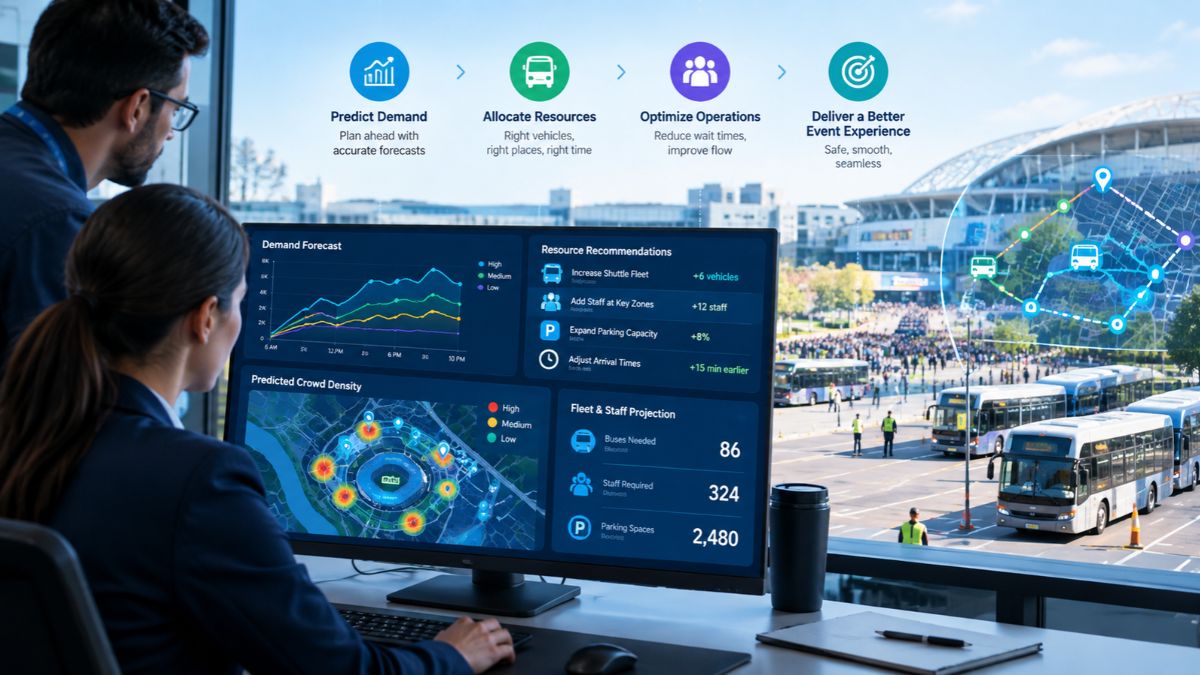
What exactly are predictive insights? Let us understand them correctly. It is known worldwide that major events rarely stick to the original plan. Passenger demand fluctuates, vehicles are delayed, routes become overcrowded, and teams may need to relocate resources on short notice. Predictive insights allow event planners to plan for what is likely to happen next, rather than just what is already happening.
This guide explains how predictive insights play a role in resource planning, how real-time data improves forecasting, and how event transportation management software puts predictions into action.
How Do Predictive Insights Improve Resource Planning for Major Events?
As the term suggests, predictive insights use current and historical event data to identify patterns (predictions) before they actually become issues. With the data, planners are able to make informed decisions by analyzing demand patterns, passenger volumes, traffic conditions, and fleet activity rather than sticking to fixed schedules.
So, if demand is expected to increase following a keynote, transport coordinators and event planners prepare vehicles or staff to handle the surge.
What Event Data Is Used for Predictive Resource Planning?
Predictive planning needs proper operational data; therefore, teams may bring together:
- Data on passenger demand and passenger count
- Real-time vehicle location and movement
- Traffic and travel time patterns
- Route and trip performance
- Pickup and drop-off activities
- Vehicle utilization and idle time
- Event schedules and expected attendance
- Previous event performance
When combined with event transportation management software, this data reveals patterns for future strategizing and planning.
How Does Real-Time Vehicle Tracking Support Event Resource Planning?
Real-time vehicle monitoring offers transportation managers an immediate perspective on fleet activity. When the event starts, resource planning persists. When vehicles experience delays on one route while another has available capacity, teams recognize and rectify the disparity.
Live fleet visibility allows planners to modify assignments and monitor ETAs effectively and efficiently. This turns resource planning into a dynamic operational activity instead of a fixed timetable.
Can Predictive Insights Help to Manage Passenger Demand?
Yes, PAX counting and passenger activity statistics reveal when and where demand is about to increase. Moreover, passenger activity, when combined with predictive data, helps teams get vehicles and staff ready before lines develop.
What Resources Can Event Teams Plan More Effectively?
Predictive insights assist in planning across several operational areas, including:
- Vehicles and Drivers
- Shuttle capacity
- Pick-up and drop-off resources
- Passenger Support Teams
- Dispatch and on-site employees
- Route capacity
- Backup vehicles
- Operational coverage during peak times
Here, the goal is not to add more resources, but to place the appropriate resources whenever and wherever required.
How Does Event Transportation Management Software Turn Insights Into Action?
EventFalcon’s event transportation management software combines prediction and execution. Teams need real-time data, alerts, GPS tracking, passenger information, ETAs, and operational controls in one location. An event transportation command center brings these inputs together, allowing planners to compare expected demand to actual conditions and act more quickly.
So, instead of waiting for a problem to manifest itself, teams can detect and respond to early warning signs.
Why Should Major Events Use Predictive Resource Planning?
Because predictive insights provide a solid foundation for teams to decide and plan where vehicles, personnel, and capacity are needed. EventFalcon combines real-time vehicle tracking, passenger intelligence, fleet visibility, and event transportation management tools to help teams identify movement, understand demand, and respond to changing conditions.
So plan smarter, allocate resources more effectively, and be ready for whatever comes next.

Introduction
A small bakery owner snaps a photo of a beautiful three-tier birthday cake, only to notice later that the background includes a sink full of mixing bowls and a calendar from two years ago. Visual content now shapes nearly every part of modern communication, from online shopping and digital marketing to personal photography and classroom materials. Images often say more in a glance than a paragraph ever could, which makes their quality and presentation essential. Distracting backgrounds, unwanted objects and mismatched settings, though, can quietly weaken even a lovely photograph. Background removal has become a practical way to create cleaner, more focused visuals. Sometimes improving a picture simply means taking things away.
As editing tools become easier to use, individuals and businesses can now adjust images without any advanced design skills. Understanding how background removal works, where it helps most and what makes an edited image genuinely effective allows people to produce far more professional visual content. A little know-how goes a surprisingly long way.
What Is Background Removal?
Background removal is the process of separating the main subject of an image from its surroundings. That subject might be a person, a product, an animal or any other object that needs to stay visible while the background is removed or replaced. A hand-carved walking stick photographed against a cluttered garden shed can end up looking ready for a craft fair catalogue.
For many years, this meant photo editing software and a great deal of patient handiwork. Editors relied on selection tools, masks and brushes to trace the subject’s edges by hand. Those methods still matter for complicated images, but artificial intelligence has brought much faster alternatives. An evening of careful tracing can now take less than a minute.
AI-powered systems analyze edges, colors, textures and shapes to tell the foreground apart from the background. The result can be an image with a transparent background, ready to sit on a new color, photograph or design. The subject stays the same. Everything around it becomes a choice.
Common Uses of Background Removal
E-Commerce and Product Photography
Online shoppers rely heavily on product images when comparing items and deciding what to buy. A cluttered background pulls attention away from the details that matter, such as shape, color and features. A pair of embroidered slippers looks far more inviting on a clean backdrop than on a bedroom rug beside a laundry basket. The product deserves the spotlight.
Removing unnecessary surroundings helps retailers create consistent listings. Clothing, electronics, furniture accessories and household goods can all appear against calm, neutral backgrounds. That consistency also helps an online shop build a recognizable visual identity. Shoppers tend to trust a store that looks organized.
Social Media and Digital Marketing
Social media content competes fiercely for attention in crowded feeds. Clear images get a message across quickly, especially on small phone screens during a busy commute. A post has only a second or two to stop someone scrolling.
Background removal lets designers drop people, objects or product photos into promotional graphics, announcements and educational posts. Rather than arranging a fresh photo shoot for every design, creators can reuse existing images in new settings. A dance teacher can turn one cheerful photo into posters for three different classes. One good picture can work hard all season.
Personal Photography and Creative Projects
Individuals also use background removal to polish portraits, create profile pictures, design invitations and make personalized artwork. A photo taken in an ordinary setting can suit something more formal or creative once its surroundings disappear. A snapshot of a grandfather at a family barbecue can become the centrepiece of an elegant retirement party invitation.
Students and hobbyists use the same technique for presentations, digital collages, posters and other projects. A history project about Roman coins looks far clearer when each coin sits neatly on a plain background. Clean images help ideas land.
How AI Has Simplified Image Editing
Artificial intelligence has cut the time needed for many routine editing jobs. Instead of tracing every edge by hand, people can upload an image and let an automated system find the main subject. A shop owner with twenty new products to list can finish before the kettle has boiled twice.
An online Background Remover tool, for example, can lift a subject away from its original surroundings, making the image far easier to use in presentations, product displays or creative designs. Tools like this are especially handy for people who want simple editing without learning complicated software. Convenience opens the door to people who might never have tried editing otherwise.
Automated results aren’t always perfect, though. Hair, transparent materials, reflective surfaces and objects in colors close to their background can all cause trouble. A string of fairy lights or a pet parrot with bright feathers against a leafy garden can confuse even capable software. A final careful review is still what turns a good edit into a convincing one.
Tips for Achieving Better Results
The quality of the original photo has a big influence on the final result. A few practical habits make the whole process smoother.
Well-lit images with clear subject edges make the best starting point. Strong contrast between the subject and its surroundings usually makes separation far easier, while blurry photos or overlapping objects often need extra work. A product photographed by a bright window will almost always behave better than one snapped under a dim kitchen bulb.
Fine details deserve a close look once the background has gone. Hair strands, glass edges, thin wires and shadows are easy for automated systems to misread. Zooming in reveals missing sections or stray patches of background that slip past at normal size. A few seconds of checking can save an embarrassing mistake.
The image’s final destination matters too. A transparent background suits subjects that will move between different designs, while a solid background often works better for standardized product listings or professional portraits. Knowing where the picture is heading shapes every choice along the way.
Realistic proportions, lighting and shadows keep the finished image believable when the subject is placed on a new background. A person lit by soft evening sunlight never looks quite right on a bright midday beach. The best edits feel as though nothing was ever changed.
Ethical and Practical Considerations
Background editing works best when it keeps the true meaning of an image intact. In advertising, journalism, education and other settings where accuracy matters, removing or replacing visual elements can mislead people if the changes aren’t disclosed when they need to be. A property photo that quietly erases a building site next door can leave buyers feeling deceived on their first visit. Honesty protects trust.
Privacy and copyright deserve real attention as well. Photographs can show identifiable people, private information or work belonging to another creator. A stranger caught in the background of a holiday photo didn’t agree to appear in a public advert. Editing and publishing images with proper permission, and with respect for privacy rules, is always the right approach.
Conclusion
Background removal has become an important part of modern digital photography and visual communication. It supports product presentation, social media design, personal projects and countless other uses by helping subjects stand out from distracting surroundings. Less clutter often means a clearer message.
AI-powered tools have made the process far more accessible, but good results still depend on image quality, careful review and thoughtful design choices. By pairing automated help with an eye for detail and responsible editing habits, people can create clear, versatile visuals that do exactly what they’re meant to do. The software clears the way. A careful eye makes sure the picture still tells the truth.
-

 NEWS1 year ago
Historical Churches in Manila
-

 TOPIC4 months ago
Unveiling AvTub: Your Ultimate Guide to the Best AV Content
-

 TOPIC1 year ago
Simbang Gabi and Kakanin
-

 TOPIC1 year ago
Symbols of Hope: The 15th Belenismo sa Tarlac
-

 TOPIC1 year ago
RIZAL at 160: a Filipino Feat in Britain
-

 NEWS5 months ago
What Caused Delta Flight DL275 to Diverted LAX? A Detailed Breakdown
-

 TOPIC3 months ago
Understanding Fascisterne: Origins and Ideological Roots
-

 TOPIC1 year ago
Biodiversity in Urban Singapore: Corporate Contributions to Nature-Based Solutions and Green Infrastructure